The Big Question
"Abhishek, everyone is talking about cloud. But my friend's company had a huge cloud bill last month. And my other friend says on-premise is more secure. I am confused. What should I do?"
Here is the honest truth from someone who has helped businesses move to cloud, stay on-premise, and build hybrid solutions:
There is no universally "better" option. There is only what is better for YOUR business.
Let me help you figure that out.
Step 3: Cloud vs On-Premise – The Big Picture
Before we dive deep, here is a high-level comparison.
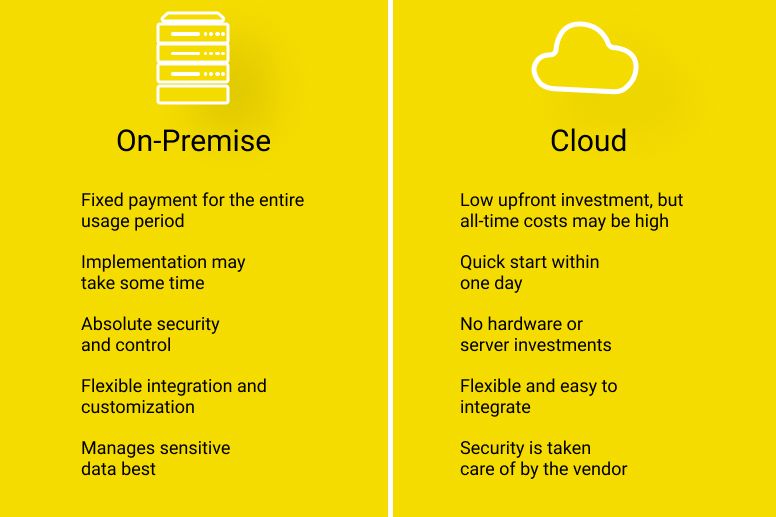
| Factor | Cloud | On-Premise |
|---|---|---|
| Upfront cost | Zero to low (pay as you go) | High (₹50 lakhs – ₹5 crore+) |
| Ongoing cost | Predictable monthly operational expense | Ongoing maintenance, power, cooling, staff |
| Control | Limited (provider manages infrastructure) | Full (you own everything) |
| Scalability | Instant (minutes) | Slow (weeks to months) |
| Security | Provider handles physical; you handle data | You handle everything (or hire a team) |
| Compliance | Provider has certifications; you configure | You build and prove compliance |
| Maintenance | Provider handles hardware and patches | Your team handles everything |
| Remote work | Built-in (access from anywhere) | Requires VPN, complex setup |
| Time to deploy | Minutes to hours | Weeks to months |
| Best for | Most businesses, especially growing ones | Regulated industries, predictable workloads, large scale |
Now, let me explain each factor in detail.
Step 4: Detailed Comparison – 10 Key Factors
Factor 1: Cost
This is usually the first question. Let me be very clear:
Cloud is not automatically cheaper. On-premise is not automatically more expensive.
Here is how to think about cost:
Cloud costs include:
-
Compute (servers) – pay per hour or second
-
Storage – pay per GB
-
Data transfer – pay for data leaving cloud
-
Managed services – databases, analytics, AI
-
Support plans
On-premise costs include:
-
Hardware (servers, storage, networking) – large upfront
-
Software licenses – often upfront or annual
-
Power and cooling – monthly operational cost
-
Real estate – data center space
-
IT staff – salaries for maintenance
-
Maintenance and replacement – ongoing
Simple rule of thumb:
| Scenario | Cloud Likely Cheaper | On-Premise Likely Cheaper |
|---|---|---|
| Small business, <50 users | Yes | No |
| Variable or growing workload | Yes | No |
| Startup, uncertain growth | Yes | No |
| Large enterprise, 1000+ users | No (maybe hybrid) | Yes (if utilization >70%) |
| Stable, predictable workload | No | Yes |
| 24/7 high-utilization servers | No | Yes |
Real example:
-
Startup: Cloud cost = ₹50,000/month. On-premise cost = ₹30 lakhs upfront + ₹2 lakhs/month. Cloud wins.
-
Large bank: Cloud cost = ₹2 crore/month for 2,000 servers. On-premise cost = ₹5 crore upfront + ₹50 lakhs/month after 3 years. On-premise wins.
"The cloud is like renting an apartment. On-premise is like buying a house. Both have their place."
Factor 2: Control
Cloud: You control your applications and data. You do not control the underlying hardware, hypervisor, or physical security.
On-premise: You control everything – from the servers to the cooling to the physical locks on the data center door.
Who needs full control?
-
Government agencies
-
Defense contractors
-
Financial institutions (sometimes)
-
Businesses with extremely sensitive IP
Who does not need full control?
-
Most SaaS companies
-
E-commerce businesses
-
Startups
-
SMEs without dedicated IT security teams
"Control is valuable – but it comes with responsibility. Can your team handle it?"
Factor 3: Security
This is the most misunderstood factor.
Common myth: On-premise is more secure than cloud.
Reality: For most businesses, cloud is more secure.
Here is why:
| Security Aspect | Cloud | On-Premise |
|---|---|---|
| Physical security | Provider invests billions (guards, biometrics, cameras) | You pay for it (expensive) |
| Network security | Enterprise-grade DDoS, firewalls, WAF | You build it (or buy it) |
| Data encryption | Built-in, often automatic | You implement it |
| Compliance certifications | SOC, ISO, PCI, HIPAA, FedRAMP | You pay for audits |
| Security updates | Automatic or one-click | Your team patches (often late) |
| Threat detection | AI-powered, 24/7 | Limited by your tools and team |
When on-premise might be more secure:
-
You have a world-class security team (most businesses do not)
-
You have regulatory requirements that prohibit cloud (rare, but exists)
-
You need air-gapped systems (no internet connection)
When cloud is more secure:
-
You are a typical business without a dedicated security team
-
You want enterprise-grade security without enterprise cost
-
You need compliance certifications (cloud providers have them ready)
"Unless you are a bank or a defense contractor, the cloud provider probably has better security than you can afford."
Factor 4: Scalability
This is where cloud wins, hands down.
Cloud scalability:
-
Add 100 servers: 5 minutes
-
Add 10TB storage: 1 click
-
Scale to another country: Deploy to new region (minutes)
-
Handle traffic spike: Auto-scaling (automatic)
On-premise scalability:
-
Add 100 servers: Order hardware (2-4 weeks), receive, rack, cable, configure (1-2 weeks) → total 3-6 weeks
-
Add 10TB storage: Order disks, install, configure (1-2 weeks)
-
Scale to another country: Build new data center (6-12 months)
-
Handle traffic spike: You already over-provisioned (waste) or you have downtime
Real example:
An e-commerce client during Diwali sale:
-
Cloud: Auto-scaling added 200 servers automatically. Sale handled seamlessly.
-
On-premise (before cloud): They would have needed to buy 200 servers for peak capacity – sitting idle for 11 months.
"The cloud scales with your business. On-premise forces you to predict the future – and pay for your mistakes."
Factor 5: Compliance
Compliance requirements vary by industry.
| Industry | Cloud Viable? | Notes |
|---|---|---|
| Banking/Financial | Yes, with caution | Many banks use cloud for non-core workloads. Core banking often remains on-premise or hybrid. |
| Healthcare | Yes | HIPAA-compliant cloud services exist. Many healthcare providers use cloud. |
| Government | Depends | Some workloads allowed on cloud (especially Indian government clouds). Classified data on-premise. |
| E-commerce | Yes | Most e-commerce is cloud-native. |
| SaaS | Yes | Almost all SaaS is cloud-based. |
| Defense | No (classified) | Air-gapped, on-premise only. |
Indian context:
-
RBI allows cloud for banks with guidelines (data localisation, audit trails)
-
MeitY has empaneled cloud providers for government workloads
-
DPDP Act 2023 does not prohibit cloud – but requires data localization for sensitive data
"Compliance is not cloud vs on-premise. It is about choosing the right deployment model for each workload."
Factor 6: Maintenance and Operations
Cloud: The provider handles hardware maintenance, patching, and infrastructure updates. Your team focuses on applications.
On-premise: Your team handles everything – from replacing failed disks to applying security patches to managing power and cooling.
Staffing comparison:
| Role | Cloud | On-Premise |
|---|---|---|
| Hardware engineer | Not needed | Needed |
| Data center technician | Not needed | Needed |
| Network engineer | Smaller team | Larger team |
| Security engineer | Focus on data/access | Focus on everything |
| System administrator | Fewer (cloud managed services) | More (manage everything) |
| Cloud architect | Needed | Not needed |
Real staffing cost example (50-server environment):
-
Cloud team: 2 cloud architects, 2 DevOps engineers, 1 security engineer = ₹3-5 crore/year
-
On-premise team: 2 hardware engineers, 2 network engineers, 3 sysadmins, 2 security engineers = ₹5-8 crore/year
"Cloud shifts your IT team from maintenance to innovation. That is often the biggest hidden benefit."
Factor 7: Performance and Latency
Cloud: Latency depends on distance to cloud region. For most users, 20-100ms is typical.
On-premise: Latency is minimal (within the data center). But remote users may have higher latency (via VPN).
When on-premise wins on performance:
-
You need single-digit millisecond latency (high-frequency trading, real-time manufacturing)
-
Your users are all in the same building as the servers
When cloud wins on performance:
-
Your users are distributed globally (cloud has regions near them)
-
You need to burst to large compute (cloud has unlimited scale)
*"For 99% of businesses, cloud performance is more than sufficient. The 1% that needs sub-10ms latency knows who they are."*
Factor 8: Disaster Recovery and Business Continuity
Cloud: Built-in. Multi-region replication, automatic failover, backup as a service.
On-premise: You build it. Second data center, replication, regular testing.
Cost comparison for DR:
| DR Capability | Cloud | On-Premise |
|---|---|---|
| Backup storage | ₹5,000-50,000/month | ₹10-50 lakhs upfront + ongoing |
| Failover to second site | Minutes, automated | Hours to days, manual |
| DR testing | Click a button, pay for test time | Disruptive, expensive |
| Recovery Time Objective (RTO) | Minutes to hours | Hours to days |
| Recovery Point Objective (RPO) | Seconds to minutes | Minutes to hours |
"For most businesses, cloud DR is not just cheaper – it is more reliable. Testing actually happens."
Factor 9: Remote Work Enablement
Cloud: Built for remote work. Access applications and data from anywhere with internet.
On-premise: Requires VPN (often slow, complex, and a bottleneck). Many legacy applications are not designed for remote access.
Real example from 2020 pandemic:
-
Cloud-native companies: Transitioned to remote work seamlessly. Productivity unchanged.
-
On-premise companies: Struggled with VPN capacity, slow access, and security concerns. Many lost weeks of productivity.
"If remote or hybrid work is part of your future (it is), cloud makes it infinitely easier."
Factor 10: Environmental Sustainability
Cloud: Data centers are typically 3-5x more energy-efficient than on-premise data centers. Providers invest heavily in renewable energy.
On-premise: You are responsible for efficiency. Most on-premise data centers run at 20-40% server utilization (wasteful).
Carbon footprint comparison:
-
Cloud: 1 server workload = 0.2-0.5 tons CO2/year
-
On-premise: 1 server workload = 0.5-1.5 tons CO2/year (depending on efficiency)
"If your business has ESG goals, cloud is one of the fastest ways to reduce your IT carbon footprint."
Step 5: The Decision Framework
Now that you understand the trade-offs, here is a simple framework to decide.
Step 1: Answer These 7 Questions
| Question | Yes | No |
|---|---|---|
| 1. Do you have unpredictable or growing IT needs? | Cloud | On-premise |
| 2. Do you have limited upfront capital? | Cloud | On-premise |
| 3. Do you have a small IT team (or no IT team)? | Cloud | On-premise |
| 4. Do you have strict data residency requirements? | Hybrid/On-premise | Cloud |
| 5. Do you have consistent, high-utilization workloads (>70%)? | On-premise | Cloud |
| 6. Do you need single-digit ms latency? | On-premise | Cloud |
| 7. Do you have regulatory restrictions on cloud? | On-premise | Cloud |
Step 2: Calculate Your 3-Year Total Cost
Use this simple formula:
Cloud 3-year cost = (Monthly cloud bill × 36) + Migration costs + Training
On-premise 3-year cost = Hardware upfront + Software licenses + (Monthly Ops × 36) + Staff + Maintenance + Power/cooling
Sample calculation for 50 servers:
| Cost Type | Cloud | On-Premise |
|---|---|---|
| Upfront hardware | ₹0 | ₹1.5 crore |
| Monthly cloud bill (est.) | ₹5 lakhs | ₹0 |
| Monthly ops (staff, power, maintenance) | ₹0 | ₹3 lakhs |
| 3-year cloud total | ₹1.8 crore | – |
| 3-year on-premise total | – | ₹1.5 crore + ₹1.08 crore = ₹2.58 crore |
In this example: Cloud is cheaper (₹1.8 crore vs ₹2.58 crore)
Note: Your numbers will differ. Run your own calculation.
Step 3: Consider Hybrid
For many businesses, the answer is not "all cloud" or "all on-premise."
Hybrid cloud = Some workloads in cloud, some on-premise.
Typical hybrid split:
| Workload Type | Usually |
|---|---|
| Customer-facing apps (website, mobile backend) | Cloud |
| Development and testing | Cloud |
| Data analytics and AI | Cloud |
| Sensitive customer data | Hybrid (encrypted in cloud) |
| Legacy systems (hard to move) | On-premise |
| Regulated data (banking, healthcare) | On-premise or hybrid |
"Most enterprises in 2026 use hybrid cloud. It gives you the best of both worlds."
Step 6: Decision Matrix – Which One is Right for You?
| Business Type | Recommendation | Reason |
|---|---|---|
| Startup (0-50 employees) | Cloud-only | No capital for hardware. Need to scale. Unpredictable growth. |
| SME (50-500 employees) | Cloud-first, hybrid if needed | Cloud for most. Keep legacy on-premise if required. |
| Enterprise with modern apps | Cloud-first, hybrid | Move what makes sense. Keep what is hard to move. |
| Enterprise with heavy regulation | Hybrid or on-premise | Keep regulated data on-premise or in approved cloud. |
| Business with stable, high-utilization workloads | On-premise or hybrid | 24/7 high-use servers are cheaper on-premise. |
| Business with global customers | Cloud | Need regions near users for low latency. |
| Business with limited IT staff | Cloud | Cannot maintain on-premise infrastructure. |
Step 7: Real Indian Business Examples
Example 1: Fintech Startup (50 employees)
Needs: Rapid scaling, low upfront cost, compliance (RBI data localisation)
Decision: Hybrid – customer-facing apps in cloud (AWS India region). Core banking data on-premise for regulatory comfort.
Result: Launched in 3 months. Cloud cost ₹2 lakhs/month. Would have been ₹1.5 crore upfront for on-premise.
Example 2: Large Manufacturing Company (5,000 employees)
Needs: ERP, supply chain, factory systems. Some legacy applications. Concerned about cloud costs at scale.
Decision: Hybrid – new applications in cloud. Legacy ERP remains on-premise. SAP on cloud (migrated).
Result: 30% reduction in IT costs over 3 years. Factory systems still on-premise (latency requirements).
Example 3: E-commerce SME (200 employees)
Needs: Handle seasonal spikes (Diwali, sales). Variable traffic. Limited IT team.
Decision: Cloud-only (AWS). Auto-scaling for traffic spikes. Managed databases.
Result: Zero downtime during sales. IT team of 3 people. Would need 10+ for on-premise.
Step 8: Frequently Asked Questions
Q1: Is cloud always cheaper than on-premise?
No. Cloud is cheaper for variable, growing, or unpredictable workloads. On-premise can be cheaper for stable, high-utilization, 24/7 workloads.
Q2: Is on-premise more secure than cloud?
For most businesses, no. Cloud providers have more security expertise and investment than typical businesses can afford. However, some regulated industries require on-premise.
Q3: Can I move from on-premise to cloud later?
Yes. Many businesses start on-premise and migrate to cloud. Plan for it. Avoid proprietary lock-in.
Q4: Can I move from cloud to on-premise?
Yes, but it is harder. Cloud services often have proprietary APIs. Design for portability if this is a concern.
Q5: What is hybrid cloud?
A mix of cloud and on-premise. Some workloads in cloud, some on-premise. They work together (shared data, unified management).
Q6: What is multi-cloud?
Using multiple cloud providers (AWS + Azure + Google). Avoids vendor lock-in, optimizes costs, improves resilience.
Q7: How do I control cloud costs?
Implement FinOps – continuous monitoring, right-sizing, reserved instances, budget alerts, chargeback/showback.
Q8: What about data localisation in India?
Hybrid cloud works well. Keep sensitive data on-premise or with Indian cloud providers. Use cloud regions within India for other workloads.
Q9: How long does a cloud migration take?
From months to years. Small migration (10-20 servers): 2-4 months. Large migration (100+ servers): 6-18 months.
Q10: Should I move everything to cloud?
Probably not. Most successful cloud adopters use hybrid. Move what makes sense. Keep what is hard to move or has regulatory constraints.
Step 9: Final Tagline (SEO & Social Media Friendly)
"Cloud or on-premise? There is no universal answer. But there is a right answer for YOUR business. Here is how to find it."
Short version for LinkedIn/Twitter:
Cloud vs on-premise – which is better? The answer depends on your business. Here is a simple decision framework (cost, control, security, compliance, and more).
Hashtags:
#CloudVsOnPremise #HybridCloud #CloudMigration #ITInfrastructure #DigitalTransformation #FinOps #InnovativeAISolutions
Ready to Make Your Decision?
Not sure which path is right for you? Let us help you evaluate your specific needs – free of charge, no pressure.
Contact Us
Phone:
+91 7464 099 059
+91 96899 67356
Email:
info@innovativeais.com
Office Address:
Netaji Subhash Place, Pitampura, Delhi – 110034
Working Hours:
Monday–Friday, 10:00 AM – 7:00 PM IST
Related services: to apply this in your business, explore our cloud services and ecommerce website development.