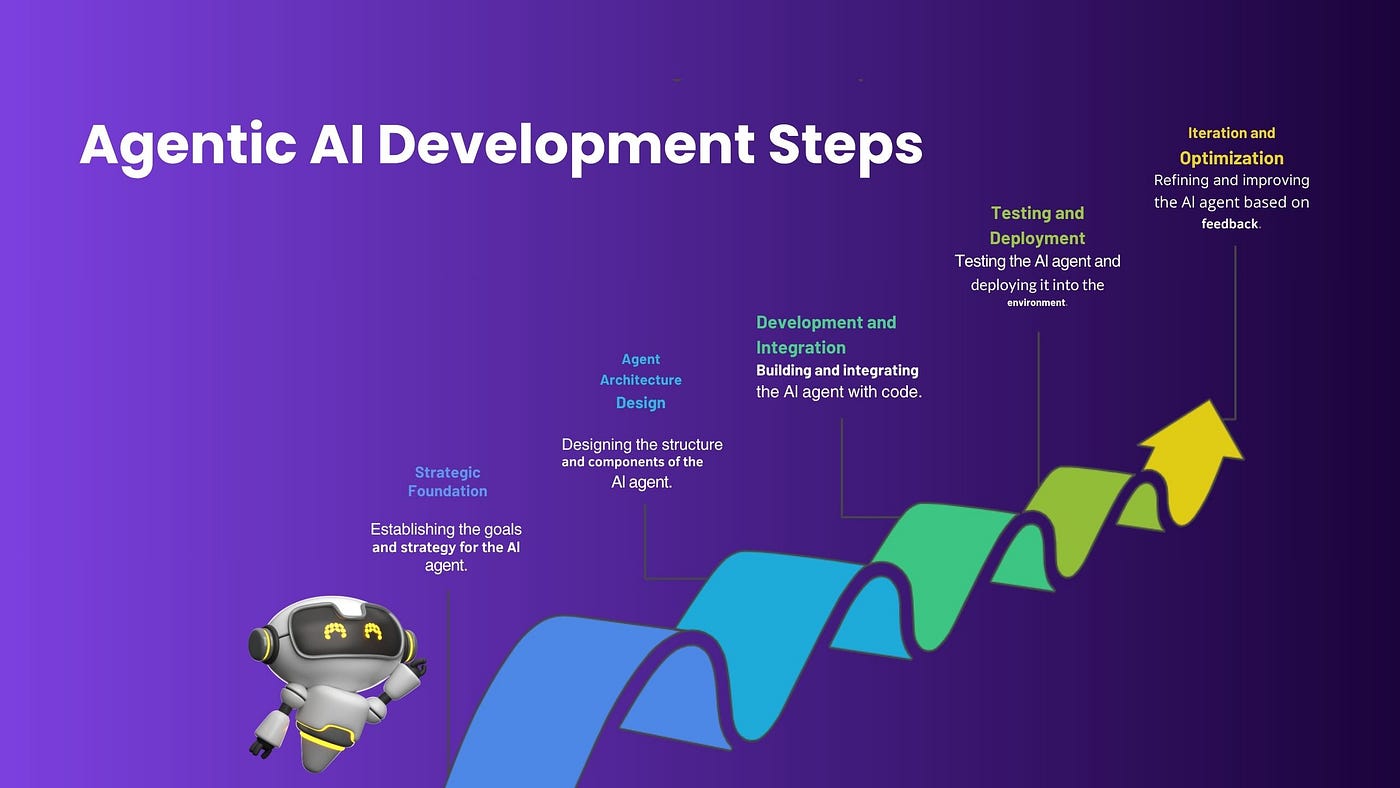
The Big Question
"Abhishek, we want to build an AI agent. But every tutorial shows complex multi-agent systems with orchestrators, specialized agents, and A2A protocols. Is there a simpler way to start?"
The honest answer:
Yes. Your first agent should be a single-agent workflow. No orchestrator. No agent teams. Just one agent, one trigger, one action.
Here is the truth:
The most successful agent deployments in 2026 did not start with multi-agent systems. They started with a single agent automating a single task. Only after proving value did they add complexity.
Let me show you the step-by-step process.
Step 3: What Makes This an "Agentic AI Workflow"?
Before we build, let me clarify what makes an AI workflow "agentic" versus a traditional automation.
| Traditional Automation (RPA) | Agentic AI Workflow |
|---|---|
| Follows rigid, pre-defined rules | Reasons and adapts to context |
| Breaks when input varies | Handles variation using LLM understanding |
| Cannot handle unstructured data | Reads and interprets free text, emails, documents |
| Requires exact triggers | Works with ambiguous or incomplete inputs |
| Example: Email parser that looks for "Order #12345" | Example: Agent that reads any customer email and takes action |
The Four Components of an Agentic Workflow
| Component | What It Does | Example |
|---|---|---|
| Trigger | What starts the workflow | Customer email arrives |
| Context | What information the agent has access to | Customer history, order database, return policy |
| Reasoning | How the agent decides what to do | LLM analyzes intent, determines next steps |
| Action | What the agent does as a result | Check order status, process return, escalate to human |
"An agentic workflow replaces 'if this then that' with 'understand the request, figure out what to do, and do it.'"
Step 4: Step 1 – Choose Your First Workflow (Days 1-2)
The Selection Criteria
| Criterion | Why | Example |
|---|---|---|
| High volume | More volume = more ROI | 500 customer emails/day about order status |
| Repetitive | Same type of request, even if worded differently | "Where is my order?" variations |
| Rule-based outcome | Clear, unambiguous resolution path | Check tracking, return status |
| Low risk if wrong | Mistakes are tolerable | Wrong order status is fixable; wrong refund is not |
| Clear success metric | You can measure improvement | Time to resolution, human handoff rate |
Workflow Examples – Start Here
| Industry | Workflow | Volume | Risk |
|---|---|---|---|
| E-commerce | Order status inquiries | High | Low |
| SaaS | Password reset requests | Medium | Low |
| Logistics | Delivery delay questions | High | Low |
| Healthcare | Appointment confirmation | High | Low |
| Finance | Account balance inquiries | High | Medium |
Sample Workflow Statement
"When a customer asks 'Where is my order?' the agent will look up the order ID from the email, check the tracking API, and respond with the current status. If the order ID cannot be found, the agent will ask for more information. If the tracking API returns an error, the agent will apologize and escalate to a human."
"Do not start with 'build an agent that handles all customer service.' Start with 'build an agent that handles order status inquiries.' The narrower the scope, the higher the success rate."
Step 5: Step 2 – Map the Current Process (Days 2-3)
Before you build an agent, you must understand the current process – including its inefficiencies.
What to Document
| Element | Questions to Answer |
|---|---|
| Trigger | What starts this process? (Email, form, chat, phone) |
| Data sources | What systems does the human currently check? (Order DB, CRM, shipping API) |
| Decision points | What decisions does the human make? (Is order shipped? Should refund be offered?) |
| Actions | What does the human do? (Check status, reply to email, escalate) |
| Failure modes | When does the human escalate? (Missing order ID, API error, ambiguous request) |
| Current metrics | How long does it take? How many are escalated? |
Sample Process Map – Order Status Inquiry
┌─────────────────────────────────────────────────────────────────────────────┐
│                    CURRENT PROCESS: ORDER STATUS INQUIRY                    │
├─────────────────────────────────────────────────────────────────────────────┤
│                                                                             │
│   Customer email arrives: "Where is my order #12345?"                       │
│        │                                                                    │
│        ▼                                                                    │
│   [Human] Reads email, extracts order ID                                    │
│        │                                                                    │
│        ├──► Order ID missing? ────► [Human] Asks customer for order ID      │
│        │                                                                    │
│        ▼                                                                    │
│   [Human] Logs into order management system                                 │
│        │                                                                    │
│        ▼                                                                    │
│   [Human] Looks up order status                                             │
│        │                                                                    │
│        ├──► Order not found? ────► [Human] Escalates to support team        │
│        │                                                                    │
│        ▼                                                                    │
│   [Human] Copies status, writes response email                              │
│        │                                                                    │
│        ▼                                                                    │
│   [Human] Sends response                                                    │
│        │                                                                    │
│        ▼                                                                    │
│   Done. Time: 3-5 minutes per email.                                        │
│                                                                             │
└─────────────────────────────────────────────────────────────────────────────┘
"You cannot automate what you do not understand. Map the process before you write a single line of code."
Step 6: Step 3 – Define Your Agent's Boundaries (Day 3)
Your agent needs clear boundaries – what it can do, what it cannot do, and when to ask for help.
The Agent Specification Template
| Section | What to Define | Example |
|---|---|---|
| Purpose | One sentence describing the agent's job | "Answer order status inquiries" |
| Trigger | What starts the agent | Customer email with order-related keywords |
| Inputs | What information the agent needs | Order ID, customer email, name |
| Tools | What systems the agent can access | Order API, tracking API |
| Authority | What actions the agent can take | Read order status, send response |
| Escalation triggers | When to hand off to a human | Missing order ID, API error, ambiguous request |
| Success metric | How you measure success | % resolved without human, time to resolution |
Sample Agent Specification – Order Status Agent
| Section | Specification |
|---|---|
| Purpose | Answer customer questions about order status and delivery estimates |
| Trigger | Inbound email or chat containing "order," "status," "delivery," "tracking" |
| Inputs | Order ID (extracted), customer email address |
| Tools | Order API (read-only), Tracking API (read-only) |
| Authority | Read order status, read tracking info, send response (cannot modify orders, issue refunds) |
| Escalation triggers | Missing order ID after one request for clarification; API returns error; customer asks a non-order question |
| Success metric | ≥80% of emails resolved without human touch; response time <30 seconds |
"Clear boundaries prevent your agent from doing things you did not intend. Start with read-only access. Add write permissions only after rigorous testing."
Step 7: Step 4 – Build the Agent (Days 4-10)
Now – and only now – you build. Use an agent framework that handles the complexity for you.
Framework Options for First-Time Builders
| Framework | Best For | Learning Curve |
|---|---|---|
| LangChain | Python developers, custom workflows | Medium |
| AutoGen | Microsoft ecosystem, multi-agent (start simple) | Medium |
| Dust | Rapid prototyping, non-technical | Low |
| Vercel AI SDK | Web developers, TypeScript/React | Low |
| Custom with OpenAI Functions | Simplicity, one-agent workflows | Low |
Step-by-Step Build – Order Status Agent (Vercel AI SDK)
Step 4.1: Define the tools the agent can use
const tools = {
  getOrderStatus: {
    description: "Get the current status of a customer order",
    parameters: z.object({
      orderId: z.string().describe("The customer's order ID")
    }),
    execute: async ({ orderId }) => {
      const response = await fetch(`/api/orders/${orderId}/status`);
      return response.json();
    }
  }
};
Step 4.2: Define the system prompt
const systemPrompt = `
You are an order status assistant for an e-commerce company.
Your job is to help customers find their order status.

Rules:
1. Always ask for the order ID if not provided
2. Use the getOrderStatus tool to look up orders
3. If order not found, apologize and ask customer to verify the ID
4. If status is "shipped", include the tracking link
5. If status is "delivered", confirm delivery date
6. Never offer refunds or discounts – escalate to human
7. Keep responses friendly and helpful
`;
Step 4.3: Run the agent in a loop
let messages = [...conversationHistory];

while (true) {
  const response = await agent.run({ messages, tools, systemPrompt });

  if (response.type === "tool_call") {
    // Execute the tool and add result to messages
    const result = await executeTool(response.tool);
    messages.push({ role: "tool", content: result });
  } else {
    // Agent has a final answer
    return response.content;
  }
}
"Your first agent should not be perfect. It should be functional. Build, test, iterate."
Step 8: Step 5 – Test Your Agent (Days 5-10)
Testing Strategy for Agentic Workflows
| Test Type | What It Validates | Success Criteria |
|---|---|---|
| Unit tests | Individual tools work correctly | 100% pass |
| Happy path | Agent handles standard request correctly | Extracts order ID, calls API, responds appropriately |
| Edge cases | Missing order ID, ambiguous language, typos | Agent asks for clarification |
| Failure cases | API error, order not found | Agent escalates or apologizes |
| Adversarial | Prompt injection, requests outside scope | Agent refuses or escalates |
| Golden dataset | 50-100 real past customer emails | ≥85% correct responses |
Golden Dataset Testing
| Metric | Target |
|---|---|
| Correct resolution (agent resolved correctly) | ≥85% |
| Graceful failure (agent recognized inability and escalated) | ≥95% |
| Wrong resolution (agent gave incorrect information) | <2% |
| Unsafe behavior (agent took unauthorized action) | 0% |
"Test with real customer emails from your past tickets. The agent's performance on historical data is the best predictor of production performance."
Step 9: Step 6 – Add Human-in-the-Loop (Day 10)
Even a successful agent will encounter cases it cannot handle. Design the handoff before you deploy.
Human-in-the-Loop Design
| Scenario | Handoff Method |
|---|---|
| Missing required information (order ID not found after asking) | Agent asks clarifying question; if still missing, escalates |
| API error | Agent apologizes, creates support ticket, notifies human |
| Unclear intent (customer asks about refund) | Agent asks clarifying question; if still unclear, escalates |
| Request outside scope (customer wants to cancel order) | Agent recognizes cannot help, escalates to human |
| Customer explicitly asks for human | Instant handoff with context |
Context Preservation on Handoff
| What to Pass to Human | Why |
|---|---|
| Full conversation history | Human does not need to re-ask questions |
| Agent's attempted solution | Human knows what already tried |
| Order ID (if found) | Human can jump straight to action |
| Reason for escalation | Human understands the issue faster |
"A seamless handoff builds trust. A customer who has to repeat themselves loses confidence in both the agent and your company."
Step 10: Step 7 – Deploy and Monitor (Day 11-14)
Pre-Deployment Checklist
| Check | Status |
|---|---|
| Agent works on golden dataset at ≥85% accuracy | ☐ |
| Handoff works correctly | ☐ |
| Audit logging enabled (every tool call, decision, escalation) | ☐ |
| Rate limits and cost caps configured | ☐ |
| Human fallback available 24/7 during pilot | ☐ |
Phased Deployment
| Phase | Traffic | Duration | Success Criteria |
|---|---|---|---|
| Phase 1 (Shadow) | 100% of traffic, agent in "observe only" mode | 3-5 days | Agent decisions match human decisions ≥90% |
| Phase 2 (Assist) | 10% of traffic, agent sends suggested responses (human approves) | 3-5 days | Human approves ≥80% of suggestions |
| Phase 3 (Autonomous) | 25% of traffic, agent responds autonomously | 1 week | Human escalation rate <20% |
| Phase 4 (Scale) | 100% of traffic | Ongoing | Monitor weekly |
Key Metrics to Monitor
| Metric | Target | Alert Threshold |
|---|---|---|
| Escalation rate | <20% | >30% |
| Response time | <30 seconds | >60 seconds |
| CSAT (on agent-resolved tickets) | ≥4.5/5 | <4.0 |
| Cost per ticket | <$0.10 | >$0.50 |
Step 11: Real Example – First Agent in Production
The Company
| Detail | Information |
|---|---|
| Type | E-commerce (fashion) |
| Volume | 2,000+ order status emails per day |
| Before agent | Human team of 8 SDRs spent 50% of time on order status |
The Workflow
| Element | Specification |
|---|---|
| Trigger | Customer email with "order," "status," "tracking," "delivery" |
| Tools | Order API (read-only), Tracking API (read-only) |
| Authority | Read status, send response (no refunds, no cancellations) |
| Escalation | Missing order ID after 1 request; API error; refund/cancel request |
The Results
| Metric | Before | After (3 months) | Change |
|---|---|---|---|
| Tickets handled by agent | 0% | 78% | +78% |
| Human time on order status | 4 hours/day | 0.5 hours/day | -87.5% |
| Response time | 4-8 hours | 30 seconds | -99% |
| CSAT on order status tickets | 4.0/5 | 4.7/5 | +0.7 |
"This agent saved 3.5 hours of human time per day – every day – on a single, narrow workflow. That is the power of starting simple."
Step 12: What's Next – Evolving Your Agent
After your first agent is stable, consider these next steps:
| Evolution | When | Complexity |
|---|---|---|
| Add more intents | Agent handles order status at ≥80%; add "returns" intent | Low |
| Add write permissions (low-risk) | Agent has handled thousands of read-only requests without error | Medium |
| Add more tools (inventory check, promo codes) | Agent has proven reliable | Medium |
| Build a second agent | Different domain, same pattern | Low |
| Build multi-agent orchestration | You have 3+ agents and need coordination | High |
"Resist the urge to build a multi-agent system for your first project. One agent, one workflow, one success. Then scale."
Step 13: Frequently Asked Questions
Q1: How long does it take to build a first agentic workflow?
-
Simple (e.g., order status): 1-2 weeks
-
Medium (e.g., returns handling with human approval): 3-4 weeks
-
Complex (e.g., end-to-end claims processing): 6-8 weeks
Q2: What skills does my team need?
-
Prompt engineering (writing effective system prompts)
-
Tool definition (defining APIs the agent can call)
-
Testing (golden dataset, edge cases)
-
Monitoring (logging, metrics, alerts)
Q3: Do I need a dedicated AI team?
Not for your first agent. A product manager + engineer can build a simple agentic workflow. For complex multi-agent systems, dedicated AI expertise helps.
Q4: How much does it cost to run an agent?
Most agents cost a fraction of a cent per task. A simple order status agent might cost $0.002-0.01 per request. Cost scales with LLM token usage, tool calls, and complexity.
Q5: What is the biggest mistake first-time builders make?
Over-scoping. "Let's build an agent that handles all customer service" fails. "Let's build an agent that handles order status" succeeds. Narrow scope = higher success rate.
Q6: How do I know if my agent is ready for production?
Run it against a golden dataset of 50-100 real past customer emails. Target ≥85% correct resolution, ≤2% wrong resolution, and 0% unsafe behavior. Then pilot with a small percentage of live traffic.
Q7: Can I build an agent without writing code?
Yes. Low-code platforms like Dust, Voiceflow, and Vercel AI SDK (with pre-built components) lower the barrier significantly. However, custom tool integrations still require development.
Q8: How do I handle customer data privacy?
Log audit trails of every tool call and decision. Anonymize personal data in logs where possible. Ensure your agent framework and LLM provider are compliant with your data privacy requirements.
Q9: What is the ROI of a first agentic workflow?
Compute ROI based on time saved. If an agent saves 3 hours/day of human time at ₹800/hour (fully loaded cost), annual savings = 3 × 800 × 365 = ₹8.76 lakhs. Most simple agents pay for themselves in weeks.
Q10: How can Innovative AI Solutions help?
We help businesses design, build, and deploy their first agentic AI workflows – from use case selection to testing to production deployment. We also provide training for your internal teams.
Step 14: Final Tagline
"Your first agent should not replace your entire customer service team. It should do one small thing – one repetitive, high-volume task – and do it well. Start stupidly simple. Then scale."
Short version:
A step-by-step guide to building your first agentic AI workflow – choose the right workflow, map the process, build the agent, test, deploy. Start simple. Then scale.
Hashtags:
#AgenticAI #AIWorkflow #BuildAI #NoCodeAI #AgenticAutomation #FirstAgent #InnovativeAISolutions
Ready to Build Your First Agent?
You don't need a complex multi-agent system. Start with one workflow, one agent, one measurable outcome.
Contact Us
Phone: +91 7464 099 059 / +91 96899 67356
Email: info@innovativeais.com
Address: Netaji Subhash Place, Pitampura, Delhi – 110034
Website: https://innovativeais.com
Related services: to apply this in your business, explore our AI agent development and API development and integration.