The Enterprise Automation Landscape
The Silo Problem
Most enterprises have islands of automation. Finance has automated invoice processing. HR has automated onboarding. IT has automated provisioning. Sales has automated lead routing. But these automations do not talk to each other. A new employee needs accounts in all systems. A new customer needs setup in sales, finance, and support. The handoffs between automated islands are manual.
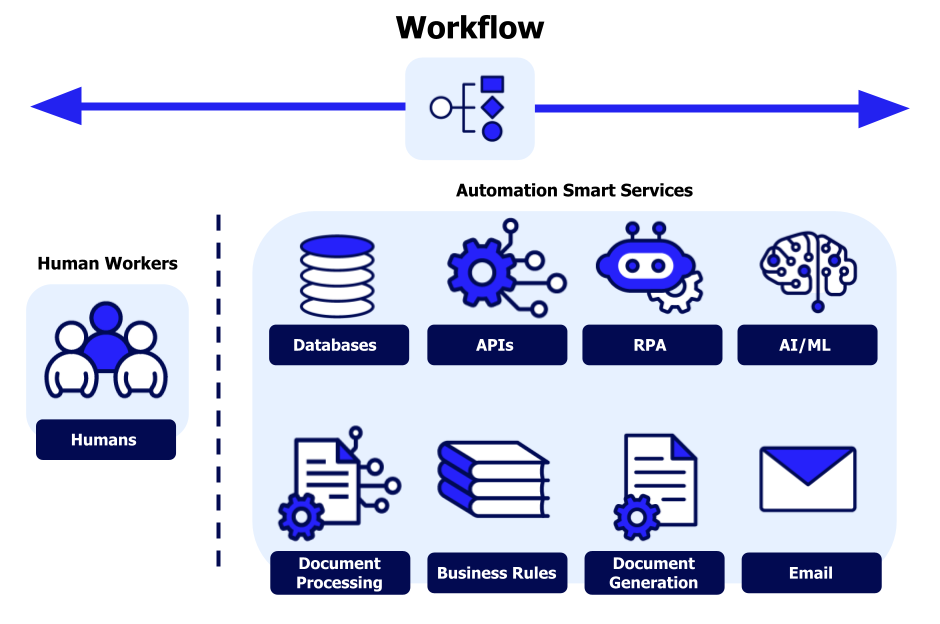
End-to-end enterprise automation connects these islands. The trigger is the same. The workflow spans systems. The completion is logged in all. The manual handoffs disappear.
The Legacy System Constraint
Enterprises run on legacy systems that predate modern APIs. Mainframes, custom-built applications, and vendor systems with limited integration capabilities are the reality. API-first automation is not an option for these systems.
The solution is not to replace the legacy systems. That is too expensive and too risky. The solution is to wrap them with integration layers: robotic process automation (RPA) for UI-level integration, message queues for asynchronous communication, and API gateways for modern interfaces to legacy systems.
The Compliance Requirement
Enterprise automation must satisfy regulatory requirements that small businesses do not face. Audit trails must be complete. Access controls must be granular. Data residency must be respected. Separation of duties must be enforced. The automation platform must support these requirements natively, not as afterthoughts.
Step 3: High-Impact Enterprise Automation Candidates
Accounts Payable (AP) Automation
AP automation is the most common enterprise automation entry point because the volume is high, the process is cross-functional, and the ROI is substantial.
| Component | Automation Approach |
|---|---|
| Invoice receipt | OCR and AI extraction from email, EDI, or portal uploads |
| Three-way matching | Automated matching of PO, receipt, and invoice with exception routing |
| Approval routing | Dynamic routing based on amount, vendor, cost center |
| Payment processing | Scheduled batch or real-time payments via ERP integration |
| GL coding | AI-suggested codes based on vendor and invoice line items |
| Reconciliation | Automated bank reconciliation with exception reporting |
Expected outcomes: processing time from days to hours, touchless processing rate from 20 to 40 percent up to 70 to 90 percent, and early payment discount capture increased by 50 to 100 percent.
Order-to-Cash (O2C) Automation
O2C automation spans sales, finance, and operations. It is a complex, multi-system workflow with significant improvement opportunity.
| Component | Automation Approach |
|---|---|
| Order capture | E-commerce API, EDI, or portal with validation rules |
| Credit check | Real-time credit system integration |
| Inventory allocation | ERP integration with reservation logic |
| Pricing and discounting | Rules engine with approval escalation |
| Invoicing | Automated generation and delivery |
| Collections | Automated dunning sequences with payment portal |
| Cash application | AI matching of payments to open invoices |
| Deductions management | Automated reason coding and dispute routing |
Expected outcomes: order-to-cash cycle time reduced by 40 to 60 percent, days sales outstanding reduced by 20 to 30 percent, and write-offs reduced by 30 to 50 percent.
Procure-to-Pay (P2P) Automation
P2P automation covers requisitioning, purchasing, receiving, invoicing, and payment. It involves multiple roles and systems.
| Component | Automation Approach |
|---|---|
| Requisition | Self-service portal with budget checking and approval routing |
| Purchase order | Automated generation and transmission to vendors |
| Receiving | Mobile scanning with automated three-way matching |
| Invoice processing | OCR extraction and validation against PO and receipt |
| Payment | Scheduled batch processing with discount optimization |
| Vendor management | Automated onboarding, qualification, and performance monitoring |
Expected outcomes: procurement cycle time reduced by 50 to 70 percent, maverick spend reduced by 30 to 50 percent, and contract compliance increased by 20 to 40 percent.
Employee Onboarding Automation
Employee onboarding involves HR, IT, facilities, payroll, and multiple hiring managers. The manual process is slow, error-prone, and creates a poor first impression.
| Component | Automation Approach |
|---|---|
| Offer acceptance | HRIS triggers workflow |
| Background check | Automated vendor integration |
| IT account provisioning | Directory service integration with role-based templates |
| Equipment ordering | Automatic generation based on role and location |
| Training assignment | LMS integration with completion tracking |
| Payroll setup | HRIS to payroll integration |
| Welcome communication | Automated multi-channel sequence |
Expected outcomes: onboarding time from weeks to days, IT provisioning from days to hours, and new hire satisfaction increased by 20 to 40 percent.
Customer Onboarding Automation
Customer onboarding spans sales, legal, compliance, operations, and support. Delays create revenue leakage and customer frustration.
| Component | Automation Approach |
|---|---|
| Contract execution | E-signature integration with workflow triggers |
| Compliance checks | Automated sanctions screening and due diligence |
| Account setup | Automated provisioning across systems |
| Welcome kit | Automated generation and delivery |
| Training access | LMS integration with role-based assignments |
| Billing setup | ERP integration with terms configuration |
Expected outcomes: time-to-value reduced by 50 to 70 percent, abandonment rate reduced by 30 to 50 percent, and customer satisfaction increased by 20 to 40 percent.
Step 4: The Enterprise Automation Technology Stack
Integration Layer
| Component | Purpose | Enterprise Requirements |
|---|---|---|
| API gateway | Unified access to internal and external APIs | Authentication, rate limiting, monitoring |
| RPA platform | UI-level integration for legacy systems | Scalability, exception handling, audit logging |
| Message queue | Asynchronous communication between systems | Guaranteed delivery, replay capability |
| ETL tools | Batch data movement for reporting and analytics | Scheduling, error handling, data quality |
Orchestration Layer
| Component | Purpose | Enterprise Requirements |
|---|---|---|
| Workflow engine | Define, execute, and monitor workflows | Versioning, rollback, parallel execution |
| Rules engine | Business logic for routing and decisions | Dynamic updates, audit trails, testing |
| Event bus | Publish-subscribe for system events | Scalability, persistence, replay |
AI Layer
| Component | Purpose | Enterprise Requirements |
|---|---|---|
| Document intelligence | OCR and extraction for forms, invoices, contracts | High accuracy, custom model training, explainability |
| Process discovery | Mining event logs to identify automation candidates | Data privacy, role-based access |
| Predictive models | Forecasting volume, risk, and outcomes | Model governance, monitoring, retraining |
| Conversational AI | Natural language interfaces for exception handling | Multi-language, integration with enterprise systems |
Governance Layer
| Component | Purpose | Enterprise Requirements |
|---|---|---|
| Access control | Role-based permissions for workflow access | Integration with corporate directory, least privilege |
| Audit logging | Complete record of workflow executions | Tamper-evident storage, retention policies |
| Compliance rules | Regulatory requirement enforcement | Configurable rules, reporting |
| Performance monitoring | Dashboards for SLAs, volume, and exceptions | Real-time alerts, trend analysis |
Step 5: Implementation Phases
Phase 1: Assessment and Planning (Two to Three Months)
| Action | Output |
|---|---|
| Inventory processes across functions | Process map with manual touchpoints |
| Measure current state metrics (time, cost, errors, volume) | Baseline dashboard |
| Prioritize processes by value and complexity | Prioritized roadmap |
| Assess integration requirements and legacy system constraints | Integration architecture |
| Define success metrics for each process | KPI dashboard |
Phase 2: Foundation (Three to Four Months)
| Action | Output |
|---|---|
| Establish automation Center of Excellence (CoE) | CoE charter and staffing |
| Select automation platform | Platform decision |
| Build integration layer for top three systems | Integration infrastructure |
| Define governance framework | Governance policies |
| Train first wave of automation builders | Trained team |
Phase 3: Pilot (Three to Four Months)
| Action | Output |
|---|---|
| Automate one high-value process end-to-end | Working automation |
| Run parallel with manual process for validation | Validation results |
| Refine exception handling and fallback logic | Improved workflow |
| Measure pilot ROI | Business case validation |
| Document lessons learned | Best practices |
Phase 4: Scale (Six to Twelve Months)
| Action | Output |
|---|---|
| Expand to additional processes | Portfolio of automations |
| Build self-service automation capability for business users | Automation enablement |
| Integrate AI for document processing and prediction | AI-enhanced workflows |
| Automate cross-functional handoffs | End-to-end workflows |
| Establish ongoing governance and monitoring | Sustained capability |
Phase 5: Optimize (Ongoing)
| Action | Output |
|---|---|
| Monitor performance against SLAs | Operations dashboard |
| Retrain models on exception data | Improved accuracy |
| Expand automation to edge cases | Higher touchless rate |
| Identify new automation opportunities | Continuous pipeline |
Step 6: Governance and Compliance
Separation of Duties
Enterprise automation must respect segregation of duties requirements. The person who requests a purchase cannot approve the purchase. The person who processes a payment cannot reconcile the bank statement. The automation platform must enforce these rules at the workflow level.
Implementation: Role-based access controls that map to job functions. Workflow steps assigned to roles, not individuals. Approval routing that prevents self-approval. Audit trails that log every action.
Audit Readiness
Regulators will ask to see your automation controls. You must be able to demonstrate that controls are designed effectively and operating effectively.
Implementation: Complete audit trail of every workflow execution, including timestamps, user identities, and decision rationales. Regular control testing. Evidence of exception handling and override approval. Retention policies that meet regulatory requirements.
Data Residency
Enterprises operating across geographic regions must respect data residency requirements. Customer data in Europe cannot be processed in the United States. The automation platform must support data localization.
Implementation: Regional deployment of automation infrastructure. Data classification to identify residency requirements. Workflow routing that respects data boundaries. Audit trails that show data movement.
Model Governance
AI models used in automation must be governed like any other critical system. Validation before deployment. Monitoring for drift. Retraining on a schedule. Approval for changes.
Implementation: Model inventory with version control. Performance monitoring dashboards. Drift detection alerts. Approval workflow for model updates. Regular model validation against holdout data.
Step 7: Measuring Enterprise Automation ROI
Direct Cost Savings
Calculate labor cost reduction by multiplying time saved per transaction by transaction volume by fully loaded labor cost. For processes that do not reduce headcount, count the value of time reallocated to higher-value work.
Indirect Cost Savings
Include error reduction savings (cost per error multiplied by error reduction), compliance penalty avoidance, early payment discount capture, and inventory carrying cost reduction.
Revenue Impact
Include faster time-to-market for new products, reduced customer churn from faster onboarding, higher conversion from faster lead response, and increased capacity to handle growth without headcount increase.
Strategic Value
Include improved customer satisfaction (CSAT and NPS), higher employee engagement (reduced turnover, higher satisfaction), better regulatory standing (fewer findings, faster audits), and competitive positioning (differentiation on speed and reliability).
Step 8: Common Enterprise Pitfalls
| Pitfall | Why It Fails | The Fix |
|---|---|---|
| No executive sponsorship | Automation crosses departmental boundaries | Secure sponsor before starting |
| Underestimating legacy system integration | Custom integration takes time | Build integration layer first |
| Ignoring change management | Users resist new processes | Budget 20 percent for training |
| Automating a broken process | Accelerates errors | Redesign before automating |
| No exception handling | 5 percent of cases break the whole workflow | Design graceful fallback |
| Over-customization | Unmaintainable automation | Use configuration over code |
Step 9: Frequently Asked Questions
Q1: What is the difference between RPA and enterprise workflow automation?
RPA automates tasks at the UI level. Enterprise workflow automation orchestrates processes across systems via APIs. RPA is a tactical tool for legacy systems. Workflow automation is strategic for integrated processes.
Q2: How do I choose between building and buying?
Build when your process is unique to your business and off-the-shelf solutions do not fit. Buy when the process is common (AP, onboarding, order-to-cash) and your requirements are standard.
Q3: What is the role of AI in enterprise automation?
AI handles unstructured inputs (document extraction, intent classification) and provides predictions (risk scoring, approval recommendations). The workflow engine orchestrates the process. The AI enriches the workflow.
Q4: How do I get business units to adopt automation?
Involve them in process design. Show them time saved, not cost reduced. Frame automation as enabling them to focus on high-value work. Pilot with willing partners and publicize wins.
Q5: What is the Automation Center of Excellence (CoE)?
A CoE is a centralized team that defines standards, provides training, governs tools, and shares best practices across business units. It prevents each department from building automation in isolation.
Q6: How long does enterprise automation take?
A pilot can show results in three to six months. Enterprise-wide transformation takes one to three years. The key is to start with a single high-value process and expand from there.
Q7: How can Innovative AI Solutions help?
We help enterprises design, build, and scale workflow automation, from process assessment and platform selection to integration, governance, and change management.
Step 10: Final Tagline
Enterprise automation is not small business automation with more zeros. It spans legacy systems, multiple business units, regulatory constraints, and geographic dispersion. The challenge is complexity, not scale. The solution is integration, orchestration, and governance, not just point automation. Enterprises that master this complexity will operate at lower cost, higher speed, and greater reliability than those that do not. The gap is widening.
Short version: AI-powered workflow automation for enterprises – high-impact processes, technology stack, implementation phases, governance, ROI measurement, and common pitfalls.
Hashtags: #EnterpriseAutomation #WorkflowAutomation #ProcessAutomation #DigitalTransformation #AIinEnterprise #AIIntegration #InnovativeAISolutions
Contact Us
Phone: +91 7464 099 059 / +91 96899 67356
Email: info@innovativeais.com
Address: Netaji Subhash Place, Pitampura, Delhi – 110034
Website: https://innovativeais.com
About the Author
Abhishek Kumar
Founder & CEO, Innovative AI Solutions
5+ years building enterprise workflow automation. Based in Delhi, serving clients across India.
Related services: to apply this in your business, explore our API development and integration and document AI and OCR.