The Big Question
"We have separate APIs for text, for image generation, for speech-to-text. Wiring them together is brittle and expensive. Is there a unified way to handle multimodal input and output?"
The honest answer:
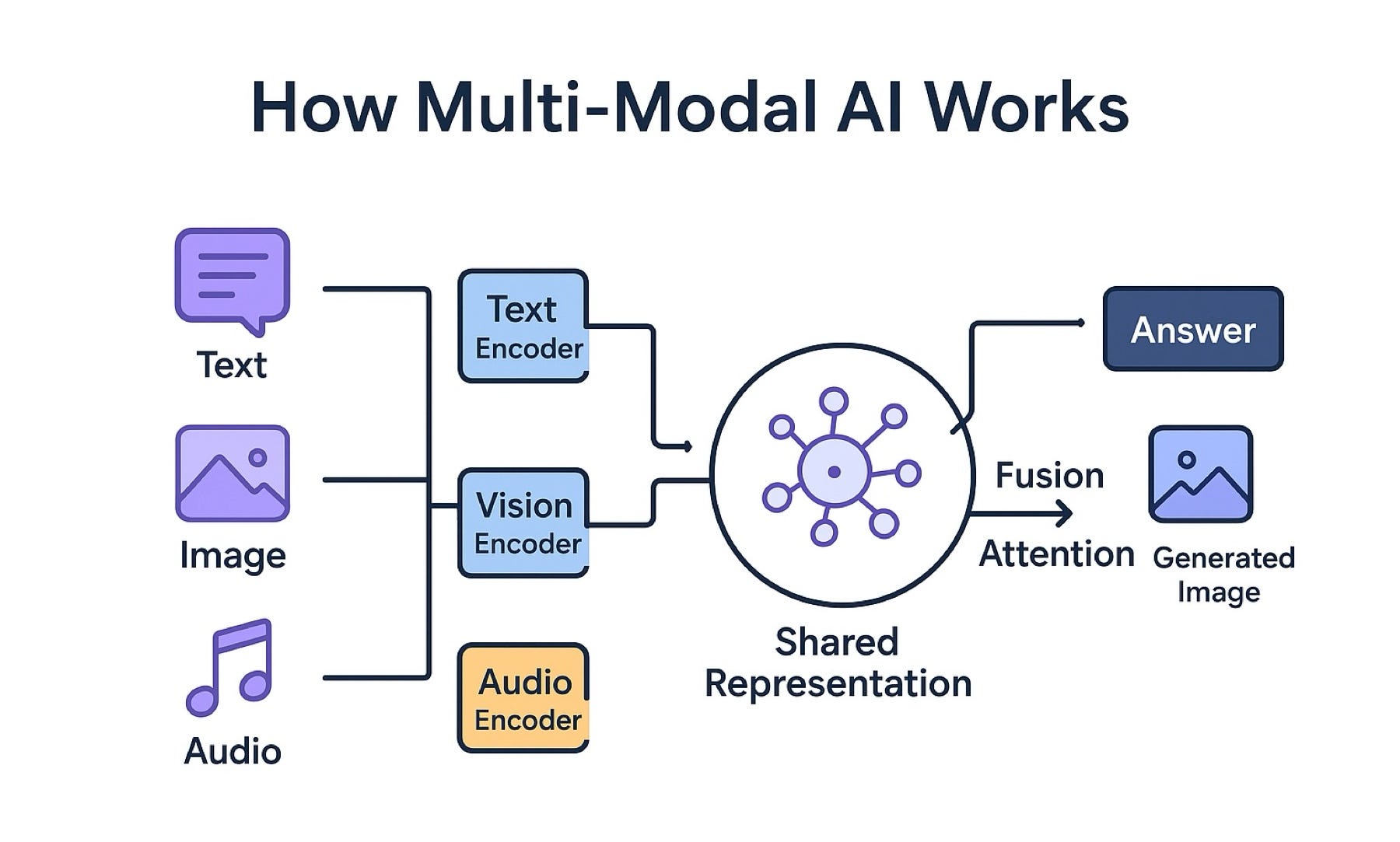
Yes – the industry is converging on unified multimodal models that accept any input combination and produce any output combination.
The shift from orchestrating separate models to using a single multimodal model is analogous to moving from REST API composition to GraphQL – less code, fewer failure points, and dramatically lower latency.
Step 3: What Is Multimodal AI?
A multimodal AI model can process and generate across multiple modalities within the same inference call.
| Modality Type | Input (Understanding) | Output (Generation) | Example Models |
|---|---|---|---|
| Text | Yes | Yes | All |
| Image | Yes (vision) | Yes (image generation) | GPT‑4o, Gemini, Nova, Claude 3.5 Sonnet |
| Audio/Speech | Yes (transcription) | Yes (voice synthesis) | GPT‑4o, Gemini, Ultra‑voice |
| Video | Yes (frame understanding) | Yes (video generation) | Gemini Omni Flash, Sora 2 |
The Modality Matrix – What Each Model Supports
| Model | Text Input | Image Input | Audio Input | Video Input | Text Output | Image Output | Audio Output | Video Output |
|---|---|---|---|---|---|---|---|---|
| Gemini Omni Flash | yes | yes | yes | yes | yes | yes | yes | yes |
| GPT‑4o | yes | yes | yes | yes | yes | yes | yes | no |
| Claude 3.5 Sonnet | yes | yes | no | no | yes | no | no | no |
| Amazon Nova Pro | yes | yes | no | no | yes | yes | no | no |
| Sora 2 | yes | no | no | no | no | no | no | yes (video only) |
"The trend is clear: unified models that handle all modalities as first-class citizens, not bolted‑on afterthoughts. Gemini Omni and GPT‑4o lead this transition."
Step 4: The Core Multimodal Models in 2026
Google Gemini Omni Flash – The Most Complete Multimodal Model
Announced at Google I/O 2026, Gemini Omni is a "world model AI that can understand and simulate the world" .
Capabilities:
-
Accepts text, image, audio, video as input
-
Outputs any combination of text, image, audio, video
-
Native conversational video editing (modify video with natural language)
-
Character consistency across multiple scenes
-
Avatar creation (digital likeness from single video + audio recording)
-
SynthID watermarking for generated content
Availability: Gemini AI Plus, Pro, and Ultra subscribers; YouTube Shorts and YouTube Create at no cost
OpenAI GPT‑4o – The Unified Real‑Time Model
GPT‑4o (the "o" stands for "omni") reasons across audio, vision, and text in real time – accepting any combination of text, audio, and image as input and generating text, audio, and image outputs .
Key differentiators:
-
Average audio response latency of 320 milliseconds (human‑like conversation)
-
Native speech‑to‑speech without cascading transcription → LLM → synthesis
-
Emotion and tone detection from voice input
-
Image understanding at native resolution
Amazon Nova – Deeply Integrated with AWS
Amazon Nova Pro, Nova Lite, and Nova Micro offer multimodal understanding with image and video input, plus text generation .
Advantages:
-
Lowest latency among multimodal models in AWS testing
-
Native integration with Bedrock Knowledge Bases for RAG
-
Fine‑tuning available (Nova Micro and Lite)
-
Lower cost compared to GPT‑4o and Gemini for high‑volume workloads
Anthropic Claude 3.5 Sonnet – Enterprise Vision
Claude 3.5 Sonnet sets a new standard for vision‑language tasks, particularly for extracting information from low‑quality images and translating visual data into structured formats .
Best for:
-
Processing scanned PDFs and handwritten documents
-
Extracting structured data from charts, graphs, diagrams
-
Enterprises needing strict security controls (no training on customer data)
Step 5: Architectural Patterns for Multimodal Apps
Pattern 1: Unified Model (Simplest, Lowest Latency)
One multimodal model handles all input and output types in a single call.
┌─────────────────────────────────────────────────────────────────────────────┐
│                    UNIFIED MODEL PATTERN                                    │
├─────────────────────────────────────────────────────────────────────────────┤
│                                                                             │
│   User Input: "What is wrong with this error message?" + [screenshot]       │
│                                                                             │
│   ┌─────────────────────────────────────────────────────────────────────┐   │
│   │                    Multimodal LLM                                   │   │
│   │                  (Gemini Omni / GPT‑4o)                             │   │
│   └─────────────────────────────────────────────────────────────────────┘   │
│                                                                             │
│   Response: "This error indicates an AWS credentials issue. The             │
│              'AccessDenied' error suggests your IAM role lacks              │
│              permissions. Here is how to fix it."                           │
│                                                                             │
└─────────────────────────────────────────────────────────────────────────────┘
When to use: Most applications; starting point for new projects
Trade‑offs: Lowest latency, simplest code, but less control over individual modalities
Pattern 2: Orchestrated Specialists (More Control)
Route inputs to specialized models, then fuse outputs.
┌─────────────────────────────────────────────────────────────────────────────┐
│                    ORCHESTRATED SPECIALISTS PATTERN                         │
├─────────────────────────────────────────────────────────────────────────────┤
│                                                                             │
│   User Input + Image                                                        │
│         │                                                                   │
│         ├──► Vision API (Nova Pro) ──► Image description                    │
│         │                                                                   │
│         ├──► Speech‑to‑Text (Whisper) ──► Transcription (if audio)          │
│         │                                                                   │
│         └──► Text LLM (GPT‑4o) combines descriptions + query ──► Response   │
│                                                                             │
└─────────────────────────────────────────────────────────────────────────────┘
When to use: Need best‑in‑class for each modality; have existing model investments
Trade‑offs: Higher latency (multiple API calls), more complex, potentially higher cost
Pattern 3: Cascading (Progressive Refinement)
Start with lightweight model; escalate to larger model if confidence low.
┌─────────────────────────────────────────────────────────────────────────────┐
│                    CASCADING PATTERN                                        │
├─────────────────────────────────────────────────────────────────────────────┤
│                                                                             │
│   User Query ──► Fast model (Nova Lite)                                     │
│                         │                                                   │
│                ┌────────┴────────┐                                          │
│                │                 │                                          │
│           High confidence    Low confidence                                 │
│                │                 │                                          │
│                ▼                 ▼                                          │
│           Return answer    Escalate to large model (Gemini Omni)            │
│                                                                             │
└─────────────────────────────────────────────────────────────────────────────┘
When to use: Cost‑sensitive, high‑volume applications
Trade‑offs: 80% of queries handled by cheap model; 20% escalated
Step 6: Building a Multimodal App – Step by Step
Step 1: Choose Your Multimodal Model
| If you want... | Choose... |
|---|---|
| Most complete multimodal (text + image + audio + video) | Gemini Omni Flash |
| Best real‑time voice conversation | GPT‑4o |
| Low‑cost integration with AWS | Amazon Nova (Pro or Lite) |
| Enterprise security + vision document processing | Claude 3.5 Sonnet |
Step 2: API Integration Example – Gemini Omni Flash
import google.generativeai as genai

genai.configure(api_key="YOUR_API_KEY")
model = genai.GenerativeModel('gemini-omni-flash')

# Multimodal input: text + image
response = model.generate_content([
    "What is wrong with this error message? Explain how to fix it.",
    load_image_from_file("error_screenshot.png")
])

print(response.text)
Step 3: Adding Voice Input/Output (if needed)
If your chosen model lacks native voice, compose with specialized APIs:
# Voice input: Speech‑to‑Text
import openai
transcription = openai.Audio.transcribe("user_question.mp3")

# Multimodal understanding (text + optional image)
response = model.generate_content([transcription.text, optional_image])

# Voice output: Text‑to‑Speech
speech = openai.Audio.speech.create(
    model="tts-1",
    voice="alloy",
    input=response.text
)
Step 4: Streaming for Real‑Time Interaction
For voice agents, streaming is essential. GPT‑4o supports real‑time audio streaming with 320ms average response latency . Gemini Omni Flash supports streaming across modalities.
Step 7: Multimodal RAG – Grounding in Visual Context
Multimodal RAG extends traditional RAG by retrieving relevant images, audio, and video alongside text.
Architecture
┌─────────────────────────────────────────────────────────────────────────────┐
│                    MULTIMODAL RAG PIPELINE                                  │
├─────────────────────────────────────────────────────────────────────────────┤
│                                                                             │
│   Ingestion:                                                                │
│   ┌─────────────────────────────────────────────────────────────────────┐   │
│   │ PDF/Image/Video ──► Unstructured Parser ──► Text + Image + Metadata │   │
│   │                              │                                      │   │
│   │                              ▼                                      │   │
│   │              VLM generates image embeddings + description           │   │
│   │                              │                                      │   │
│   │                              ▼                                      │   │
│   │                    Vector Database (text + image)                   │   │
│   └─────────────────────────────────────────────────────────────────────┘   │
│                                                                             │
│   Query:                                                                    │
│   ┌─────────────────────────────────────────────────────────────────────┐   │
│   │ User asks with or without image ──► Embed query + optional image    │   │
│   │                              │                                      │   │
│   │                              ▼                                      │   │
│   │                    Retrieve relevant text + images                  │   │
│   │                              │                                      │   │
│   │                              ▼                                      │   │
│   │                    VLM / Multimodal LLM generates response          │   │
│   └─────────────────────────────────────────────────────────────────────┘   │
│                                                                             │
└─────────────────────────────────────────────────────────────────────────────┘
AWS Implementation – Bedrock Knowledge Bases with Nova
AWS announced multi‑modal support in Bedrock Knowledge Bases using Amazon Nova models :
import boto3
from langchain_aws import BedrockEmbeddings

bedrock_runtime = boto3.client('bedrock-runtime')
bedrock_embeddings = BedrockEmbeddings(model_id="amazon.titan-embed-image-v1")

# Multi‑modal query with image
response = bedrock_runtime.invoke_model(
    modelId="amazon.nova-pro-v1:0",
    body={
        "inputText": "What is wrong with this error message?",
        "inputImages": [error_screenshot_base64],
        "kbId": knowledge_base_id
    }
)
Step 8: Multimodal in Production – Key Considerations
Cost Management
| Cost Factor | Single‑Modal (Text only) | Multimodal |
|---|---|---|
| Input tokens | Low | Higher (image tokens, audio tokens) |
| Model size | Smaller | Larger (more parameters) |
| Image encoding cost | $0 | Per image (e.g., $0.002 per image for GPT‑4o) |
| Scaling | Linear | Can spike with large images or long video |
Optimization: Cascade to smaller models when possible; resize images before encoding; use lossy compression for non‑critical understanding.
Latency Expectations
| Modality | Typical Latency (P95) |
|---|---|
| Text‑only | 0.5‑1.5 seconds |
| Text + image | 1.0‑2.5 seconds |
| Voice + text | 2.0‑4.0 seconds |
| Video understanding | 3.0‑8.0 seconds (depends on length) |
Security and Privacy
| Risk | Mitigation |
|---|---|
| PII in uploaded images | Pre‑processing PII detection (AWS Rekognition, Azure Computer Vision) |
| Sensitive audio | Encryption in transit (TLS), at rest; ephemeral storage |
| Deepfake generation | SynthID watermarking (Google), content provenance |
| Malicious image inputs | Input validation, rate limiting, anomaly detection |
Step 9: Real-World Applications
Application 1: Visual Customer Support
User uploads: Screenshot of error message
System: Identifies error, retrieves relevant documentation, provides step‑by‑step fix
Result: 40% reduction in support escalations for visual issues
Application 2: Product Discovery with Visual Search
User uploads: Photo of a product
System: Identifies similar products, retrieves specifications, pricing, availability
Result: 30% increase in add‑to‑cart rate
Application 3: Voice‑First Assistant
User speaks: "What's the weather like in Delhi tomorrow?"
System: Transcribes speech, retrieves weather data, synthesizes voice response
Result: 70% user preference over typing for on‑the‑go tasks
Application 4: Meeting Transcription + Action Items
User uploads: Video recording of team meeting
System: Transcribes speech, identifies speakers, extracts action items and decisions
Result: 90% reduction in time spent taking notes
Step 10: Frequently Asked Questions
Q1: Which multimodal model should I start with?
Gemini Omni Flash (most complete) or GPT‑4o (best real‑time voice). Both have generous free tiers.
Q2: How do I handle image uploads from users?
Resize images before sending to APIs (maximum 1024x1024). Encode as base64. Set content‑type to image/jpeg or image/png.
Q3: What is the cost difference between multimodal and text‑only?
Multimodal costs 5-20x more per request depending on image size and model. However, it eliminates the need for multiple specialized models, which can lower overall architecture complexity.
Q4: Can I use multimodal models for batch processing (e.g., analyzing thousands of images)?
Yes. Use batch processing APIs (OpenAI Batch, Gemini Batch). Costs are typically 50% lower for asynchronous processing.
Q5: How do I evaluate multimodal model quality?
Create a test set of 50‑100 representative inputs across modalities. Evaluate on accuracy, latency, and cost. Rerun monthly as models improve.
Q6: What is the best way to combine text + image + voice in a single user experience?
Use a unified model (Gemini Omni or GPT‑4o) with streaming for voice. For the frontend, MediaPipe or WebRTC handle audio capture.
Step 11: Final Tagline
"Your users no longer want to type every question. They want to upload a photo, speak a command, and circle a problem. Multimodal AI makes this possible – not as separate tools, but as one unified experience."
Short version:
The rise of multimodal AI – combining text, image, and voice in your apps. Gemini Omni, GPT‑4o, Nova, and architectural patterns for building unified experiences.
Hashtags:
#MultimodalAI #GenerativeAI #GeminiOmni #GPT4o #Nova #AIDevelopment #VoiceAI #VisualAI #InnovativeAISolutions
Ready to Build Multimodal Apps?
Text‑only AI is table stakes. Multimodal is the competitive advantage. Let us help you integrate text, image, and voice into your applications.
Contact Us
Phone: +91 7464 099 059 / +91 96899 67356
Email: info@innovativeais.com
Address: Netaji Subhash Place, Pitampura, Delhi – 110034
Website: https://innovativeais.com
Related services: to apply this in your business, explore our LLM integration and RAG development.