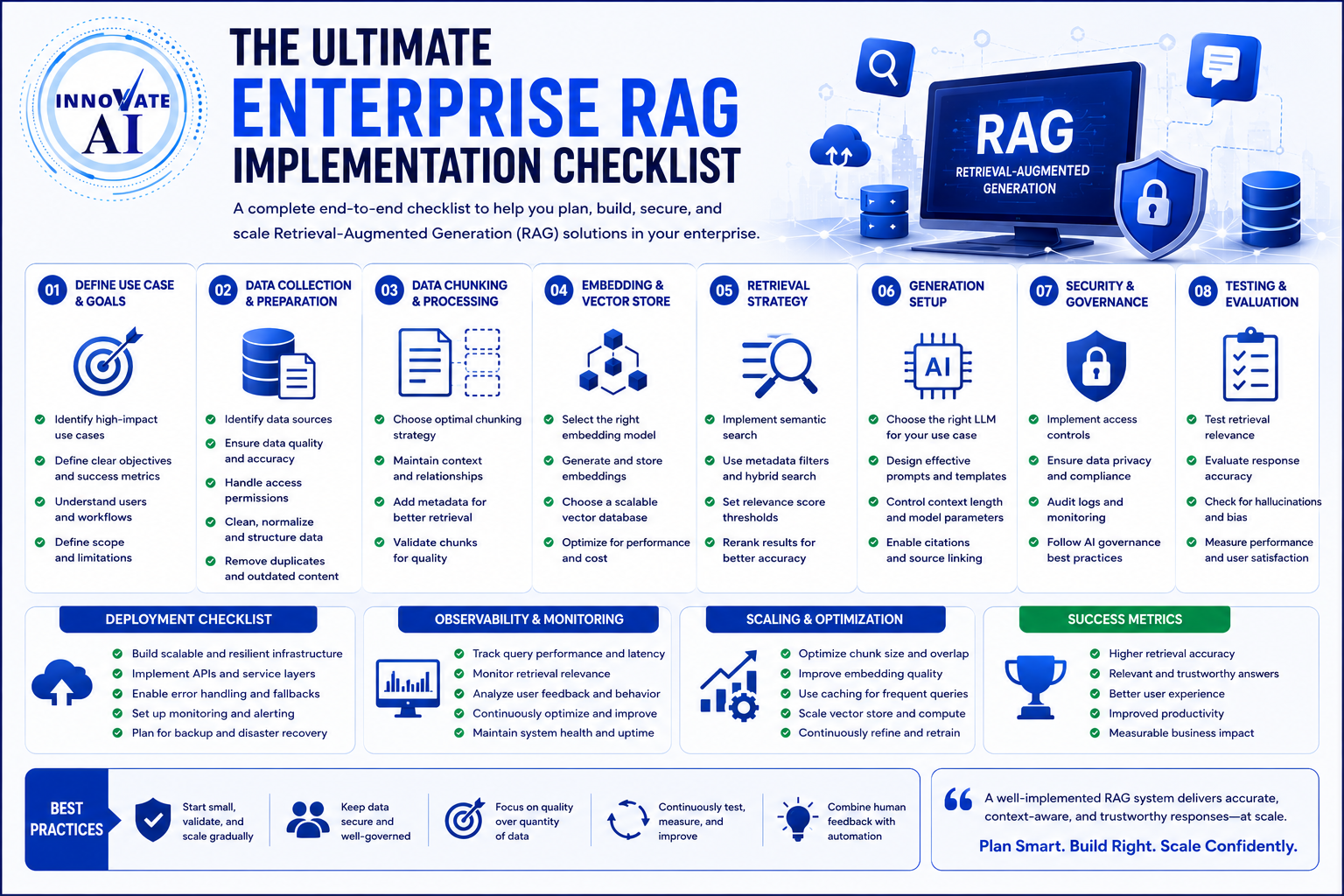
The Big Question
"We have a RAG prototype that works. But moving it to production feels overwhelming. What do we actually need to do, and in what order?"
The honest answer:
You need to move from "vector database + LLM" thinking to full engineering pipeline thinking.
Here is the truth:
A real RAG system isn't just "vector DB + LLM." It's a full engineering pipeline with governance, safety, evaluation, and continuous improvement. Most teams rush to "add a vector DB and call it RAG," but the real work is in the layers underneath.
Step 3: The 16-Step RAG Implementation Roadmap
Based on enterprise production patterns, a complete RAG implementation follows a 16-step sequence. Each step matters if you want reliability, accuracy, and trust.
Phase 1: Foundation (Steps 1-4)
Step 1: Define Business Goals
Clarify why you're building RAG and what outcomes matter—accuracy, cost efficiency, automation, or improved decision-making. Without clear goals, you cannot measure success.
Questions to answer:
| Question | Why It Matters |
|---|---|
| What specific business problem are we solving? | Prevents building a solution in search of a problem |
| What is the acceptable hallucination rate? | Defines quality threshold |
| What is the cost per query budget? | Prevents cost surprises at scale |
| What is the acceptable latency (P95)? | Defines user experience requirements |
Key insight: If you cannot state your success criteria as a measurable business outcome, you are not ready to build.
Step 2: Choose High-Impact Use Cases
Pick use cases that have text-heavy workflows and clear ROI.
| Industry | High-Impact Use Cases |
|---|---|
| Customer Support | Internal knowledge assistants, case resolution support |
| Legal | Contract review, clause comparison, compliance checking |
| HR | Policy Q&A, onboarding assistance, benefits queries |
| Finance | Report analysis, regulatory compliance, due diligence |
| Manufacturing | Equipment manual Q&A, safety procedure lookup |
Rule of thumb: Choose a bounded, high-volume use case where retrieval accuracy directly maps to business value.
Step 3: Identify Key Data Sources
List internal documents, emails, CRMs, knowledge bases, and other systems RAG will ingest. Enterprise data lives in multiple silos, and each source has its own structure, quality, and permission model.
Common enterprise data sources:
-
SharePoint and Confluence
-
Google Drive and OneDrive
-
Emails and Slack/Teams conversations
-
CRM and ERP systems
-
Technical documentation and wikis
-
PDFs, Word documents, and scanned images
Critical question: Are your documents "RAG-ready"? Most enterprise documents are not. Invoices, contracts, regulatory filings, and scanned forms require a document parsing layer before retrieval—turning messy documents into structured evidence that a retriever can index effectively.
Step 4: Check Compliance and Permissions
Ensure data privacy, access control, and regulatory constraints are cleared before ingestion. This is non-negotiable.
Compliance requirements by industry:
| Industry | Key Regulations |
|---|---|
| Healthcare (US) | HIPAA, 21 CFR Part 11 (validation), FDA compliance |
| Financial Services | SR 26-2, GDPR, SEC regulations |
| India | DPDPA 2023 (personal data protection, breach notification) |
| EU/International | GDPR, EU AI Act (risk management) |
| Life Sciences | GxP validation, 21 CFR Part 11, EU AI Act |
Access control requirements:
-
Role-based access control (RBAC) must be enforced at retrieval time, not only at the UI layer.
-
Document-level permissions must be propagated to the vector store metadata.
-
Permission inheritance must be maintained when documents are reclassified, archived, or updated.
Phase 2: Data Preparation (Steps 5-7)
Step 5: Ingest and Clean Your Data
Standardize, normalize, and clean documents so your system isn't learning from noisy inputs. A RAG pipeline that retrieves from a million poorly formatted documents will underperform one that retrieves from ten thousand clean, well-chunked documents.
Data quality practices:
| Practice | What It Does |
|---|---|
| Deduplication | Remove redundant records before they pollute embeddings |
| Freshness enforcement | Tag documents with last-verified dates; expire stale content automatically |
| Format standardization | Convert PDFs, Word, scans to consistent text format |
| OCR quality assessment | For scanned documents, verify OCR quality before indexing |
| Corruption detection | Flag and quarantine corrupted or incomplete documents |
The hidden cost: If your document parsing layer loses layout, table relationships, or reading order, retrieval quality drops before the retriever even operates. Invest in robust document parsing, not just vector search.
Step 6: Chunk Your Documents
Split data into structured, meaningful segments that the model can retrieve accurately. Chunking strategy is one of the highest-leverage decisions in RAG architecture.
Chunking strategies:
| Strategy | Best For |
|---|---|
| Fixed-size (token-based) | Simple, uniform documents |
| Semantic (section-aware) | Preserves logical boundaries |
| Hierarchical | Parent-child relationships across sections |
| Overlapping | Prevents information loss at chunk boundaries |
Rule of thumb: A poor chunking strategy will tank performance no matter how strong your LLM is. Test at least 3-5 chunking configurations on your actual documents before settling.
Step 7: Generate Embeddings and Build Vector Index
Convert data into embeddings and store them in a vector database for fast retrieval.
Embedding model selection:
| Model | Best For | Context Window |
|---|---|---|
| OpenAI text-embedding-3-large | General-purpose English | 8K tokens |
| BGE-M3 | Multilingual, hybrid retrieval | 8K tokens |
| Amazon Titan Text Embeddings | AWS native, cost-effective | 8K tokens |
| Qwen3-Embedding (8B) | Open-source, high accuracy | 8K tokens |
| Nomic-embed-text | Lightweight, local deployment | 8K tokens |
Vector database considerations:
-
Scalability: Can it handle your document volume and concurrent queries?
-
Query performance: What is P95 latency under load?
-
Security: Encryption, access controls, audit logging
-
Integration: Works with your existing data ecosystem
-
Metadata filtering: Can you filter by document permissions and attributes?
Popular options: Pinecone, Weaviate, Milvus, Qdrant, and vector capabilities in existing database platforms.
Phase 3: Retrieval Architecture (Steps 8-10)
Step 8: Build Your Retrieval Pipeline
Combine semantic search, keyword search, reranking, and filtering for more accurate results.
The seven-layer retrieval pipeline:
| Layer | Purpose |
|---|---|
| 1. Query Understanding | Intent classification, query rewriting, expansion |
| 2. Hybrid Search | Dense vector (semantic) + sparse keyword (BM25) |
| 3. Metadata Filtering | Filter by permissions, document type, date, department |
| 4. Reranking | Cross-encoder models reorder candidates by relevance |
| 5. Context Assembly | Select and order chunks for the context window |
| 6. Generation | LLM writes answer from evidence |
| 7. Evaluation | Faithfulness, relevance, citation accuracy |
Why hybrid search matters: Dense vector search finds semantic meaning. Sparse keyword search (BM25) preserves exact terms—invoice numbers, customer IDs, SKUs, clause references—that embeddings can miss. A production system usually needs both.
Enterprise intent to adopt hybrid retrieval rose from 10.3% to 33.3% in a single quarter. The signal is clear: production teams are reworking retrieval architecture rather than bolting bigger models on top.
Step 9: Design Prompts and Context Format
Craft structured prompts that blend retrieved context with user queries effectively.
Prompt engineering best practices:
-
Create standardized prompt templates for different use cases
-
Include clear instructions for source citation
-
Specify expected format and level of detail in responses
-
Provide context about the user's role and access permissions
-
Test prompts systematically and iteratively
Critical rule: Well-designed prompts help the LLM properly contextualize retrieved information and generate appropriate responses. Don't treat prompt engineering like an end-user issue. Enterprises should define templates, citations, and formats in advance.
Step 10: Choose Your LLM
Pick a model based on accuracy, latency, cost, compliance, and data sensitivity.
| Factor | Consideration |
|---|---|
| Accuracy | Does the model perform well on your domain? |
| Latency | Is response time acceptable for your use case? |
| Cost | What is the cost per query at scale? |
| Compliance | Can the model be deployed on-premise or in your VPC? |
| Sovereignty | Where is data processed and stored? |
| Context window | Can it handle your chunk size and assembly? |
Model options:
-
Proprietary APIs: GPT-4, Claude, Gemini (fastest to deploy, higher ongoing cost)
-
Open-weight: Llama 3, Mistral, Qwen (lower cost, need infrastructure)
-
Fine-tuned: Domain-specific performance, controlled cost
Phase 4: Generation and Guardrails (Step 11)
Step 11: Generate Grounded Answers
Ensure answers cite retrieved sources, avoid hallucination, and stay tightly grounded.
RAG-specific evaluation metrics:
| Metric | What It Measures |
|---|---|
| Faithfulness | Does the answer follow from the retrieved context? |
| Context Precision | Are the retrieved documents relevant? |
| Context Recall | Were all relevant documents retrieved? |
| Answer Relevance | Does the answer address the query? |
| Citation Accuracy | Are citations correctly attributed? |
Grounding best practices:
-
Force the model to answer only from authoritative internal documents
-
Require mandatory citations for every claim
-
If retrieved context is insufficient, the system must decline rather than approximate
-
Implement citation fabrication testing to detect invented references
The reality: Only 16% of AI-generated answers to open-ended enterprise questions are accurate enough for decision-making. The gap between demo accuracy and production accuracy is a measurement problem—demos don't measure.
Phase 5: Testing and Evaluation (Step 12)
Step 12: Test and Evaluate Quality
Validate accuracy, hallucination rate, relevance, latency, and overall system stability.
Building a golden dataset:
-
Create 50–100 questions with known correct answers drawn from your corpus
-
Cover: common queries, edge cases, ambiguous terminology, cross-source questions
-
Score: context precision, recall, faithfulness, and citation accuracy
-
Not just "does it sound right"
Performance testing requirements:
-
Realistic concurrent user loads (tens to hundreds of simultaneous queries)
-
Corpus sizes representative of production volume
-
P50, P95, P99 latency under load
-
Cost per query under load
-
Fault tolerance: what happens when the vector database is unavailable?
Red flag: The vendor can't provide retrieval precision and answer faithfulness scores on a corpus similar to yours.
Phase 6: Integration and Deployment (Step 13)
Step 13: Integrate Into User Experience
Embed RAG inside apps, portals, chatbots, CRMs, or enterprise tools.
Integration considerations:
| Component | Requirement |
|---|---|
| User Interface | Chat interface, search bar, embedded widget |
| Authentication | SSO, OAuth, role-based access |
| API Gateway | Rate limiting, request validation, monitoring |
| Fallback Paths | What happens when RAG fails or times out |
| Feedback Loop | User corrections should improve the system |
Deployment modes:
-
Cloud-native: AWS Bedrock Knowledge Bases, Azure AI Search, GCP Vertex AI
-
OpenShift-based: Red Hat OpenShift AI with GPU-accelerated inference
-
Self-hosted: vLLM, Ollama, custom Kubernetes deployment
-
Local development: Docker, Podman, limited GPU availability
Phase 7: Monitoring and Governance (Steps 14-15)
Step 14: Monitor System Performance
Track drift, versioning, model degradation, and user interaction quality.
What to monitor:
| Monitoring Area | What to Track |
|---|---|
| Retrieval Quality | Context precision, MRR, hit rate over time |
| Generation Quality | Faithfulness, hallucination rate, answer relevance |
| Infrastructure | Latency (P50, P95, P99), throughput, error rate |
| Cost | Cost per query, total token usage, cost trends |
| User Feedback | Thumbs up/down, corrections, rephrased queries |
Key insight: RAG pipelines decay. Embeddings drift, documents update, ranking breaks, and relevance quietly drops. Without observability, teams only notice when users complain.
The three latency components: Vector search, context assembly, and LLM inference. Per-component visibility tells you whether a latency regression is a vector store issue, a reranker bottleneck, or an LLM inference slowdown.
Step 15: Add Safety and Access Controls
Implement data permissions, moderation, PII protection, and compliance layers.
Access control enforcement:
-
RBAC must be enforced at retrieval time, not only at the UI layer
-
Access filters need to apply consistently across both dense and sparse retrieval paths
-
Document-level permissions must be propagated to the vector store metadata
-
Metadata filtering at query time based on user identity and role
Safety guardrails:
-
PII detection and redaction
-
Content moderation and filtering
-
Prompt injection prevention
-
Output validation and schema checking
-
Citation tracking and source attribution
Compliance documentation:
-
Audit logs capturing: query, retrieved documents, generated output
-
Data lineage: which source documents informed which answers
-
Change control: who changed what, when, and why
-
Model risk management documentation (SR 26-2, GxP, 21 CFR Part 11)
Phase 8: Continuous Improvement (Step 16)
Step 16: Improve and Scale Continuously
Tune embeddings, prompts, chunking, and workflows for new use cases.
Continuous improvement loops:
| Loop | Frequency |
|---|---|
| User Feedback Loop | Corrections feed back into prompt refinement |
| Retrieval Optimization | Monitor MRR, hit rate; adjust chunking, reranking |
| Cost Optimization | Token usage tracking, model tiering |
| Document Updates | Incremental indexing, embedding refresh |
| Model Upgrades | Evaluate new models against golden dataset |
The five changes that require formal testing before deployment:
-
Updates to the embedding model
-
Changes to chunking strategy or chunk size
-
Updates to retrieval parameters: k, similarity threshold, reranking
-
Schema changes to document metadata
-
Major additions to or removals from the document corpus
Step 4: The Enterprise RAG Architecture Checklist
Phase 1: Document Preparation
-
Data sources identified (SharePoint, Confluence, Google Drive, CRM, etc.)
-
Document parsing layer validated (PDF, DOCX, scans, forms)
-
OCR quality assessment performed (for scanned documents)
-
Document cleaning pipeline built (deduplication, freshness, standardization)
-
Metadata extraction and schema defined
-
Version control for document updates established
Phase 2: Vector and Retrieval
-
Embedding model selected (text-embedding-3-large, BGE-M3, etc.)
-
Vector database chosen (Pinecone, Weaviate, Milvus, Qdrant, pgvector)
-
Chunking strategy defined (semantic, hierarchical, overlapping)
-
Hybrid search implemented (BM25 + vector)
-
Reranking layer configured (cross-encoder models)
-
Metadata filtering enabled (permissions, document type, date)
Phase 3: Generation
-
LLM selected (GPT-4, Claude, Llama 3, etc.)
-
Prompt templates designed and tested
-
Source citation and grounding enforced
-
Guardrails configured (PII detection, content filtering)
-
Output validation implemented
Phase 4: Evaluation
-
Golden dataset built (50-100 Q&A pairs)
-
Retrieval metrics defined (MRR, hit rate, context precision)
-
Generation metrics defined (faithfulness, hallucination rate)
-
Performance metrics defined (latency P95, throughput)
-
Cost metrics defined (cost per query)
Phase 5: Governance
-
RBAC enforced at retrieval time
-
Audit logs configured (query, retrieved documents, response)
-
Data lineage established (source documents to answers)
-
Compliance documentation prepared
-
Access controls synchronized with source systems
Phase 6: Monitoring
-
Retrieval quality monitoring enabled
-
Generation quality monitoring enabled
-
Infrastructure monitoring enabled (latency, error rate)
-
Cost monitoring enabled
-
User feedback loop implemented
-
Alerting configured for metric regressions
Step 5: Frequently Asked Questions
Q1: What is the most common reason RAG systems fail in production?
Retrieval failure. When a RAG answer is wrong, the failure rarely starts at the moment the model writes. By then, two upstream decisions have already shaped the result: what evidence was retrieved, and how the source document was converted into retrievable data. Retrieval quality and document parsing determine reliability.
Q2: How do I choose between naive RAG, hybrid RAG, graph RAG, and agentic RAG?
-
Naive RAG: Prototypes and simple knowledge bases
-
Hybrid RAG: Production default for most enterprises (semantic + keyword + reranking)
-
Graph RAG: When relationship traversal is central to your use case
-
Agentic RAG: When the system must plan, verify, and act across multiple steps
The practical rule: choose the simplest architecture that answers your hardest real question reliably.
Q3: What is the single most important metric to track?
Retrieval quality. If the retrieved documents are wrong, no generation-side monitoring will catch it upstream. Monitor context precision, MRR, and hit rate continuously.
Q4: How do I prevent embedding drift?
Implement incremental indexing and monitor retrieval quality metrics after each update. When documents change, the vector index must reflect those changes. Stale embeddings drift away from what users actually need.
Q5: What is the minimum data governance needed for a RAG pilot?
At minimum: access controls (who can read what), data freshness tracking (when was this last verified), and a feedback mechanism (how do users report bad outputs back to the data team).
Q6: How can Innovative AI Solutions help?
We help enterprises design, build, and deploy production-grade RAG systems—from data readiness and retrieval architecture to governance, monitoring, and continuous improvement. Based in Delhi, serving clients across India.
Step 6: Final Tagline
"A real RAG system isn't just 'vector DB + LLM.' It's a full engineering pipeline with governance, safety, evaluation, and continuous improvement. Teams who follow this roadmap build solutions that are accurate, safe, scalable, and enterprise-ready."
Short version:
The ultimate enterprise RAG implementation checklist—data preparation, retrieval architecture, generation, evaluation, monitoring, and continuous improvement. A 2026 practical framework for moving from prototype to production.
Hashtags:
#EnterpriseRAG #RAGImplementation #AIArchitecture #GenerativeAI #RetrievalAugmentedGeneration #AIProduction #InnovativeAISolutions
Contact Us
Phone: +91 7464 099 059 / +91 96899 67356
Email: info@innovativeais.com
Address: Netaji Subhash Place, Pitampura, Delhi – 110034
Website: https://innovativeais.com
About the Author
Abhishek Kumar
Founder & CEO, Innovative AI Solutions
5+ years building AI systems and enterprise RAG pipelines. Based in Delhi, serving clients across India.
Related services: to apply this in your business, explore our RAG development and LLM integration.