The Big Question
"Abhishek, I moved my business to the cloud because I thought it was more secure. But then I read about a data breach at another company using the same cloud provider. Am I actually safe?"
This question keeps business owners up at night.
The cloud provider is responsible for security OF the cloud. YOU are responsible for security IN the cloud.
Let me explain the difference.
Step 3: The Shared Responsibility Model (Most Important Concept)
This is the single most important thing to understand about cloud security.
| What the Cloud Provider Secures | What YOU Must Secure |
|---|---|
| Physical data centers | Your customer data |
| Servers and hardware | Your applications |
| Networking infrastructure | Your access policies |
| Hypervisors (virtualization) | Your user identities |
| Base operating systems | Your API keys and secrets |
| Compliance certifications (as a service) | Your compliance configuration |
In simple terms:
-
The cloud provider locks the doors and guards the building.
-
YOU must lock your filing cabinets, manage your keys, and control who enters your office.
"The cloud is secure by default. But 'secure enough' for your specific business? That depends on you."
Step 4: The 15 Cloud Security Best Practices
Here is my ranked list of cloud security best practices – from most critical to important but advanced.
| Rank | Best Practice | Impact | Difficulty |
|---|---|---|---|
| 1 | Enable Multi-Factor Authentication (MFA) Everywhere | Critical | Easy |
| 2 | Follow the Principle of Least Privilege | Critical | Medium |
| 3 | Encrypt Data at Rest and in Transit | Critical | Medium |
| 4 | Enable Cloud Monitoring and Logging | High | Medium |
| 5 | Regular Backup and Test Recovery | High | Medium |
| 6 | Secure Your API Keys and Secrets | High | Easy |
| 7 | Implement Network Security (VPC, Firewall) | High | Medium |
| 8 | Enable Automatic Security Updates | High | Easy |
| 9 | Conduct Regular Security Audits | High | Medium |
| 10 | Implement DDoS Protection | Medium | Easy |
| 11 | Use a Cloud Security Posture Management (CSPM) Tool | Medium | Advanced |
| 12 | Implement Data Loss Prevention (DLP) | Medium | Advanced |
| 13 | Conduct Regular Penetration Testing | Medium | Advanced |
| 14 | Implement a Zero-Trust Architecture | Advanced | Advanced |
| 15 | Develop an Incident Response Plan | Critical | Medium |
Now, let me explain each in detail.
Best Practice #1: Enable Multi-Factor Authentication (MFA) Everywhere
This is the single most effective security control you can implement.
What is MFA? Requiring two or more verification methods:
-
Something you know (password)
-
Something you have (phone, security key)
-
Something you are (fingerprint, face)
Where to enable MFA:
| Account Type | Why MFA is Critical |
|---|---|
| Cloud provider root/administrator accounts | Full access to everything |
| All user accounts with access to sensitive data | Prevents credential theft |
| API key management console | Keys can be stolen |
| CI/CD deployment pipelines | Attackers can inject malicious code |
| Backup and recovery consoles | Attackers can delete backups |
Statistic: MFA blocks 99.9% of account compromise attacks (Microsoft).
"No MFA = your cloud account is one stolen password away from disaster."
Best Practice #2: Follow the Principle of Least Privilege
What it means: Give users and services only the permissions they absolutely need – nothing more.
Common mistakes:
| Mistake | Risk | Fix |
|---|---|---|
| Giving all users administrator access | One compromised account = full breach | Use role-based access control (RBAC) |
| Using root account for daily tasks | Root account has unlimited power | Create admin accounts with limited scope |
| Giving service accounts full database access | Compromised microservice can delete everything | Grant only specific table/operation permissions |
| "Just in case" permissions | Attackers use unused permissions | Review and remove unnecessary permissions |
Example of least privilege:
| Role | Permissions They Actually Need | What to NOT give |
|---|---|---|
| Marketing user | Read access to analytics dashboard | Write access to database |
| Developer | Read/write to dev environment | Access to production |
| Backup service | Write to backup bucket | Ability to delete backups |
| Monitoring agent | Read system metrics | Access to customer data |
"Give permissions like you are giving out office keys. The mailroom clerk does not need the CEO's office key."
Best Practice #3: Encrypt Data at Rest and in Transit
What it means:
-
In transit: Data moving between your app and the cloud (use TLS 1.3)
-
At rest: Data stored in databases, storage buckets (use AES-256)
Where encryption is mandatory:
| Data Type | Encryption Required? | Common Mistake |
|---|---|---|
| Customer PII (name, email, phone) | Yes | Storing unencrypted in logs |
| Payment/financial data | Yes (PCI DSS) | Storing credit card numbers unnecessarily |
| Healthcare data | Yes (HIPAA/DPDP) | Unencrypted backups |
| Passwords | Yes (hash + salt) | Storing in plain text |
| API keys and secrets | Yes | Hardcoding in source code |
| Backups | Yes | Forgetting to encrypt backups |
How to implement:
| Cloud Provider | Encryption Service | Best Practice |
|---|---|---|
| AWS | KMS (Key Management Service) | Use customer-managed keys, rotate annually |
| Azure | Key Vault | Use hardware security modules (HSM) for sensitive data |
| Google Cloud | Cloud KMS | Enable automatic key rotation |
"Encryption turns your stolen data into garbage – unless the attacker also has your keys."
Best Practice #4: Enable Cloud Monitoring and Logging
You cannot secure what you cannot see.
What to monitor:
| What to Log | Why | Cloud Service |
|---|---|---|
| All API calls | Detect unauthorized access | CloudTrail (AWS), Monitor (Azure), Audit Logs (GCP) |
| User logins (success and failure) | Detect brute force attacks | Cloud Logging |
| Data access (who read what) | Detect data exfiltration | S3 Access Logs, Data Access Logs |
| Configuration changes | Detect security weakening | Configuration Recorder |
| Network traffic | Detect unusual patterns | VPC Flow Logs |
| Cost anomalies | Detect compromised resources (crypto mining) | Cost Explorer + Alerts |
Setting up alerts:
| Alert Condition | Action |
|---|---|
| Root account login | Immediate notification (should never happen) |
| Multiple failed logins from same IP | Block IP, notify security team |
| Unusual data download volume | Suspect exfiltration, restrict access |
| New user with admin privileges | Require secondary approval |
| Configuration change to public bucket | Automatic revert + notification |
"If you are not logging, you are blind. If you are not alerting, you are deaf."
Best Practice #5: Regular Backup and Test Recovery
Backups are not just for disaster recovery. They are for security recovery – when ransomware encrypts your data or an attacker deletes it.
Backup best practices:
| Best Practice | Why | Implementation |
|---|---|---|
| 3-2-1 backup rule | Redundancy | 3 copies, 2 media types, 1 offsite |
| Immutable backups | Prevent ransomware from encrypting backups | Object lock (S3), Immutable storage |
| Separate backup account | If primary account is compromised, backups survive | Different AWS/Azure account |
| Regular recovery testing | Ensure backups actually work | Quarterly restore test |
| Geographic separation | Regional outage doesn't destroy backups | Different cloud region |
Backup frequency guidelines:
| Data Type | Backup Frequency | Retention |
|---|---|---|
| Databases | Daily (minimum), continuous (better) | 30-90 days |
| User uploads | Real-time (replicate) | Indefinite |
| Application code | Every deployment | Forever (version control) |
| Configuration | Every change | 12 months |
| Logs | Real-time | 12-36 months (compliance) |
"A backup that hasn't been tested is not a backup. It is a hope."
Best Practice #6: Secure Your API Keys and Secrets
API keys are passwords for your applications. They are often the most overlooked security risk.
Common API key mistakes:
| Mistake | Risk | Fix |
|---|---|---|
| Hardcoding keys in source code | Keys exposed in GitHub | Use environment variables or secrets manager |
| Committing keys to git | Public repos expose keys immediately | Git hooks to scan for secrets |
| Sharing keys between applications | One compromised app exposes others | Separate keys per app |
| Never rotating keys | Old keys may have been leaked | Rotate every 90 days |
| Embedding keys in mobile apps | Anyone can extract | Use backend proxy |
Secrets management solutions:
| Cloud Provider | Service | Best For |
|---|---|---|
| AWS | Secrets Manager | Automatic rotation, RDS integration |
| AWS | Parameter Store | Free, simple key-value |
| Azure | Key Vault | Hardware security, integration |
| Google Cloud | Secret Manager | Simple, integrated with GCP |
| Cross-platform | HashiCorp Vault | Advanced, multi-cloud, open source |
"Your API keys are the crown jewels. Treat them like passwords – not configuration."
Best Practice #7: Implement Network Security (VPC, Firewall, WAF)
Control who can access your cloud resources at the network level.
Network security layers:
| Layer | Purpose | Implementation |
|---|---|---|
| VPC (Virtual Private Cloud) | Isolate your resources | Create dedicated VPC, do not use default |
| Security groups | Instance-level firewall | Allow only necessary ports (80, 443, SSH from specific IPs) |
| Network ACLs | Subnet-level firewall | Additional layer of defense |
| Web Application Firewall (WAF) | Block common attacks (SQL injection, XSS) | AWS WAF, Azure WAF, Cloud Armor |
| DDoS protection | Prevent availability attacks | AWS Shield, Azure DDoS, Cloud Armor |
| Private endpoints | Keep traffic within cloud network | VPC Endpoints, Private Link |
Common network security mistakes:
| Mistake | Risk | Fix |
|---|---|---|
| Leaving port 22 (SSH) open to the internet | Anyone can attempt to log in | Restrict to office IP or use VPN |
| Using default VPC | Default VPC has wide-open rules | Create custom VPC with strict rules |
| No WAF | Common web attacks succeed | Enable WAF with OWASP ruleset |
| Public database | Anyone on internet can attempt to connect | Keep databases in private subnets |
"The first line of defense is network. Close everything. Open only what is absolutely necessary."
Best Practice #8: Enable Automatic Security Updates
Patching is boring. Breaches are exciting. Choose boring.
What to automate:
| Component | Update Strategy | Risk of Not Updating |
|---|---|---|
| Operating system | Automatic security patches | Known vulnerabilities exploited |
| Managed database | Automatic minor version upgrades | Security fixes missed |
| Container images | Automated rebuild with latest base images | Old images have known CVEs |
| Dependencies (npm, pip, etc.) | Automated dependency scanning + PRs | Supply chain attacks |
| SSL/TLS certificates | Automatic renewal | Expired certs = downtime |
Tools for automation:
| Task | Tools |
|---|---|
| OS patching | AWS Systems Manager Patch Manager, Azure Update Management |
| Container scanning | AWS ECR scanning, Trivy, Snyk |
| Dependency scanning | Dependabot, Snyk, OWASP Dependency Check |
| Certificate management | AWS Certificate Manager, Let's Encrypt |
"If you are manually patching servers in 2026, you are losing the security game."
Best Practice #9: Conduct Regular Security Audits
You cannot fix what you do not know is broken.
What to audit (frequency):
| Audit Type | Frequency | Tools |
|---|---|---|
| IAM permissions review | Monthly | IAM Access Analyzer, Access Advisor |
| Publicly accessible resources | Weekly | Trusted Advisor, Security Hub |
| Unused resources (volumes, IPs) | Monthly | Cost Explorer + manual review |
| Configuration compliance | Continuous | Config Rules, Azure Policy, Security Command Center |
| Vulnerability scan | Weekly | Inspector, Defender, Cloud Scanner |
| Penetration test | Annually (or after major changes) | Third-party security firm |
Free/automated audit tools:
| Cloud Provider | Service | What It Checks |
|---|---|---|
| AWS | Trusted Advisor | Cost, security, performance, fault tolerance |
| AWS | Security Hub | Centralized security findings |
| Azure | Secure Score | Recommendations based on best practices |
| Azure | Defender for Cloud | Threat protection |
| Google Cloud | Security Command Center | Asset inventory, vulnerabilities |
"Security is not a destination. It is a continuous process of audit, find, fix, repeat."
Best Practice #10: Implement DDoS Protection
DDoS (Distributed Denial of Service) attacks can take your business offline – costing revenue and reputation.
DDoS protection levels:
| Level | What It Protects Against | Cost | Best For |
|---|---|---|---|
| Basic (free) | Common network attacks | Included | All businesses |
| Standard | Most DDoS attacks | Low | Most businesses |
| Advanced | Sophisticated, large-scale attacks | High | High-risk (gaming, e-commerce, finance) |
Cloud provider DDoS protection:
| Provider | Basic | Advanced |
|---|---|---|
| AWS | Shield Standard (free) | Shield Advanced (paid) |
| Azure | DDoS Protection Basic (free) | DDoS Protection Standard (paid) |
| Google Cloud | Cloud Armor (free tier) | Cloud Armor Managed Protection (paid) |
"DDoS protection is like insurance. You hope you never need it. But when you do, you are glad you have it."
Best Practice #11: Cloud Security Posture Management (CSPM)
CSPM tools automatically check your cloud configuration against security best practices.
What CSPM detects:
| Misconfiguration | Why Dangerous |
|---|---|
| Publicly readable S3 bucket | Data leak |
| Unencrypted database | Data exposure if storage stolen |
| Overly permissive IAM role | Privilege escalation |
| Unused security group rules | Larger attack surface |
| Missing MFA on root account | Account takeover |
Popular CSPM tools:
| Tool | Type | Best For |
|---|---|---|
| AWS Config + Security Hub | Native | AWS-only shops |
| Azure Policy + Defender | Native | Azure-only shops |
| Google Cloud Security Command Center | Native | GCP-only shops |
| Wiz, Orca, Lacework | Third-party | Multi-cloud, advanced features |
| Open Source (Steampipe) | DIY | Budget-conscious |
"CSPM is like spell-check for your cloud configuration. Use it. Every day."
Best Practice #12: Implement Data Loss Prevention (DLP)
DLP prevents sensitive data from leaving your control – accidentally or maliciously.
What DLP monitors:
| Data Type | Examples | DLP Action |
|---|---|---|
| Credit card numbers | PAN, CVV | Block, alert, quarantine |
| Personal identifiers | Aadhaar, PAN, passport | Block, alert |
| Healthcare data | Medical record numbers | Block, alert |
| Intellectual property | Source code, designs | Alert, restrict |
| Passwords/credentials | Plain text secrets | Block, alert |
DLP implementation approaches:
| Approach | Best For | Examples |
|---|---|---|
| Cloud-native DLP | Simpler, integrated | AWS Macie, Azure Information Protection |
| Third-party CASB | Multi-cloud, advanced features | McAfee, Netskope, Symantec |
| API gateway scanning | API-only workloads | Built into API Gateway |
"DLP is your last line of defense. Assume your network is compromised. What stops data from leaving?"
Best Practice #13: Regular Penetration Testing
Vulnerability scanners find known vulnerabilities. Penetration testers find what scanners miss.
Penetration testing frequency:
| Business Type | Frequency | Required By |
|---|---|---|
| E-commerce (handling payments) | Annually | PCI DSS (also after major changes) |
| Fintech | Annually | RBI guidelines |
| Healthcare | Annually | HIPAA, DPDP |
| Any business with sensitive data | Annually | Best practice |
| After major application changes | As needed | Best practice |
Cloud provider permission for pen testing:
| Provider | Approval Required? | Process |
|---|---|---|
| AWS | Yes (submit request) | 3-5 days approval |
| Azure | No (but follow rules) | Notification recommended |
| Google Cloud | No (but follow rules) | Notification recommended |
"Penetration testing is the only way to know if your security actually works. Not hope. Evidence."
Best Practice #14: Implement Zero-Trust Architecture
Zero-trust means "never trust, always verify" – even inside your network.
Zero-trust principles for cloud:
| Principle | Implementation |
|---|---|
| Verify every request | Every API call authenticated and authorized |
| Use least privilege | Granular permissions, not broad roles |
| Micro-segmentation | Separate VPCs/security groups per workload |
| Encrypt everything | In transit, at rest, in use |
| Assume breach | Design for detection and containment |
Zero-trust for cloud:
| Capability | Cloud Service |
|---|---|
| Identity verification | MFA, conditional access |
| Device verification | Device attestation, endpoint management |
| Network verification | VPC, security groups, private endpoints |
| Application verification | API gateway, WAF |
| Data verification | Encryption, DLP, audit logging |
"Zero-trust is not a product. It is a mindset. Trust no one. Verify everything."
Best Practice #15: Develop an Incident Response Plan
Not if. When. You will have a security incident. Be ready.
Incident response plan components:
| Phase | What to Document |
|---|---|
| Preparation | Roles, contacts, tools, playbooks |
| Identification | How you detect incidents (alerts, logs) |
| Containment | Short-term: isolate. Long-term: remove access. |
| Eradication | Remove attacker access, patch vulnerabilities |
| Recovery | Restore from clean backups, verify integrity |
| Lessons learned | What happened, why, how to prevent |
Cloud-specific incident response:
| Scenario | Response Action |
|---|---|
| Compromised API key | Revoke key, rotate immediately |
| Unusual data download | Restrict access, preserve logs, investigate |
| Ransomware | Isolate affected resources, restore from immutable backups |
| Account takeover | Force password reset, revoke sessions, review MFA |
| Insider threat | Revoke access, preserve evidence, legal hold |
"The time to plan for an incident is before it happens. Not during."
Step 5: Cloud Security Checklist (Printable)
Here is a simple checklist to assess your cloud security posture.
Identity and Access
-
MFA enabled for all user accounts
-
Least privilege implemented (no excessive permissions)
-
Root/administrator accounts not used for daily work
-
Regular IAM review (monthly)
-
Service accounts have limited permissions
Data Protection
-
Data encrypted at rest
-
Data encrypted in transit (TLS 1.3)
-
Backups configured and tested
-
Immutable backups for ransomware protection
-
DLP implemented for sensitive data
Network Security
-
VPC configured with private subnets
-
Security groups restrict access (no open ports)
-
WAF enabled for web applications
-
DDoS protection enabled
-
No public databases
Monitoring and Logging
-
Cloud logging enabled for all services
-
Alerts configured for suspicious activity
-
Logs retained for 12+ months
-
Security audit tools enabled (Security Hub, etc.)
-
Logs are immutable (cannot be deleted by attackers)
Compliance and Auditing
-
Regular security audits scheduled
-
Vulnerability scans running weekly
-
Penetration test conducted annually
-
Compliance requirements documented (DPDP, etc.)
-
Incident response plan tested
Step 6: Common Cloud Security Mistakes (Real Examples)
Here are real mistakes we have seen – and how to avoid them.
Mistake #1: Public S3 Bucket with Customer Data
What happened: A client accidentally made an S3 bucket public. It contained customer names, emails, and purchase history. A security researcher found it and reported it (fortunately, not an attacker).
Fix: Enable "block public access" by default. Use S3 Access Analyzer to detect public buckets.
Mistake #2: Hardcoded AWS Keys in Mobile App
What happened: A client embedded AWS keys in their mobile app. Someone extracted them and launched 100 cryptocurrency mining instances – costing ₹25 lakhs in 12 hours.
Fix: Never embed keys in mobile apps. Use a backend proxy or authenticated API Gateway.
Mistake #3: No MFA on Root Account
What happened: A client's root account password was phished. Attacker deleted all EC2 instances and backups. Business was down for 3 days.
Fix: Enable MFA on every account – especially root/administrator.
Mistake #4: No Backups of Database
What happened: A client's database was accidentally deleted by a developer script. Last backup was 6 months old. Lost 6 months of customer orders.
Fix: Automated daily backups with 30-day retention. Test recovery quarterly.
Mistake #5: Overly Permissive IAM Role
What happened: A client gave a CI/CD service full admin access. The CI/CD system was compromised, and attacker deleted everything.
Fix: Least privilege. CI/CD needs only write to specific S3 bucket and deploy to specific EC2 instances – not admin.
Step 7: Cloud Security by Cloud Provider
Here are provider-specific resources for security.
AWS Security Best Practices
| Resource | What It Provides |
|---|---|
| Well-Architected Framework (Security Pillar) | Design principles, best practices |
| Security Hub | Centralized security findings |
| GuardDuty | Threat detection (intelligent) |
| Inspector | Vulnerability scanning |
| Macie | Data discovery and protection |
| Shield | DDoS protection |
| WAF | Web application firewall |
Azure Security Best Practices
| Resource | What It Provides |
|---|---|
| Azure Security Center | Unified security management |
| Microsoft Defender for Cloud | Threat protection |
| Azure Sentinel | SIEM (Security Information Event Management) |
| Azure Policy | Compliance enforcement |
| Azure Key Vault | Secrets management |
| Azure DDoS Protection | DDoS protection |
Google Cloud Security Best Practices
| Resource | What It Provides |
|---|---|
| Security Command Center | Centralized visibility |
| Cloud Armor | DDoS and WAF |
| Chronicle | Security analytics (SIEM) |
| Cloud KMS | Key management |
| Access Transparency | Audit log of Google employee access |
| VPC Service Controls | Data exfiltration protection |
Step 8: Frequently Asked Questions
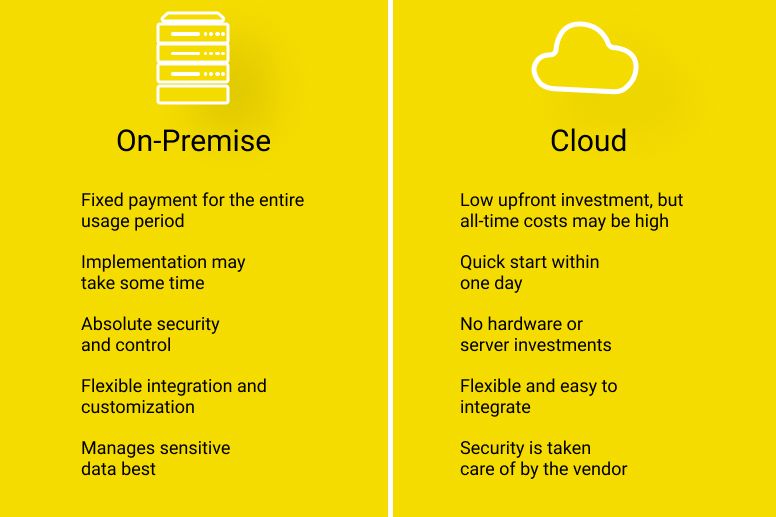
Q1: Is the cloud more secure than on-premise?
For most businesses, yes. Cloud providers have more security expertise and investment than typical businesses can afford. But security is shared – you must do your part.
Q2: What is the most common cloud security mistake?
Not enabling MFA. Followed by overly permissive IAM roles and public storage buckets.
Q3: How often should I rotate my cloud credentials?
-
API keys: Every 90 days (automated)
-
Database passwords: Every 90 days
-
SSL/TLS certificates: Every 12 months (automated)
-
Root account password: Every 90 days
Q4: Do I need a dedicated security team for cloud security?
For small businesses, no – a cloud-savvy developer or IT person can implement basic security. For medium to large enterprises, yes – security is a full-time job.
Q5: What is a Cloud Security Posture Management (CSPM) tool?
CSPM tools automatically scan your cloud configuration for security misconfigurations (public buckets, overly permissive IAM, etc.). Use one.
Q6: How do I get started with cloud security?
-
Enable MFA on all accounts
-
Review and tighten IAM permissions
-
Enable logging and alerts
-
Back up your data with immutable storage
-
Run a vulnerability scan
Q7: What compliance standards apply to cloud security in India?
-
DPDP Act 2023 (data protection)
-
RBI guidelines for financial services
-
IT Act 2000 (amended)
-
ISO 27001 (voluntary but respected)
Q8: How much does cloud security cost?
-
Basic (MFA, backups, logging): ₹5,000-20,000/month
-
Comprehensive (CSPM, SIEM, DLP): ₹20,000-2,00,000/month
-
Enterprise (dedicated team, advanced tools): ₹2,00,000+/month
Q9: What should I do immediately after a suspected breach?
-
Revoke all credentials (passwords, API keys)
-
Isolate affected resources (change security groups)
-
Preserve logs (copy to immutable storage)
-
Restore from clean backups
-
Notify affected customers if PII exposed
Q10: Why should I trust Innovative AI Solutions with my cloud security?
Because we have secured dozens of cloud environments for healthcare, fintech, and e-commerce clients. Because we stay current on cloud security best practices. Because we are based in Delhi – you can visit our team. And because 80% of our clients return for more.
Step 9: Final Tagline (SEO & Social Media Friendly)
"The cloud provider secures the cloud. YOU secure what you put in the cloud. Here are 15 best practices every business must follow."
Short version for LinkedIn/Twitter:
Cloud security is not automatic. MFA, least privilege, encryption, monitoring, backups – here are 15 best practices every business must follow.
Hashtags:
#CloudSecurity #CyberSecurity #DataProtection #AWS #Azure #GoogleCloud #ZeroTrust #DPDP #InnovativeAISolutions
Ready to Secure Your Cloud Environment?
Not sure if your cloud setup is secure? Let us assess your cloud security posture – free of charge, no pressure.
Contact Us
Phone:
+91 7464 099 059
+91 96899 67356
Email:
info@innovativeais.com
Office Address:
Netaji Subhash Place, Pitampura, Delhi – 110034
Working Hours:
Monday–Friday, 10:00 AM – 7:00 PM IST
Related services: to apply this in your business, explore our cloud services and API development and integration.