The Big Question
"Abhishek, I know we need to move to the cloud. Everyone is telling me that. But I have no idea where to begin. Do we move everything at once? How long will it take? What if something breaks? And how do I control costs?"
Here is the honest truth:
Cloud migration is not one big event. It is a journey. And like any journey, you need a map.
Let me give you that map.
Step 3: What is Cloud Migration? (No Jargon, Just Honesty)
Before we dive into the steps, let me clarify what we are talking about.
| Migration Type | What It Means | Example |
|---|---|---|
| Lift & Shift (Rehost) | Move existing servers as-is to cloud | Take your on-premise VM and run it on EC2 |
| Replatform | Move with minor optimizations | Move from self-managed MySQL to RDS (managed) |
| Refactor (Re-architect) | Redesign application for cloud-native | Break monolith into microservices |
| Repurchase | Move to SaaS | Replace on-premise CRM with Salesforce |
| Retire | Decommission – no longer needed | Shut down old reporting server |
| Retain | Keep on-premise (for now) | Critical system that is hard to move |
For most businesses, the right approach is a mix:
| Workload Type | Recommended Approach |
|---|---|
| Simple web servers | Lift & Shift |
| Databases (small to medium) | Replatform (to managed service) |
| Legacy applications (complex) | Retain or Refactor (later) |
| Email, collaboration | Repurchase (SaaS) |
| Unused servers | Retire (save money immediately) |
"You do not need to refactor everything. Some workloads are perfectly fine with lift and shift. Move first, optimize later."
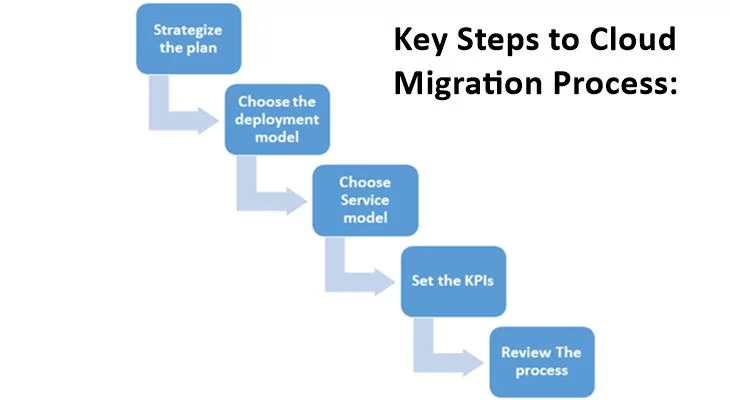
Step 4: The 7-Step Cloud Migration Framework
Here is our proven framework – used for 50+ successful migrations.
Step 1: Assessment  →  Step 2: Plan  →  Step 3: Design
        ↓                    ↓               ↓
Step 4: Test Cloud Setup → Step 5: Migrate → Step 6: Optimize
                              ↓
                        Step 7: Manage
Now, let me explain each step in detail.
Step 5: Step 1 – Assessment (1-3 Weeks)
You cannot migrate what you do not understand.
What to Inventory
| Category | What to List | Why Important |
|---|---|---|
| Servers | OS, specs, utilization, dependencies | Right-size in cloud |
| Storage | Capacity, type (SSD/HDD), growth rate | Estimate cloud storage cost |
| Databases | Type (MySQL, SQL Server, etc.), size, criticality | Decide on managed service |
| Applications | Name, users, dependencies, criticality | Prioritize migration order |
| Network | Topology, firewalls, VPNs, bandwidth | Design cloud networking |
| Security | Current controls, compliance needs | Plan cloud security |
| Cost | Current IT spend (hardware + people + power) | Calculate ROI |
Discovery Tools
| Cloud Provider | Discovery Tool | What It Does |
|---|---|---|
| AWS | Migration Evaluator | Scans on-premise, estimates cloud cost |
| Azure | Azure Migrate | Discovers servers, dependencies, sizing |
| Google Cloud | Migrate for Compute Engine | Agentless discovery |
| Cross-platform | Cloudamize, Cloudscape | Multi-cloud discovery, TCO analysis |
Output of Step 1
| Deliverable | What It Contains |
|---|---|
| Inventory list | All servers, storage, databases, applications |
| Dependency map | How applications talk to each other |
| TCO analysis | 3-year on-premise vs cloud cost comparison |
| Criticality ranking | Which workloads to migrate first |
"Skip assessment, and you will be surprised – by dependencies you didn't know, by servers no one uses, by costs you didn't expect."
Step 6: Step 2 – Plan (1-2 Weeks)
Now you know what you have. Time to decide what to do with it.
The 6 R's Decision Matrix
| Workload | Decision | Why |
|---|---|---|
| Simple web server with low traffic | Rehost (Lift & Shift) | Fastest, lowest risk |
| Database running on self-managed VM | Replatform (to managed RDS) | Less maintenance, better performance |
| Custom application with heavy dependencies | Retain (keep on-premise) | Too complex, migrate later |
| Old reporting server (no one uses) | Retire | Save money immediately |
| Email, file sharing | Repurchase (M365, Google Workspace) | Cloud-native, better features |
| Monolith application (strategic) | Refactor (plan for later) | Long-term project |
Prioritization Framework
| Priority | Characteristics | Examples |
|---|---|---|
| High (Month 1-2) | Low risk, high value, easy to move | Web servers, dev/test environments |
| Medium (Month 3-6) | Medium complexity, moderate value | Internal apps, non-production DBs |
| Low (Month 6-12) | High complexity, critical systems | ERP, customer databases, legacy apps |
Migration Wave Planning
| Wave | Workloads | Timeline |
|---|---|---|
| Wave 1 | 5-10 low-risk workloads | Week 1-2 |
| Wave 2 | 10-20 medium workloads | Week 3-6 |
| Wave 3 | Remaining workloads | Week 7-12 |
"Do not plan to migrate everything in one weekend. Plan in waves. Learn from each wave. Improve the next."
Step 7: Step 3 – Design (1-3 Weeks)
Before you migrate, design your cloud environment.
Cloud Design Decisions
| Decision | Options | Recommendation |
|---|---|---|
| Cloud provider | AWS, Azure, Google, Indian | Start with one; evaluate based on workloads |
| Regions | Mumbai, Singapore, etc. | Start with closest region to users |
| Account structure | Single vs multi-account | Multiple accounts (dev, test, prod, security) |
| Networking | VPC design, CIDR ranges | Non-overlapping with on-premise |
| Security | IAM roles, MFA, encryption | Enable everything by default |
| Backup | Frequency, retention, region | 30-day retention, cross-region for critical |
Sample Multi-Account Structure
| Account | Purpose | Access |
|---|---|---|
| Master/Payer | Billing, organization management | Limited access (security team) |
| Security | Logging, auditing, security tools | Security team |
| Shared Services | DNS, monitoring, CI/CD | Infrastructure team |
| Development | Dev environments | All developers |
| Testing/Staging | QA and pre-production | QA team |
| Production | Customer-facing workloads | Limited (senior engineers) |
Infrastructure as Code (IaC) Decision
| Tool | Best For | Learning Curve |
|---|---|---|
| Terraform | Multi-cloud, complex infrastructure | Steep |
| AWS CloudFormation | AWS-only, AWS-native services | Moderate |
| Azure ARM/Bicep | Azure-only | Moderate |
| Pulumi | Programming languages (Python, TS, Go) | Steep |
"Always use Infrastructure as Code. Your cloud should be defined in text files – not created by clicking in a console."
Step 8: Step 4 – Test Cloud Setup (1 Week)
Before migrating any production workload, validate your cloud environment.
Test Plan Checklist
| Test | What to Verify | How |
|---|---|---|
| Network | Connectivity between cloud and on-premise | Ping test, VPN verification |
| Identity | Users can log in with correct permissions | Test IAM roles |
| Security | MFA works, encryption enabled | Security scan tools |
| Backup | Can create and restore | Test restore to cloud |
| Monitoring | Logs and alerts working | Generate test events |
| Cost | Billing dashboard shows usage | Review cost explorer |
Pilot Migration (1-2 non-critical workloads)
| Workload | Purpose | Success Criteria |
|---|---|---|
| Dev/test server | Validate migration process | Server works in cloud, access via VPN |
| Internal reporting app | Test cutover process | Can cutover back to on-premise if needed |
"Test everything before you touch production. Your first migration should be boring – that is the goal."
Step 9: Step 5 – Execute Migration (Waves 1-N)
Now the actual migration begins.
Migration Tools by Provider
| Provider | Server Migration | Database Migration | File/Storage Migration |
|---|---|---|---|
| AWS | Server Migration Service (SMS) | Database Migration Service (DMS) | DataSync, Transfer Family |
| Azure | Azure Migrate | Database Migration Service | AzCopy, Storage Explorer |
| Google Cloud | Migrate for Compute Engine | Database Migration Service | Storage Transfer Service |
Pre-Migration Checklist (for each workload)
| Item | Status |
|---|---|
| Backup taken (on-premise) | ☐ |
| Migration tool configured | ☐ |
| Target cloud resources created | ☐ |
| Network connectivity verified | ☐ |
| Rollback plan documented | ☐ |
| Stakeholders notified | ☐ |
| Migration window scheduled | ☐ |
Migration Execution Steps (for a server)
| Step | Action | Time |
|---|---|---|
| 1 | Take final backup of on-premise server | 10-30 min |
| 2 | Replicate data to cloud (initial sync) | Hours to days |
| 3 | Cutover – stop writes to on-premise | 5 min |
| 4 | Final delta sync (changed data) | 5-15 min |
| 5 | Redirect traffic to cloud (DNS change) | 5 min |
| 6 | Verify application works in cloud | 5-30 min |
| 7 | Keep on-premise as fallback for 7 days | – |
Post-Migration Checklist
| Item | Status |
|---|---|
| Application verified working | ☐ |
| Monitoring and alerts configured | ☐ |
| Backups confirmed working | ☐ |
| Security scan passed | ☐ |
| Users confirmed access | ☐ |
| On-premise source kept (read-only) | ☐ |
"The key to a smooth migration is practice. Do a dry run. Then do another. Then do the real cutover with confidence."
Step 10: Step 6 – Optimize (Ongoing)
Moving to cloud is not the finish line. Optimizing is where the value comes from.
Optimization Areas
| Area | What to Optimize | Potential Savings |
|---|---|---|
| Compute | Right-size instances, use spot/reserved | 20-70% |
| Storage | Lifecycle policies, delete unused | 30-60% |
| Network | Data transfer, CDN, compression | 10-30% |
| Database | Serverless vs provisioned, cache | 20-50% |
| Architecture | Serverless vs always-on | 40-80% (for variable workloads) |
Cost Optimization Tools
| Provider | Tool | Purpose |
|---|---|---|
| AWS | Cost Explorer, Compute Optimizer | Rightsizing recommendations |
| AWS | Trusted Advisor | Cost + security recommendations |
| Azure | Cost Management + Advisor | Cost recommendations |
| Google Cloud | Recommender | Idle resource detection |
| Cross-platform | CloudHealth, CloudCheckr, Vantage | Multi-cloud cost optimization |
Sample Optimization Schedule
| Frequency | Action |
|---|---|
| Daily | Review cost alerts (budget thresholds) |
| Weekly | Check for idle resources (stopped VMs, unattached volumes) |
| Monthly | Rightsizing review (are instances over/under-provisioned?) |
| Quarterly | Reserved instance purchase (for steady workloads) |
| Annually | Architecture review (serverless opportunities?) |
"A cloud bill that never changes means you are not optimizing. Your usage changes. Your cloud should change with it."
Step 11: Step 7 – Manage (Ongoing)
Cloud is not "set and forget." It requires ongoing management.
Cloud Management Responsibilities
| Area | Daily/Weekly | Monthly/Quarterly |
|---|---|---|
| Security | Review alerts, patch vulnerabilities | IAM audit, penetration test |
| Backup | Verify backup success | Test restore, review retention |
| Monitoring | Investigate anomalies, respond to incidents | Review SLAs, update dashboards |
| Cost | Review daily spend, check alerts | Rightsize, purchase reservations |
| Compliance | Automated checks (CSPM) | Audit evidence gathering |
| Documentation | Update runbooks | Architecture review |
Staffing Models
| Business Size | Recommended Model | Monthly Cost Range |
|---|---|---|
| Small (<50 employees) | Part-time cloud admin or managed service | ₹20,000-50,000 |
| Medium (50-500) | 1-2 dedicated cloud engineers | ₹1-3 lakhs |
| Large (500+ employees) | Cloud team (3-10 engineers) | ₹3-10 lakhs |
"Plan for cloud operations before you migrate. Who will handle the alerts at 2 AM? Have an answer."
Step 12: Real Example – Complete Migration
Let me walk you through a real client migration.
Client Profile
| Aspect | Details |
|---|---|
| Business | Mid-sized e-commerce (200 employees) |
| On-premise | 50 servers, 100TB storage, 5 databases |
| Challenge | Servers aging, capacity limits, high maintenance cost |
Migration Plan
| Wave | Workloads | Timeline |
|---|---|---|
| 1 | Dev/test environments, monitoring tools | Week 1-2 |
| 2 | Web servers (public-facing) | Week 3-4 |
| 3 | Databases (replatform to managed) | Week 5-8 |
| 4 | Internal apps, reporting | Week 9-12 |
| 5 | Legacy systems (retain on-premise – not migrated) | – |
Results
| Metric | Before | After | Improvement |
|---|---|---|---|
| Monthly infrastructure cost | ₹18 lakhs | ₹9 lakhs | 50% reduction |
| Deployment frequency | Once per month | 5x per day | 150x |
| Server utilization | 15% average | 65% average | 4x |
| Downtime (monthly) | 6 hours | 15 minutes | 96% reduction |
| IT team productivity | 70% maintenance | 20% maintenance | 3.5x improvement |
"This client went from 'keeping the lights on' to building new features. That is the real value of cloud migration."
Step 13: Common Mistakes to Avoid
Here are the mistakes I see most often.
| Mistake | Why It Happens | How to Avoid |
|---|---|---|
| Lift and shift everything | Fastest, easiest | Optimize after migration; have an optimization plan |
| No cost controls | Cloud bills are variable | Set budgets, alerts, and review weekly |
| Ignoring security | "Cloud provider handles it" | Shared responsibility – you must do your part |
| No rollback plan | Overconfidence | Always have a way to go back |
| Migrating during peak | Poor planning | Schedule during low-traffic periods |
| No testing | "It works on-premise" | Test in cloud before cutover |
| One person knows everything | Bus factor = 1 | Document, train, cross-train |
"Every mistake I have made is on this list. Learn from my pain."
Step 14: Cost Estimation Guide
Here is how to estimate your cloud migration cost.
One-Time Migration Costs
| Cost Item | Estimated Range | Notes |
|---|---|---|
| Assessment and planning | ₹50,000 – 3,00,000 | Depends on complexity |
| Migration tools/licensing | ₹0 – 5,00,000 | Most cloud providers have free tools |
| External consultants | ₹2,00,000 – 20,00,000 | If you need help |
| Data transfer (to cloud) | First 10GB free, then ~₹3-6/GB | Plan to minimize |
| Testing and validation | Included in above | – |
| Total one-time | ₹2,50,000 – 28,00,000 | Varies widely |
Monthly Cloud Costs (after migration)
| Workload | Estimated Monthly Cost |
|---|---|
| 10 small VMs (web servers) | ₹30,000-60,000 |
| Managed database (100GB) | ₹10,000-25,000 |
| Object storage (10TB) | ₹15,000-20,000 |
| Load balancer + CDN | ₹5,000-15,000 |
| Monitoring + security | ₹5,000-15,000 |
| Total per month | ₹65,000-1,35,000 |
Typical migration ROI: 6-18 months
"Most clients see cloud cost lower than on-premise within 12 months – often much sooner."
Step 15: Frequently Asked Questions
Q1: How long does a cloud migration take?
-
Small business (10-20 servers): 1-3 months
-
Medium business (50-100 servers): 3-6 months
-
Large enterprise (100+ servers): 6-18 months
Q2: Will my applications experience downtime?
Not if you plan properly. Use the "cutover" approach – final sync takes minutes, not hours. Schedule during low-traffic periods.
Q3: How do I ensure data security during migration?
Encrypt data in transit (TLS), use private connectivity (VPN or Direct Connect), and enable encryption at rest in the cloud.
Q4: What if something goes wrong during cutover?
Always have a rollback plan. Keep on-premise systems running (read-only) for 7-14 days. If issues arise, change DNS back.
Q5: Do I need to hire cloud experts?
For simple migrations (lift and shift), your existing IT team can learn. For complex migrations (refactoring, multi-cloud), hire experts or work with a partner.
Q6: Which cloud provider should I choose?
Start with one provider. Evaluate based on:
-
Your existing tools (Microsoft? Azure. AWS experience? AWS.)
-
Your workloads (data analytics? Google Cloud.)
-
Your region (all have India – Mumbai)
Q7: What about compliance (DPDP, etc.)?
All major cloud providers support Indian compliance. Use India regions for data residency. Enable audit logging. Work with a compliance expert if needed.
Q8: How do I control cloud costs after migration?
-
Right-size instances (don't over-provision)
-
Use reserved instances or savings plans for steady workloads
-
Use spot instances for batch/development
-
Set budget alerts
-
Review cost reports weekly
Q9: What is the smallest budget cloud migration?
₹2-3 lakhs total – 5-10 small servers, lift and shift to cloud. Monthly cloud bill: ₹20,000-30,000.
Q10: Why should I trust Innovative AI Solutions with my cloud migration?
Because we have migrated 50+ businesses to the cloud. Because we have a proven step-by-step process. Because we are based in Delhi – you can visit our team. Because we offer a free assessment before you commit. And because 80% of our clients return for more.
Step 16: Final Tagline (SEO & Social Media Friendly)
"Cloud migration is not one big event. It is a journey. Here is your step-by-step map – from assessment to optimization."
Short version for LinkedIn/Twitter:
Moving to the cloud? Here is a step-by-step guide – assessment, planning, migration, optimization. No hype. Just a practical roadmap.
Hashtags:
#CloudMigration #CloudComputing #DigitalTransformation #AWS #Azure #GoogleCloud #CloudStrategy #InnovativeAISolutions
Ready to Start Your Cloud Journey?
You do not need to figure this out alone. Let us help you plan and execute your cloud migration – starting with a free, no-obligation assessment.
Contact Us
Phone:
+91 7464 099 059
+91 96899 67356
Email:
info@innovativeais.com
Office Address:
Netaji Subhash Place, Pitampura, Delhi – 110034
Working Hours:
Monday–Friday, 10:00 AM – 7:00 PM IST
Related services: to apply this in your business, explore our cloud services and RAG development.