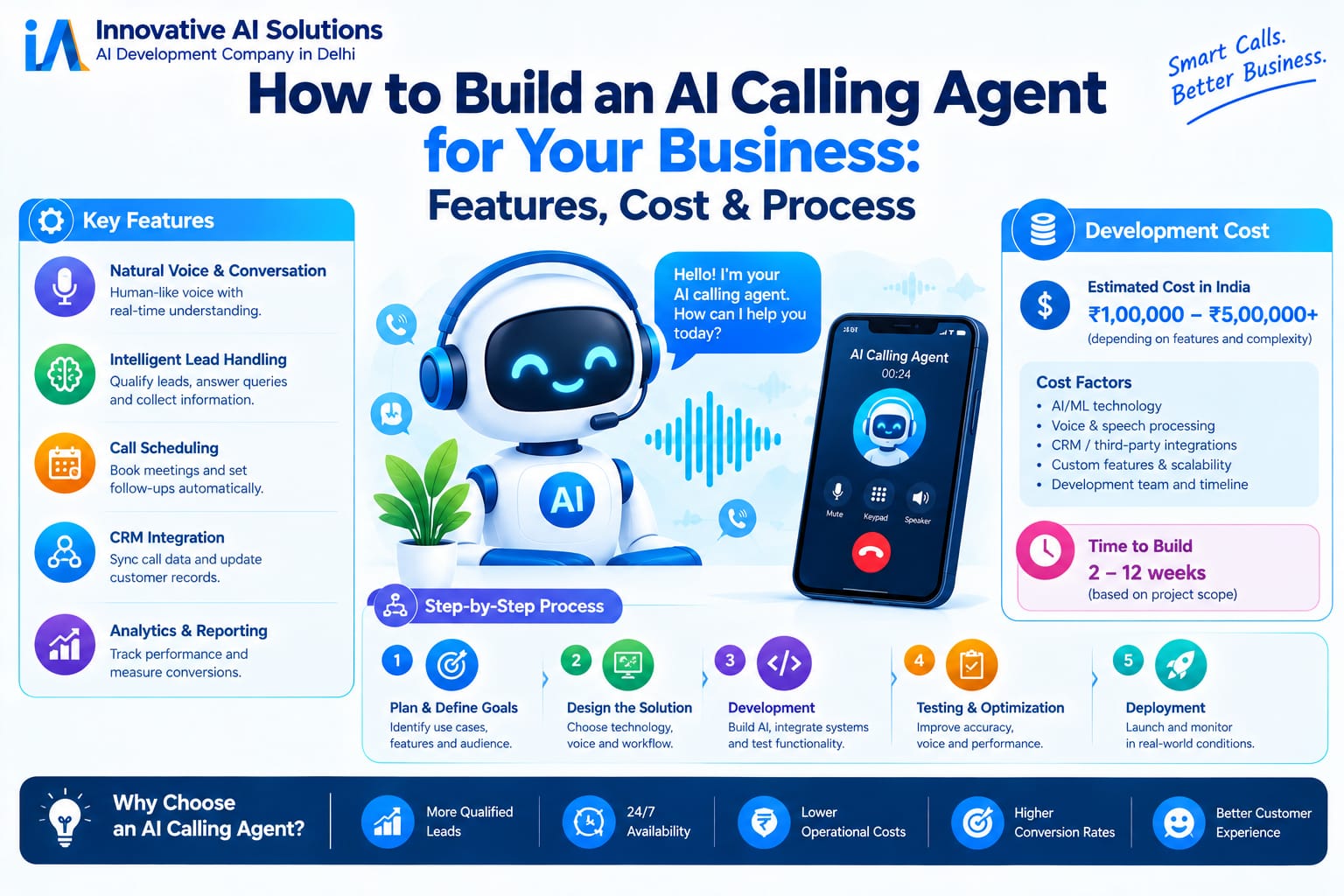
Why do most AI calling agent projects never make it to production?
95% of AI pilots never make it to deployment. Not because the technology doesn't work, but because businesses onboard AI agents with less care and attention than they'd give an intern.
Demos are easy. A pre-recorded call flow, a scripted conversation, a polished interface these take days to build. Production systems are hard. They handle interruptions, mid-call language switching, CRM integrations, compliance requirements, services and the thousands of edge cases that emerge only when real customers call.
But the success stories are real. IndiaMART's AI voice system handles 1 lakh calls a day, automating 95% of buyer conversations and delivering 20% higher conversion than manual calls. Anarock scaled calling capacity 5x without adding headcount. Cars24 automates 25% of all call volume, with calling costs dropping 50%.
This guide walks you through everything you need to build a production-grade AI calling agent.
Who Should Build an AI Calling Agent?
Not every business needs a custom AI calling agent. The right choice depends on your scale, use case, and strategic priorities.
Build when:
-
Your monthly call volume consistently exceeds 10,000 minutes
-
Voice AI is your product or a core competitive advantage
-
You have highly proprietary data workflows that can't leave your infrastructure
-
You need deep, non-standard integrations that platforms can't provide
-
Compliance requires data sovereignty or on-premise deployment
Buy when:
-
Your monthly volume is below 10,000 minutes
-
You need to start calling in weeks, not months
-
Your use case is standard: appointment booking, order status, lead qualification
-
You lack in-house engineering resources to build and maintain a voice stack
The hybrid path (often the best answer): License the platform for the undifferentiated heavy lifting (telephony, STT/TTS, dialog orchestration) and own the conversation IP (prompts, conversation policy, per-campaign tuning) and the data layer.
The Technical Stack: Components of Every AI Calling Agent
A production AI calling agent is composed of five layers that work together.
Layer 1: Telephony and SIP Trunking
This is the layer that connects your agent to the phone network. It handles inbound and outbound calls, streams audio to the STT service, and routes TTS output back to the caller.
Key requirements:
-
Native support for 8kHz mulaw audio (no resampling step = lower latency)
-
Integration with Indian telephony providers (Exotel, Plivo, Vobiz) or Twilio
-
Phone number rental at approximately ₹349/month in India, with call charges starting at ₹2/minute
Layer 2: Speech-to-Text (STT)
STT converts the caller's speech into text that the LLM can process.
Key requirements:
-
Streaming transcription (word-by-word as the caller speaks, not after they finish)
-
Median latency below 300ms
-
High accuracy on alphanumeric data (phone numbers, confirmation codes, email addresses)
-
Noise robustness phone lines have background noise and compression artifacts
Recommended options:
| Provider | Latency | Best For |
|---|---|---|
| Deepgram Nova-2 | ~200ms | Production, best price-performance |
| AssemblyAI Universal-3 | ~307ms | Highest alphanumeric accuracy |
| OpenAI Whisper (hosted) | ~400ms | General purpose, easy integration |
For most AI calling platforms, Deepgram Nova-2 is the default choice it accepts 8kHz mulaw natively, delivers ~200ms P50 latency, and has excellent accuracy for structured data (numbers, codes, addresses) that callers share over the phone.
Layer 3: Large Language Model (LLM)
The LLM receives transcribed text, maintains conversation context, decides what to say next, and optionally calls external tools (your CRM, calendar, payment system).
Why Claude is a strong choice for AI calling:
-
Instruction following reliably follows complex system prompts that define agent persona, call flow, services and escalation rules
-
Concise replies tends toward shorter, more conversational responses when prompted correctly, which is critical for voice
-
Tool use function calling works reliably for real-time lookups with correct JSON formatting
-
Multi-turn context maintains coherent context throughout a call
Model selection for calls:
-
Claude Haiku lowest latency (~150ms), best for simple inbound flows
-
Claude Sonnet balanced latency and reasoning, best for most calling use cases
-
Claude Opus highest reasoning quality, only use when call complexity demands it
System prompt structure:
You are [Agent Name], [Role] at [Company].

Personality: [Tone, style—e.g., "Professional but warm, concise"]

Your goal: [Primary objective—e.g., "Qualify inbound leads and book demos"]

Call flow:
1. Greet the caller by name if known
2. Identify their need with one open-ended question
3. [Flow logic...]
4. If you cannot resolve: transfer to a human agent

Rules:
- Keep every response under three sentences
- Never make up information—if unsure, say so
- Always confirm before taking action (booking, updating records)
- If the caller asks to stop, end the call politely

Available tools:
- check_calendar(date, time) → returns availability
- create_booking(name, email, date, time) → books appointment
- lookup_customer(phone_number) → returns CRM record
Layer 4: Text-to-Speech (TTS)
TTS converts the LLM's text response into natural-sounding audio that plays back to the caller. The quality of this voice directly affects whether callers trust and engage with your agent.
Key requirements:
-
Streaming TTS (starts playing before the full response is generated reduces latency by ~40%)
-
Low time-to-first-byte (<300ms)
-
Natural prosody pauses, emphasis, pacing
-
Telephony-compatible output
Recommended options:
-
ElevenLabs quality leader with streaming support (200ms TTFB)
-
Cartesia sub-90ms model latency, ranked #1 in blind listening tests
-
Sarvam AI Indian languages, starting at ₹3/minute
Layer 5: Orchestration
The orchestration layer connects everything: handles interruptions, manages conversation state, executes tool calls, and handles escalation.
Key frameworks:
-
Pipecat frame-based pipeline architecture with 68+ service integrations
-
LiveKit Agents session-based architecture with WebRTC transport
-
Piopiy AI open-source telephony grade framework with 40+ providers
Core Features You Must Build
Interruption Handling (Barge-In)
Real callers interrupt. They change direction, cut off the opening, and answer questions you haven't asked yet. An agent that keeps talking through this sounds like a robot and gets hung up on.
Production pattern: A true interruption is a sustained speech signal lasting approximately 300ms. A brief cough or a loud background noise should not trigger a cut-off.
Tool Calling with Fillers
Tool calls in voice have a problem that text chat doesn't: the gap between when a tool call fires and when the result arrives is audible. Dead air makes users think the call dropped.
The fix: Instruct the model to narrate what it's doing before and after tool calls "Let me check that for you" or "One moment, pulling that up." This keeps the conversation audibly active.
Silence Handling
Voice users go silent for reasons text users never do. They're driving. The call dropped. They're putting you on hold.
Three-tier approach:
-
Short timeout (3-5 seconds): Re-prompt with a shorter version of the question
-
Medium timeout (8-10 seconds): Acknowledge "Are you still there?"
-
Long timeout (20+ seconds): Disconnect or transfer to a human
Escalation and Transfer
When the agent can't handle a call, it must transfer to a human with full context. Agents without escalation are useless when conversations go off-script.
Configure cold transfer: Trigger on authentication failure, repeated misunderstanding, required tool failure, or explicit request for a human.
The Step-by-Step Build Process
Step 1: Define the Use Case and Scope
Don't build an agent that does everything. Build one that does one thing well: appointment booking, order status, or lead qualification.
Define what "success" looks like from the caller's perspective. For lead qualification: "The caller has booked a sales meeting." For order status: "The caller received their order status."
Step 2: Design the Conversation Flow
Map out the call structure:
-
Greeting and identity confirmation "Am I speaking to [Name]?"
-
Need identification one open-ended question
-
Qualification questions budget, timeline, authority, need
-
Action book, transfer, or record
-
Confirmation repeat details before ending
Best practice: Always confirm appointment details before ending. "So that's Tuesday at 3 PM, correct?" Confirmation reduces misheard dates by more than half.
Step 3: Connect a Knowledge Base
If you have FAQ documents, pricing sheets, or policy documents, upload them to a knowledge base. Then expose a knowledge base search tool so the agent can answer questions from your own content rather than making things up.
For Indian businesses: Use platforms like Sarvam AI or Gnani.ai for Indian language STT/TTS. These are specifically trained on Indic languages and code-mixed telephony audio.
Step 4: Configure Tools and Integrations
Your agent needs access to external systems to do its job.
Essential tools:
-
Calendar check availability and book appointments (Google Calendar API or Cal.com)
-
CRM look up customer records, write back qualification data
-
Transfer hand off calls to a human via SIP
-
DTMF for menu navigation or PIN entry
Confirmation and CRM integration are the biggest reasons deployments slip from 8 weeks to 4 months.
Step 5: Set Up Outbound Calling
Outbound calls are subject to TCPA and state disclosure rules. Build disclosures into the first turn and opt-out into the agent.
Disclosure example: "This is an automated call from [Business] about your appointment confirmation."
Two contact list modes:
-
CSV upload (static): Prepare a spreadsheet with name and phone columns
-
API sync (dynamic): Call the API directly from your CRM when you want to trigger a campaign
Step 6: Test on Real Phones
Before you launch, test on a real phone. Don't just trust the platform's built-in simulator.
Things to test:
-
Does the agent answer reliably?
-
Is the greeting clear and natural?
-
Does interruption handling work?
-
Do tool calls execute successfully?
-
Do silence timeouts trigger?
-
Does escalation transfer successfully?
-
Hallucination test: Ask "What is the square root of a banana?" (Should refuse or deflect)
The Cost: What You'll Actually Pay
Managed Platform (SaaS)
Per-minute pricing: Published Indian rates range from ₹2 to ₹12 all-in, with ₹3 to ₹6 the most common mid-market band.
But effective cost is often 2 to 4 times the headline figure. One Indian SMB calculated ₹10-20 per minute when all components were included. For 40-50 calls daily at ~5 minutes each, that's ₹75,000-1,50,000 per month more than a human sales rep at ₹30,000-40,000/month.
The gap comes from:
-
Telephony markups carrier charges and number rental, often billed separately
-
Connect-rate losses unanswered calls, voicemails, and ring time that are billed but never produce a conversation. In EMI reminder campaigns, 30% to 50% of dials failing to connect is common
-
Retries and callbacks a policy requiring three attempts to reach a borrower triples the dialing cost for that account
Custom Development (One-Time Build)
| Tier | One-Time Build | Monthly Running | Best For |
|---|---|---|---|
| Starter Agent | ₹75,000 – ₹1,25,000 | ₹4,000 – ₹6,000 | SMBs, single workflow |
| Business Agent | ₹1,50,000 – ₹2,50,000 | ₹6,000 – ₹10,000 | Multi-channel, CRM sync |
| Enterprise Agent | ₹3,00,000 – ₹8,00,000+ | ₹12,000 – ₹40,000+ | Multi-agent orchestration, on-prem |
Cost per integration: CRM sync (Salesforce, HubSpot, Zoho) ₹15,000-40,000. Calendar integration ₹15,000-40,000. Payment gateway ₹15,000-40,000.
The Crossover Point
Cost curves hit an inflection point around 10,000 minutes per month. Below that, bundled platforms win. Above it, building becomes more economical. A fully custom build breaks even past 500,000 monthly minutes.
Frequently Asked Questions
Q1: How much does it cost to build an AI calling agent?
Managed platforms: ₹2-12 per minute all-in, with effective cost often 2-4x the headline. Custom builds: ₹75,000 to ₹8,00,000+ one-time, with ₹4,000 to ₹40,000+ monthly running costs.
Q2: How long does it take to build?
Proof of concept: 1-2 days. Single-use-case production agent: 2-4 weeks. Full multi-use-case platform with integrations: 6-10 weeks.
Q3: What technical components do I need?
Five layers: telephony/SIP trunking, speech-to-text (STT), large language model (LLM), text-to-speech (TTS), and orchestration.
Q4: Which STT provider is best?
Deepgram Nova-2 is the production default for most AI calling platforms ~200ms P50 latency, native 8kHz mulaw support, high accuracy for structured data.
Q5: Which LLM should I use?
Claude Haiku for simple inbound flows (lowest latency). Claude Sonnet for most calling use cases. Claude Opus only when call complexity demands it.
Q6: How do I handle interruptions?
Distinguish true interruptions (sustained speech lasting ~300ms) from brief coughs or background noise. Use filler phrases to keep conversation audibly active during tool calls.
Q7: Should I build or buy?
Below 10,000 minutes/month: buy. Above it: model both options. Custom wins at scale or when voice is a core differentiator. The hybrid path is often the best answer.
Q8: What India-specific compliance requirements apply?
DLT registration for outbound calls (TRAI), DPDP Act consent and audit trails, 9 AM–9 PM calling hours, and RBI Fair Practices Code compliance for BFSI.
Q9: Can the agent handle Hindi and regional languages?
Yes. Sarvam AI and Gnani.ai specialize in Indic languages and code-mixed telephony audio. Cars24 runs agents across 13 languages.
Q10: What should the latency budget be?
Telephony (~50ms) + STT (~200ms) + LLM (~200ms) + TTS (~100ms) + Server (~50ms) = ~600ms. Anything above 1 second feels robotic.
Frequently Asked Questions (Continued)
Q11: What's the biggest mistake?
Skipping governance. 95% of AI pilots never make it to deployment because businesses onboard agents with less care than an intern. Build human handoff and confidence thresholds first.
Q12: Which use case should I automate first?
Pick a high-volume, well-defined, measurable process. Appointment confirmation, order status, services, or lead qualification. Prove value. Then expand.
Q13: How do I measure ROI?
Track cost per qualified lead, cost per booking, and conversion rate. The formula: Monthly call volume × average duration × per-minute rate = AI cost. If AI cost < 50% of human cost, it works.
Q14: Do I own the code and data?
You should. Ensure your contract includes full data export and IP transfer. Vendor lock-in is a strategic risk.
Q15: Why should I choose Innovative AI Solutions?
Because we build production systems, not demos. Because we focus on India-specific capabilities Indic languages, DLT, DPDP compliance. Because we've delivered 100+ projects. Because your code is always yours.
Contact Us
Phone:
+91 7464 099 059
+91 9689967356
Email:
info@innovativeais.com
Address:
9th Floor, Pearls Best Heights-I,
Head Office: 904, Netaji Subhash Place,
Delhi – 110034