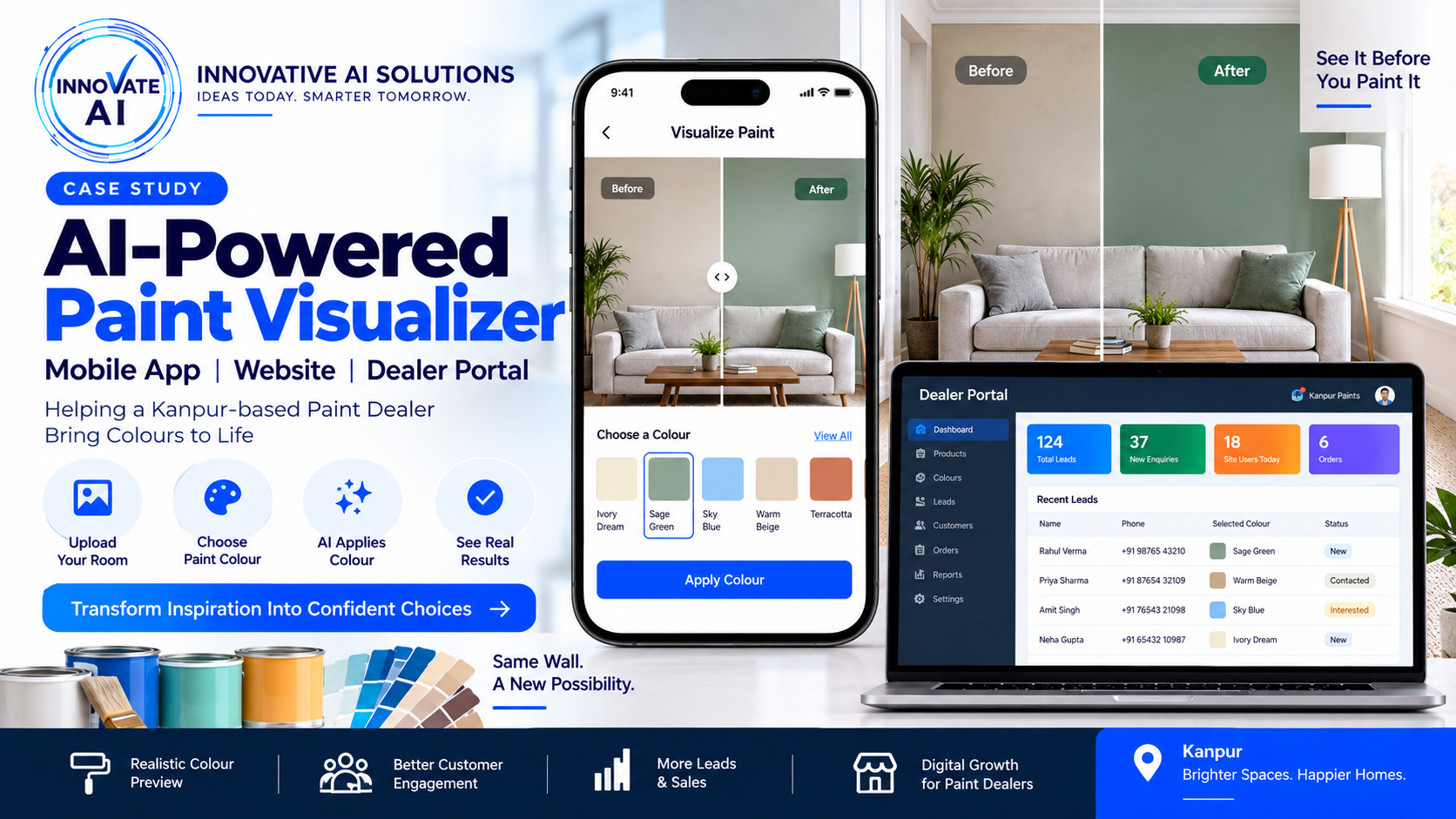
AI-Powered Paint Visualization Platform: Mobile App, Website & Dealer Portal for a Kanpur Paint Dealer SEO Title AI Paint Visualizer App & Website...
AI-Powered Paint Visualization Platform: Mobile App, Website & Dealer Portal for a Kanpur Paint Dealer
SEO Title
AI Paint Visualizer App & Website Case Study | Paint Dealer Software
Meta Description
Explore how Innovative AI Solutions is building a complete AI-powered paint visualization platform with a mobile app, customer website and dealer portal for a Kanpur-based paint business.
URL
/ai-paint-visualizer-app-website-case-study-kanpur/Primary Keyword
AI paint visualizer app
Secondary Keywords
- AI paint visualizer
- paint visualizer app
- wall colour visualizer
- AI wall colour visualizer
- paint dealer software
- paint dealer app
- paint dealer website
- paint visualization software
- AI paint visualization
- virtual wall painting app
- paint business software
- AI development company India
- AI development company Delhi NCR
- AI software development company
- custom AI application development
AI Paint Visualizer App & Website: Complete Digital Platform for a Kanpur Paint Dealer
Choosing the right paint colour sounds easy until you actually have to choose one.
A customer may look at dozens of colour cards and still wonder:
"How will this colour actually look on my wall?"
This is a common problem in the paint-buying journey.
A colour that looks good on a small physical swatch can look very different when applied across a large wall. Lighting, furniture, shadows, room size and surrounding colours can all influence the final appearance.
To solve this problem, Innovative AI Solutions is building a complete digital paint visualization platform for a Kanpur-based paint dealer.
The project is much more than an AI image-processing feature.
We are building an entire ecosystem consisting of:
- Customer mobile application
- Customer-facing website
- Dealer/admin portal
- Paint and colour catalogue
- AI-powered wall visualization
- Customer project management
- Lead generation
- Business management capabilities
- Digital customer engagement
The goal is simple:
Help customers visualize paint colours on their own walls before making a purchase decision.
Project Overview
| Area | Details |
|---|---|
| Client | Kanpur-based Paint Dealer |
| Industry | Paints & Home Improvement |
| Project Type | AI + Mobile App + Web Platform |
| Core Product | AI Paint Visualization Platform |
| Mobile App | Customer-facing experience |
| Website | Online customer experience |
| Portal | Dealer/Admin management |
| AI | Wall / surface visualization |
| Catalogue | Paint products and colours |
| Business Goal | Improve customer confidence and generate leads |
The Problem
Traditionally, the paint buying process looks like:
Customer
   ↓
Visits Paint Store
   ↓
Looks at Colour Cards
   ↓
Selects Colour
   ↓
Imagines Colour on Wall
   ↓
Buys Paint
The biggest problem is the gap between:
"This is the colour on the card."
and
"This is how it will look in my room."
Customers have to imagine the final result.
That can create uncertainty.
The new platform changes that experience.
The New Customer Journey
Instead of asking customers to imagine the result, the platform allows them to visualize it.
Customer
   ↓
Mobile App / Website
   ↓
Upload Room Photo
   ↓
Select Paint Colour
   ↓
AI Detects Wall
   ↓
Virtual Paint Application
   ↓
Preview
   ↓
Compare Colours
   ↓
Select Product
   ↓
Send Enquiry / Request Quote
This creates a much more interactive buying journey.
We Built Three Major Platforms
The project is designed around three connected interfaces.
1. Customer Mobile App
The mobile app is designed for customers who want to visualize colours directly from their phones.
A typical journey is:
Open App
   ↓
Upload / Capture Room
   ↓
Choose Colour
   ↓
Visualize
   ↓
Compare
   ↓
Save Design
   ↓
Share / Enquire
The mobile experience is particularly useful because the customer can take a photo of their actual room and immediately experiment with different colours.
2. Customer Website
The website provides the broader online experience.
It can serve multiple purposes:
- Introduce the paint business
- Display paint products
- Display colours
- Explain products
- Provide colour inspiration
- Offer the AI visualizer
- Generate enquiries
- Connect customers with the dealer
The website therefore becomes more than a traditional company website.
It becomes a digital sales channel.
3. Dealer / Admin Portal
The dealer portal is the business side of the platform.
This is where the paint dealer can manage the digital ecosystem.
A typical architecture is:
                  DEALER PORTAL
                       │
       ┌───────────────┼────────────────┐
       ↓               ↓                ↓
    Products         Colours          Leads
       ↓               ↓                ↓
   Catalogue       Colour Data      Customers
       │               │                │
       └───────────────┼────────────────┘
                       ↓
                 Customer Platform
This separation is important because the customer should have a simple experience while the dealer needs much more control.
AI Paint Visualization
The central feature of the platform is the AI paint visualization engine.
The customer uploads a room image.
The system then identifies the relevant wall or paintable surface.
Conceptually:
Room Image
    ↓
Image Processing
    ↓
Wall Detection
    ↓
Segmentation
    ↓
Colour Selection
    ↓
Colour Application
    ↓
Realistic Preview
The goal is to change the wall colour while keeping the rest of the room intact.
Why Wall Detection Is Important
Imagine the uploaded image contains:
- Wall
- Sofa
- Window
- Curtains
- Television
- Floor
- Furniture
The system shouldn't apply the selected colour to everything.
Instead:
                 ROOM IMAGE
                     ↓
              AI SEGMENTATION
                     ↓
        ┌────────────┴────────────┐
        ↓                         ↓
     WALL AREA               OTHER OBJECTS
        ↓                         ↓
  Apply Selected Colour          Preserve
        ↓
        └────────────┬────────────┘
                     ↓
                Final Image
This is one of the important computer-vision aspects of the platform.
Making the Visualization Look Natural
A simple colour overlay can look artificial.
The system needs to account for the original image's visual characteristics.
For example:
- Shadows
- Highlights
- Lighting
- Wall texture
- Perspective
- Existing surface details
The objective is to produce a preview that gives the customer a useful representation of the selected colour in their actual room.
Existing paint visualizer products similarly emphasize preserving lighting, shadows and surface appearance rather than simply placing a flat colour over an image.
Colour Catalogue
The AI visualizer is connected to the paint catalogue.
Instead of asking the customer to enter a random colour code, the platform can present available colours through the application.
For example:
Colour Catalogue
       ↓
Colour Family
       ↓
Colour Name
       ↓
Colour Code
       ↓
Preview
       ↓
Product Information
This creates a connection between:
Digital visualization → Actual paint product
That is important from a business perspective.
Colour Discovery
The platform can organize colours into useful categories such as:
- White
- Beige
- Grey
- Blue
- Green
- Yellow
- Red
- Brown
- Neutral
- Pastel
The exact structure can be customized according to the dealer's catalogue.
Customers can then browse colours instead of searching through an unstructured list.
Before & After Comparison
A useful feature for the customer is comparing the original room with the generated result.
For example:
┌─────────────────┬─────────────────┐
│                 │                 │
│     BEFORE      │      AFTER      │
│                 │                 │
│ Original Room   │ Selected Colour │
│                 │                 │
└─────────────────┴─────────────────┘
This helps the customer understand exactly what changed.
A slider-based comparison can make the experience even more intuitive.
Save Designs
The platform can allow customers to save their favourite visualizations.
For example:
My Designs

Living Room – Option 1
Living Room – Option 2
Bedroom – Option 1
Exterior – Option 1
This becomes useful when a customer wants to compare options with family members before making a decision.
Share Designs
The customer can potentially share a visualization with:
- Family
- Interior designer
- Contractor
- Dealer
- Salesperson
For example:
"Which one looks better?"
This can turn a single-user visualization into a collaborative buying experience.
Lead Generation
One of the most important business components is converting visualization activity into leads.
After the customer creates a design, the platform can show:
Like this colour? Get a Quote
Then:
Customer
   ↓
Visualizes Colour
   ↓
Selects Product
   ↓
Get Quote
   ↓
Name + Phone + Location
   ↓
Lead
   ↓
Dealer Portal
The dealer can then follow up with the customer.
Dealer Portal: Lead Management
The dealer portal can provide a central location for managing customer enquiries.
For example:
Dashboard

New Leads
Pending Leads
Contacted
Interested
Converted
This gives the dealer visibility into the customer journey.
Customer Project Management
The portal can also associate customer projects with their selected designs.
For example:
Customer: Rahul
Location: Kanpur

Project:
Living Room

Selected Colour:
Warm Beige

Visualization:
Image

Status:
Quotation Requested
This creates useful context for the sales team.
Mobile App + Website + Portal Architecture
The complete platform can be visualized as:
                         PLATFORM
                            │
            ┌───────────────┼───────────────┐
            ↓               ↓               ↓
       MOBILE APP        WEBSITE        DEALER PORTAL
            │               │               │
            └───────────────┼───────────────┘
                            ↓
                       BACKEND API
                            ↓
             ┌──────────────┼──────────────┐
             ↓              ↓              ↓
         DATABASE       AI ENGINE       CATALOGUE
             │              │              │
             └──────────────┼──────────────┘
                            ↓
                      LEAD MANAGEMENT
                            ↓
                         DEALER
This is why I would position this project as a complete AI-powered business platform, not simply an AI feature.
Website SEO Opportunity
The website also creates a strong SEO opportunity.
Instead of targeting only:
Paint dealer Kanpur
the platform can build content around search intent.
Examples:
- Best wall colours for living room
- Best bedroom paint colours
- Modern wall colour combinations
- Home paint colour ideas
- Wall colour visualizer
- Paint colour visualizer
- Virtual wall painting
- AI paint visualizer
- Paint shop in Kanpur
- Paint dealer in Kanpur
- Interior wall paint colours
- Exterior wall colour ideas
This allows the business to target both:
Local commercial searches + informational searches.
Local SEO for Kanpur
Because the business is based in Kanpur, local SEO can become an important acquisition channel.
The website can target legitimate local searches such as:
Paint Dealer in Kanpur
Paint Shop in Kanpur
Wall Paint Store in Kanpur
Interior Paint Dealer in Kanpur
Home Painting Solutions in Kanpur
But these pages should contain useful, genuinely local information rather than simply repeating the city name.
AI Recommendation Layer
The current core concept can also be extended.
Instead of customers manually choosing colours, the AI could eventually recommend colours.
For example:
"Suggest colours for my living room."
The system could analyze the room and return options.
Room Photo
     ↓
AI Analysis
     ↓
Colour Recommendations
     ↓
Option 1
Option 2
Option 3
     ↓
Visualize
This moves the product from a simple visualizer toward an AI colour consultant.
Future AI Assistant
Another potential layer is conversational AI.
A customer could ask:
"I want a light colour for my bedroom."
The assistant could:
Understand Requirement
        ↓
Search Paint Catalogue
        ↓
Recommend Colours
        ↓
Visualize
        ↓
Show Products
        ↓
Generate Enquiry
This is where the platform can eventually combine:
AI + RAG + Product Catalogue + AI Agent + Automation
The same concepts are covered in your existing AI-agent and RAG content cluster.
Business Workflow
The complete business journey can eventually look like:
                 CUSTOMER
                    ↓
          Website / Mobile App
                    ↓
              AI Visualizer
                    ↓
             Select Product
                    ↓
             Request Quote
                    ↓
             Dealer Portal
                    ↓
              Sales Follow-up
                    ↓
                Purchase
This is much more valuable to a business than a standalone image-generation tool.
Why This Project Is Different
The interesting part of this project is the combination of multiple technologies.
It's not simply:
"We built an AI image generator."
It is:
AI + Computer Vision + Mobile App + Website + Business Portal + Product Catalogue + Lead Management
That makes it a much stronger software-development case study.