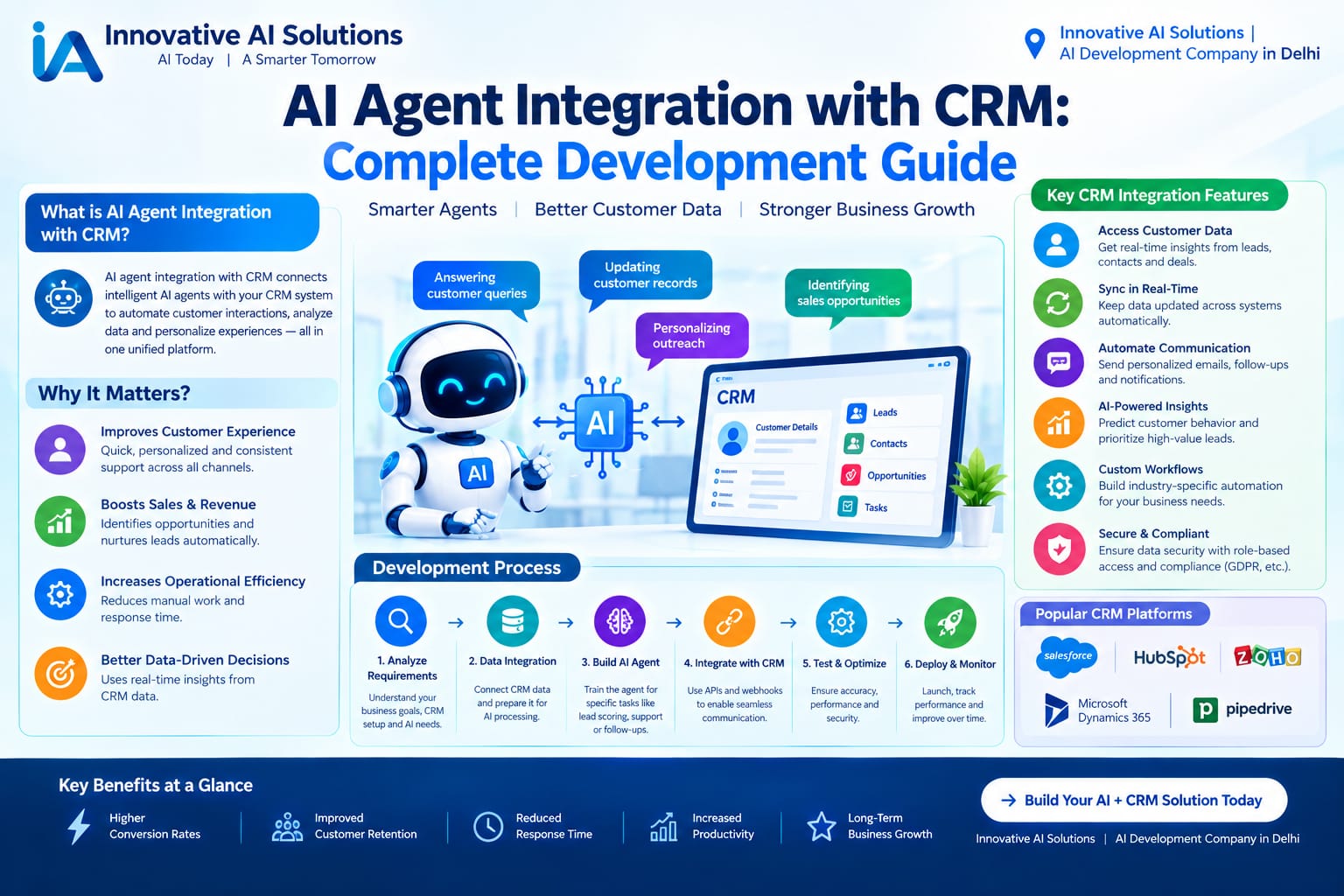
The Big Question
Why would you connect an AI agent to your CRM?
The short answer: because your CRM knows everything and does nothing.
Think about it. Your CRM has every customer interaction. Every deal stage. Every support ticket. Every email thread. It's a goldmine of context. But most CRMs just sit there, waiting for a human to look something up, update a field, or trigger a workflow.
AI agents change that equation.
An agent connected to your CRM can answer questions like "Show me my top 5 opportunities this month" or "List all contacts from Acme Corp in the last quarter" . But it can also do things: update deal stages, create follow-up tasks, log call notes, and flag at-risk accounts.
The difference between a CRM chatbot and a CRM agent is the difference between reading and writing. A chatbot reads your CRM and tells you what's there. An agent reads, reasons, and writes back.
But here's the catch: writing to a CRM is risky. An agent that creates a duplicate lead or overwrites a deal stage can wreak havoc on your pipeline. That's why the architecture matters—and why production deployments look very different from demos.
This guide covers the real patterns: how agents connect to CRMs, what the safeguards look like, and what it actually costs to build one that works services .
Cost Based on Integration Type
Let's talk numbers. What does it actually cost to integrate an AI agent with your CRM in 2026?
Read-Only Agent (Context Retrieval)
Think: an agent that answers questions by reading CRM data. "Show me all deals closing this month." "What's the status of Acme Corp's account?" No writes. No state changes. Just retrieval and response.
Typical cost: ₹15,00,000 to ₹28,00,000. Timeline: 8–12 weeks. Monthly running cost: ₹25,000–₹50,000.
The complexity here is in the connector. Every CRM (Salesforce, HubSpot, Pipedrive, Zoho) has different APIs, authentication patterns, and data models. Building a reliable read layer takes time .
Low-Stakes Write Agent (Human-in-the-Loop)
Think: an agent that proposes actions—"Create a follow-up task for this deal"—but requires human approval before committing. The agent drafts. The human approves. The write fires.
Typical cost: ₹28,00,000 to ₹45,00,000. Timeline: 12–16 weeks. Monthly running cost: ₹40,000–₹75,000.
The additional cost goes into the confirmation workflow, audit logging, and rollback mechanisms. These aren't optional features. They're what makes writes safe .
Bounded Autonomous Agent (High-Volume, Defined Actions)
Think: an agent that handles high-volume, well-defined workflows without per-action approval. "When a lead fills out the pricing form, enrich the record and assign it to the right rep." The agent runs unattended within strict boundaries.
Typical cost: ₹45,00,000 to ₹65,00,000. Timeline: 16–20 weeks. Monthly running cost: ₹75,000–₹1,20,000.
This is where the architecture gets serious. You need validation layers, exception handling, retry logic, and monitoring. The agent operates within guardrails, but the guardrails have to be built .
Enterprise Multi-Agent CRM Program
Think: multiple agents coordinating across CRM, ERP, support, and analytics. A sales agent, a service agent, a data enrichment agent—all working from shared context.
Typical cost: ₹65,00,000 to ₹85,00,000+. Timeline: 20–24 weeks. Monthly running cost: ₹1,20,000+.
This is where HubSpot's Agent Hub and Salesforce's Agentforce come into play. Agent Hub provides one place to manage agents across go-to-market, using shared context from the CRM . But the governance layer—permissions, audit trails, cost attribution—is still your responsibility .
What Affects Your Cost
The biggest factors are: number of systems (one CRM vs. CRM + ERP + support), write complexity (read-only vs. multi-step writes with rollback), compliance requirements (audit trails, data residency), agent count (each agent adds coordination overhead), and ongoing maintenance (typically 15–20% of development cost annually) .
Breakdown by Integration Approach (2020–2026)
How has CRM integration evolved over the past six years?
2020–2021: Custom API Wrappers
Every integration was custom. You wrote a Python script that called the Salesforce REST API, parsed the JSON, and hoped for the best. Authentication was a nightmare. Error handling was minimal. Most integrations were read-only because writes were too risky.
Cost: ₹8,00,000–₹15,00,000 for basic read access. Timeline: 12–16 weeks.
2022–2023: Pre-Built Connectors Emerge
Tools like Zapier, Make, and Workato introduced pre-built CRM connectors. You could connect to Salesforce without writing code. But these tools were designed for workflow automation, not AI agents. They lacked the context layer and reasoning capabilities agents need.
Cost: ₹15,00,000–₹25,00,000 for more sophisticated integrations.
2024–2025: The MCP Revolution
The Model Context Protocol (MCP) changed everything. MCP provides a standard way for AI agents to discover and use tools—including CRM operations—without bespoke integrations for each one . A CRM publishes an MCP server, and any MCP-capable AI client can act on it.
Cost: ₹20,00,000–₹35,00,000 for production-grade integrations. Timeline: 10–14 weeks.
2026: The Agentic CRM Era
Today, CRM platforms are building agentic capabilities natively. HubSpot's Agent Hub and Agent Builder let you create custom agents using natural language, running on your CRM data without separate setup . Salesforce's Agentforce provides a platform for building agents that reason over CRM data and take action .
But here's the nuance: native platform agents are convenient, but they're not the whole story. You still need integration depth, governance, and the ability to connect to systems beyond the CRM.
Cost: ₹15,00,000–₹50,00,000+ depending on scope. Timeline: 8–20 weeks.
Why Prices Changed in 2026
CRM agent integration costs have shifted. Here's why.
Reason 1: MCP Standardized the Connection Layer
Before MCP, every CRM integration was custom. Salesforce had one API pattern. HubSpot had another. Pipedrive had a third. Developers spent weeks on authentication, pagination, and error handling before they could build anything useful.
MCP changes that. It provides a common language for agents to discover and use tools. A CRM exposes its capabilities as MCP tools, and any MCP-capable agent can use them . This reduced integration development time by 40–50%.
Reason 2: CRMs Built Agentic Features Natively
HubSpot launched Agent Hub and Agent Builder in public beta in 2026. These tools let you create custom agents using natural language, running on your CRM data without separate setup . Salesforce rebranded its entire AI stack around Agentforce, with agents that reason over CRM data and take action .
Native platform agents reduce the need for custom development—for simple use cases. But complex workflows still require custom integration.
Reason 3: The Safeguard Pattern Matured
Early CRM agents failed because they wrote to systems without proper controls. The industry learned. Production architectures now include confirmation-gated writes, immutable audit logs, and rollback paths as standard components . This added cost but eliminated the "surprise records on Monday morning" problem.
Reason 4: Memory Architecture Became Sophisticated
Early agents had no memory. Users had to re-explain context every session. Production agents now use multi-layer memory: session context, user preferences, and account-level history . This adds development complexity but dramatically improves usefulness.
Reason 5: Cost Models Became Transparent
Salesforce's Flex Credits and HubSpot's credit systems provide granular cost visibility. You can see exactly what each agent action costs. But this transparency also revealed how expensive uncontrolled agents can be. The break-even point for Salesforce Agentforce is around 20 actions per interaction—below that, Flex Credits win; above that, per-conversation pricing is cheaper .
Pro Tips for CRM Agent Integration
After building these systems, here's what actually works.
Tip 1: Start Read-Only
The safest way to prove value is a read-only agent. It retrieves context, answers questions, and suggests actions—but never writes. This builds operational trust and validates your integration architecture before you introduce risk .
Tip 2: Gate Every Write Behind Confirmation
The production pattern that works: the agent drafts the action, the user approves, the write commits. Nothing silently changes. This isn't a limitation—it's a feature. It builds user confidence and prevents costly mistakes .
Tip 3: Log Everything Immutably
Every tool call. Every write. Before and after values. Append-only storage. This is what makes agents auditable and compliant . Without it, you can't answer the question "what did the agent do?"
Tip 4: Use MCP for Portability
Don't build custom integrations for each CRM. Use MCP. It lets you swap CRMs without touching the agent. Salesforce, HubSpot, Pipedrive, and Dynamics 365 all have MCP connectors or support .
Tip 5: Design for Exception Handling from Day One
What happens when the CRM API is down? When the agent's confidence is low? When the data is missing? Define these patterns before launch, not after the first incident .
Tip 6: Compose Memory Layers
A single context window isn't enough. Production agents use session memory (current conversation), user memory (preferences, history), and account memory (company-wide context). Compose them at prompt time .
Tip 7: Own Your Data and Integration Logic
Platform-native agents are convenient, but they can lock you in. Build your integration layer so you can switch CRMs or platforms without rebuilding everything.
Questions to Ask Before Hiring
Before you commit to a CRM agent project, ask these questions.
1. "Can you show me a production agent connected to a CRM?"
Not a demo. A live system. If they can't, walk away.
2. "How do you handle writes to the CRM?"
The answer should include confirmation gates, validation layers, and audit logging. "It just writes" is a red flag.
3. "What's your rollback strategy?"
Every write should have a defined rollback path. Multi-step workflows need compensating actions. If they haven't thought about this, they haven't built production systems .
4. "How do you handle CRM API rate limits?"
Salesforce, HubSpot, and Pipedrive all have different rate limits. Retry logic should be system-specific, not generic .
5. "What's your memory architecture?"
Session-only memory is insufficient. Look for layered memory: session, user, and account context .
6. "How do you prevent runaway costs?"
Agents can loop. They can make expensive API calls. Ask about cost ceilings, step limits, and monitoring.
7. "Who owns the integration code and audit logs?"
You do. Full transfer. No exceptions.
8. "Can I start read-only and add writes later?"
You should be able to. Any vendor who insists on full write access from day one is optimizing for their revenue, not your risk.
9. "How do you test edge cases?"
Good vendors have test sets, simulated failures, and confidence threshold testing. If they say "we test manually," that's not enough.
10. "Can I speak with your existing clients?"
References matter. Ask for named contacts. Ask about the good and the bad.
Why Delhi is a Great Hub for AI Development
I run an AI company in Delhi. I'm biased. But there are real reasons why Delhi NCR is a powerhouse for CRM agent development.
Talent Density
Delhi-NCR is second only to Bengaluru in tech talent concentration. IIT Delhi, DTU, and NSIT produce thousands of graduates annually. Many specialize in AI, ML, and enterprise integrations.
Enterprise Client Base
Delhi is India's administrative and corporate capital. Large enterprises with complex CRM requirements are here. For agents serving regulated industries, proximity matters.
Cost Advantage
Delhi offers a 20–30% cost advantage over Bengaluru and Mumbai. Office rents are lower. Salaries are competitive.
Time Zone Advantage
IST overlaps with US, UK, and Southeast Asian business hours. Real-time communication is possible without overnight shifts.
Ecosystem Maturity
Delhi NCR has a mature ecosystem of AI providers, cloud infrastructure, and consulting firms. Salesforce, HubSpot, and Microsoft all have strong presence.
What We Offer
At Innovative AI Solutions, we've spent five years building AI systems that actually work. Not hype. Not buzzwords. Results.
CRM Agent Integration
We build agents that connect to Salesforce, HubSpot, Pipedrive, Zoho, and Dynamics 365. Read-only, confirmation-gated writes, and bounded autonomous workflows.
MCP Integration
We implement Model Context Protocol connectors that let your agents discover and use CRM capabilities without bespoke integrations.
Confirmation-Gated Write Architecture
We build the guardrails: draft-review-commit workflows, immutable audit logs, rollback paths, and validation layers.
Multi-Layer Memory
We implement session, user, and account memory so your agents remember context across interactions.
Enterprise Safeguards
Validation, rollback, exception handling, retry logic, and human-in-the-loop routing—designed in from day one.
Ongoing Support
Agents need tuning. We offer flexible support packages to keep your systems performing.
What Sets Us Apart
We focus on Small AI. Practical solutions. Right-sized for your actual problem. Affordable pricing. Fast delivery. And a team that actually cares about your success.
Frequently Asked Questions
Q1: What is AI agent CRM integration?
AI agent CRM integration connects an AI agent to your Customer Relationship Management system, allowing the agent to read CRM data, reason about it, and take actions—like updating records, creating tasks, or processing workflows.
Q2: How much does CRM agent integration cost in India?
Read-only agents start at ₹15,00,000. Confirmation-gated write agents range from ₹28,00,000 to ₹45,00,000. Bounded autonomous agents cost ₹45,00,000 to ₹65,00,000. Enterprise multi-agent programs run ₹65,00,000 to ₹85,00,000+.
Q3: What is MCP, and why does it matter?
MCP (Model Context Protocol) is a standard way for AI agents to discover and use tools—including CRM operations—without bespoke integrations. It reduces development time and makes your agent portable across CRMs .
Q4: How do you prevent the agent from making bad writes?
Confirmation-gated writes: the agent drafts, the user approves, the write commits. Plus validation layers, rollback paths, and immutable audit logs .
Q5: What's the difference between Salesforce Agentforce and a custom CRM agent?
Agentforce is Salesforce's native agent platform. It's convenient for Salesforce-only workflows. Custom agents can connect to multiple systems and aren't locked into one vendor .
Q6: Can the agent work with HubSpot?
Yes. HubSpot has Agent Hub and Agent Builder for native agents, and MCP connectors for custom agents .
Q7: How do you handle CRM API rate limits?
System-specific retry logic with exponential backoff. Salesforce, HubSpot, and Pipedrive all have different limits. Generic retry policies don't work .
Q8: What memory does the agent have?
Production agents use multi-layer memory: session (current conversation), user (preferences, history), and account (company-wide context). Composed at prompt time .
Q9: How long does it take to build a CRM agent?
Read-only: 8–12 weeks. Confirmation-gated writes: 12–16 weeks. Bounded autonomous: 16–20 weeks.
Q10: What's the ROI of a CRM agent?
Depends on the workflow. An agent that enriches leads automatically or handles tier-1 support queries can recover costs in 3–6 months.
Frequently Asked Questions (Continued)
Q11: Can I start small and scale?
Yes. That's exactly what we recommend. Start read-only. Prove value. Add confirmation-gated writes. Then expand to bounded autonomy .
Q12: What happens if the agent makes a mistake?
Confirmation gates catch most errors before they commit. For autonomous workflows, rollback paths restore previous state. Audit logs document everything .
Q13: How do you test agents before production?
Sandbox environments, test sets of real customer questions, confidence threshold testing, and simulated failures.
Q14: Who owns the code and audit logs?
You do. Full transfer. No exceptions.
Q15: Why should I choose Innovative AI Solutions?
Because we build production systems, not demos. Because we focus on safeguards. Because we've delivered 100+ projects. Because your code is always yours.
Contact Us
Ready to connect an AI agent to your CRM? Let's talk.
Phone:
+91 7464 099 059
+91 9689967356
Email:
info@innovativeais.com
Address:
9th Floor, Pearls Best Heights-I,
Head Office: 904, Netaji Subhash Place,
Delhi – 110034