The Big Question
What happens when your app fires an API call on a network that is technically connected but effectively unusable? When a user on a train loses signal mid-request and the app hangs waiting for a timeout? When a large upload is attempted on a metered connection the user did not want to spend?
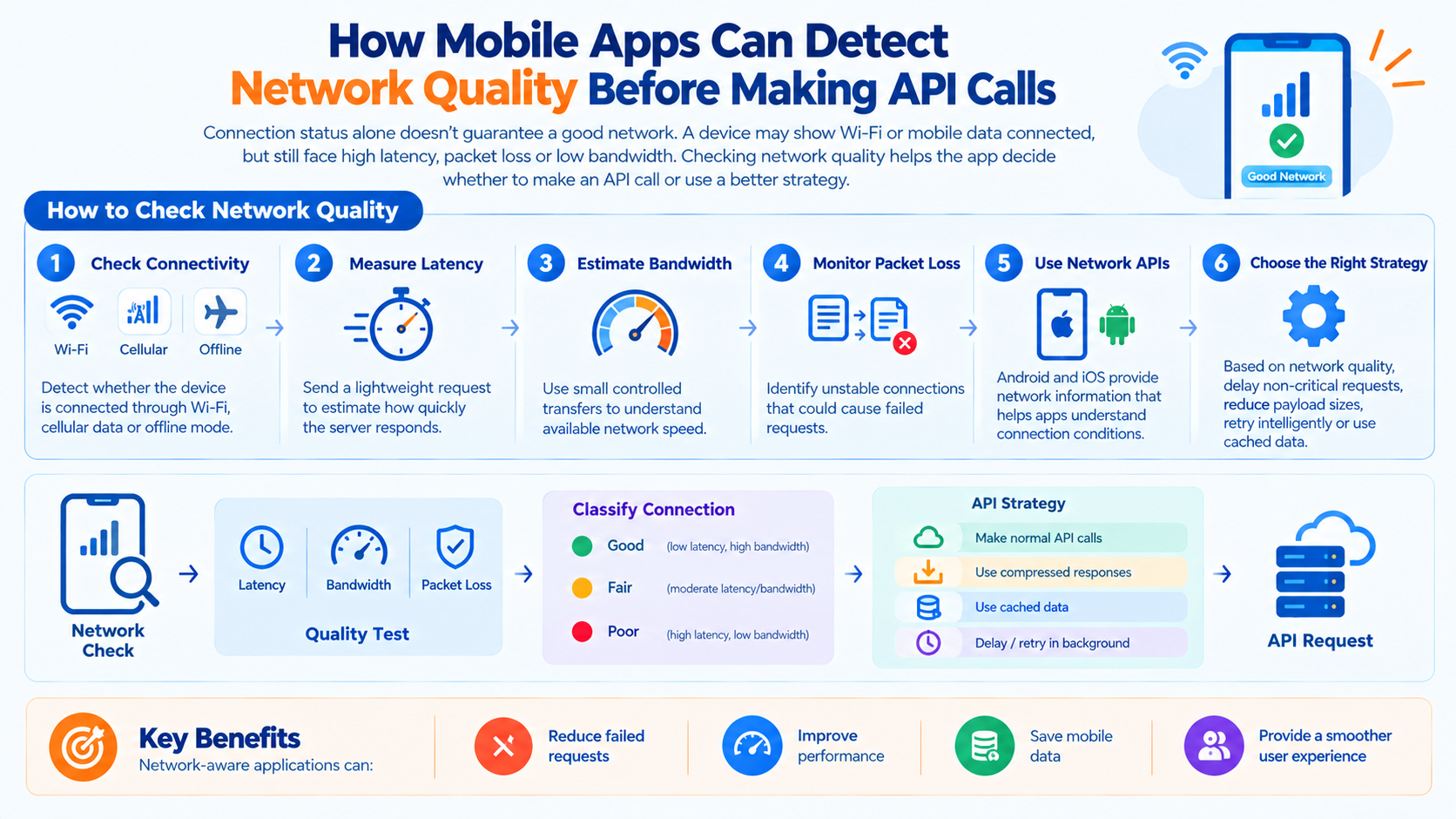
Mobile networks are not binary. A device can be "connected" while experiencing high latency, packet loss, low bandwidth, or intermittent availability. Apps that treat connectivity as a yes-or-no question will make bad decisions.
Detecting network quality before making a call is what allows an app to behave intelligently retrying, deferring, degrading gracefully, or asking the user.
What "Network Quality" Actually Means
Network quality is not a single measurement. It is a composite of several properties, each affecting different kinds of requests differently.
| Property | What It Affects |
|---|---|
| Bandwidth | Large uploads and downloads, media streaming |
| Latency | Interactive requests, real-time features |
| Jitter | Voice, video, and other time-sensitive traffic |
| Packet loss | Reliability of any request, especially large ones |
| Stability | Whether the connection persists long enough to complete a request |
| Metered status | Whether usage incurs cost to the user |
| Congestion | Whether the network is currently saturated |
A connection with high bandwidth but high latency is good for downloads and bad for interactive features. A connection with low latency but high packet loss is good for small requests and bad for large transfers. Quality is contextual.
The Signals Available to Mobile Apps
Modern mobile platforms expose several signals that indicate network conditions.
Connectivity Status
The most basic signal: is the device connected, and to what type of network?
iOS: The NWPathMonitor API reports whether a path is available and what type it is (Wi-Fi, cellular, wired).
Android: The ConnectivityManager reports the active network and its capabilities.
Limitations: Connectivity status tells you that a network exists, not that it works well. A device can be connected to a Wi-Fi access point with no internet access.
Network Type
Whether the connection is Wi-Fi, cellular, ethernet, or something else.
Why it matters: Cellular connections are frequently metered and may be slower. Wi-Fi is usually faster and unmetered, but not always.
Limitations: Wi-Fi quality varies enormously. A hotel Wi-Fi network may be worse than a strong cellular connection.
Metered Status
Whether the current connection is metered, meaning usage may incur cost to the user.
iOS: The isExpensive property on NWPath indicates a metered connection.
Android: NET_CAPABILITY_NOT_METERED and, in newer versions, NET_CAPABILITY_TEMPORARILY_NOT_METERED.
Why it matters: Apps should behave differently on metered connections—deferring large transfers, reducing media quality, or asking the user before consuming data.
Bandwidth Estimation
An estimate of the connection's throughput.
Android: NetworkCapabilities provides getLinkDownstreamBandwidthKbps and getLinkUpstreamBandwidthKbps.
iOS: No direct equivalent, but NWPath and observed performance can inform estimates.
Limitations: These are estimates based on the network's declared capabilities, not measured throughput. Actual performance may differ.
Measured Latency
Actual round-trip time to a known endpoint.
How to measure: A lightweight request to a health endpoint or a known fast server. Measured latency is far more reliable than declared capabilities.
Design consideration: Measurement itself consumes bandwidth and battery. It should be done sparingly and cached.
Historical Performance
The app's own record of how the network has performed recently.
What to track: Request success rates, latency, and timeouts by network type and location.
Why it matters: Historical data lets the app predict whether a request is likely to succeed on the current network, based on past experience.
Thermal and Battery State
While not network signals, device state affects what the app should do.
Why it matters: An app on a low battery or overheated device should reduce network activity, not increase it.
How Apps Should Use These Signals
Detecting network quality is only useful if it changes behavior.
Decide Whether to Call Now
A request that is likely to fail should not be attempted. If the app knows the network is unstable, it can defer the request until conditions improve.
Design pattern: Queue requests when conditions are poor; flush when conditions improve.
Decide How Much to Send
On a slow or metered connection, the app should send less.
Design patterns:
-
Compress payloads more aggressively
-
Request smaller page sizes
-
Reduce image resolution
-
Defer non-essential telemetry
Decide How Long to Wait
Timeouts should adapt to network conditions.
Design pattern: On a slow network, use longer timeouts. On a fast network, use shorter ones. A fixed timeout is wrong for both extremes.
Decide What to Show
The user should know what is happening.
Design patterns:
-
Show a loading indicator with an estimated wait
-
Indicate when content is stale because it could not be refreshed
-
Warn before large transfers on metered connections
-
Offer to defer uploads until Wi-Fi is available
Decide What to Fall Back To
When the network cannot support the primary experience, degrade gracefully.
Design patterns:
-
Serve cached content with a staleness indicator
-
Switch to a lighter version of the feature
-
Disable real-time features when latency is too high
-
Queue actions for later synchronization
A Practical Decision Framework
Network quality signals can be combined into a simple classification that drives app behavior.
| Classification | Signals | App Behavior |
|---|---|---|
| Excellent | Wi-Fi or strong cellular, low latency, low loss | Full experience, no restrictions |
| Good | Adequate bandwidth, acceptable latency | Full experience, standard timeouts |
| Marginal | High latency or moderate loss | Reduce payload, extend timeouts, defer non-essential calls |
| Poor | High loss, unstable, very low bandwidth | Cache-first experience, defer writes, warn user |
| Unusable | Connected but no working path | Offline mode, queue everything, inform user |
The classification thresholds depend on the app. A chat app has different requirements than a video streaming app or a financial trading app.
The Offline-First Connection
Network quality detection is closely related to offline-first design. An app designed to work offline is already prepared to handle poor network conditions it simply extends that capability to partially working networks.
The pattern: Treat the network as optional. Queue writes locally, cache reads, and synchronize when conditions allow. Network quality detection becomes the trigger for synchronization rather than a prerequisite for functionality.
This approach is especially valuable in India, where network conditions vary widely across geographies and device types.
Implementation Roadmap
Phase 1: Instrument (Weeks 1-2)
-
Add network state monitoring using platform APIs.
-
Track request outcomes by network type success, failure, latency, timeout.
-
Establish baselines for what normal looks like on each network type.
Phase 2: Classify (Weeks 3-4)
-
Define quality thresholds for your app's use cases.
-
Implement a quality classifier that combines connectivity, type, metered status, and measured latency.
-
Expose the classification to the parts of the app that make network decisions.
Phase 3: Adapt (Weeks 5-8)
-
Implement adaptive timeouts.
-
Implement payload reduction for slow or metered connections.
-
Implement request deferral for poor conditions.
-
Implement user-facing indicators for degraded states.
-
Integrate with offline-first caching and queuing.
Frequently Asked Questions
Q1: Is connectivity status enough to decide whether to make an API call?
No. A device can be connected to a network that does not work. Measured latency and historical performance are needed to make good decisions.
Q2: How do I measure network quality without wasting bandwidth?
Use lightweight requests to a known endpoint, cache results, and measure only when the app is about to make a significant call. Avoid continuous measurement.
Q3: Should I defer requests on metered connections?
It depends on the request. Small, essential requests should proceed. Large transfers and non-essential telemetry should be deferred or reduced, and the user should be informed before consuming significant data.
Q4: How do adaptive timeouts work?
The app sets timeouts based on measured latency. On a fast network, a 5-second timeout is generous. On a slow network, it may be too short. Timeouts should scale with observed conditions.
Q5: What is the relationship between network quality detection and offline-first design?
Offline-first design treats the network as optional. Network quality detection tells the app when the network is good enough to synchronize. Together, they produce an app that works well across the full spectrum of network conditions.
Q6: How can Innovative AI Solutions help?
We help organizations design and build mobile applications that adapt to network conditions from quality detection and adaptive timeouts to offline-first architecture. Explore our services to see how we build mobile systems for variable networks. Based in Delhi, serving clients across India.
Why Delhi is a Great Hub for Mobile Engineering
Delhi is emerging as a hub for mobile and AI innovation, backed by a massive smartphone user base and some of the most variable network conditions in the world. Indian mobile users move between 5G, 4G, Wi-Fi, and no connectivity within a single commute. Apps built for this environment must be designed for variability which makes the region an ideal place to build and test network-aware mobile applications.
What We Offer at Innovative AI Solutions
-
Network-Aware Design: We help you define how your app should behave under different network conditions.
-
Implementation: We build quality detection, adaptive timeouts, and payload reduction.
-
Offline-First Architecture: We design caching and queuing that work across the full spectrum of connectivity.
-
Telemetry and Monitoring: We track request outcomes by network type to inform ongoing optimization.
-
Mobile Performance Optimization: We tune apps for low-bandwidth and high-latency environments.
Final Thought
The shift is clear: from assuming the network works to detecting whether it actually does. Mobile apps that assess network quality before making calls behave intelligently on the networks their users actually have not the networks developers wish they had. Organizations that build this capability will deliver better experiences, fewer failed requests, and more efficient use of user data.
Contact Us:
Phone: +91 7464 099 059 / +91 9689967356
Email: info@innovativeais.com
Address: 904, 9th floor Pearls Best Heights-I, Netaji Subhash Place, Delhi-110034
Website: https://innovativeais.com
About the Author
Abhishek Kumar
Founder & CEO, Innovative AI Solutions
5+ years building AI, mobile, and enterprise systems. Based in Delhi, serving clients across India.