The Big Question
What happens when your mobile app the digital gateway to your business runs on a device you don't control, over a network you don't own, and is exposed to attackers with unlimited time to reverse engineer it? How do you secure an application that lives in the most hostile environment in enterprise computing?
This is the fundamental challenge of mobile security architecture .
Why Mobile Security Is Different
Traditional enterprise security relies on a perimeter firewalls, controlled networks, and managed devices. Mobile applications operate in the exact opposite environment :
| Factor | Traditional Enterprise | Mobile Environment |
|---|---|---|
| Device Control | Corporate-owned, managed | User-owned, unmanaged |
| Network | Protected internal network | Hostile public networks |
| Deployment | Controlled rollout | Public app stores |
| Code Access | Protected source | Easily reverse-engineered |
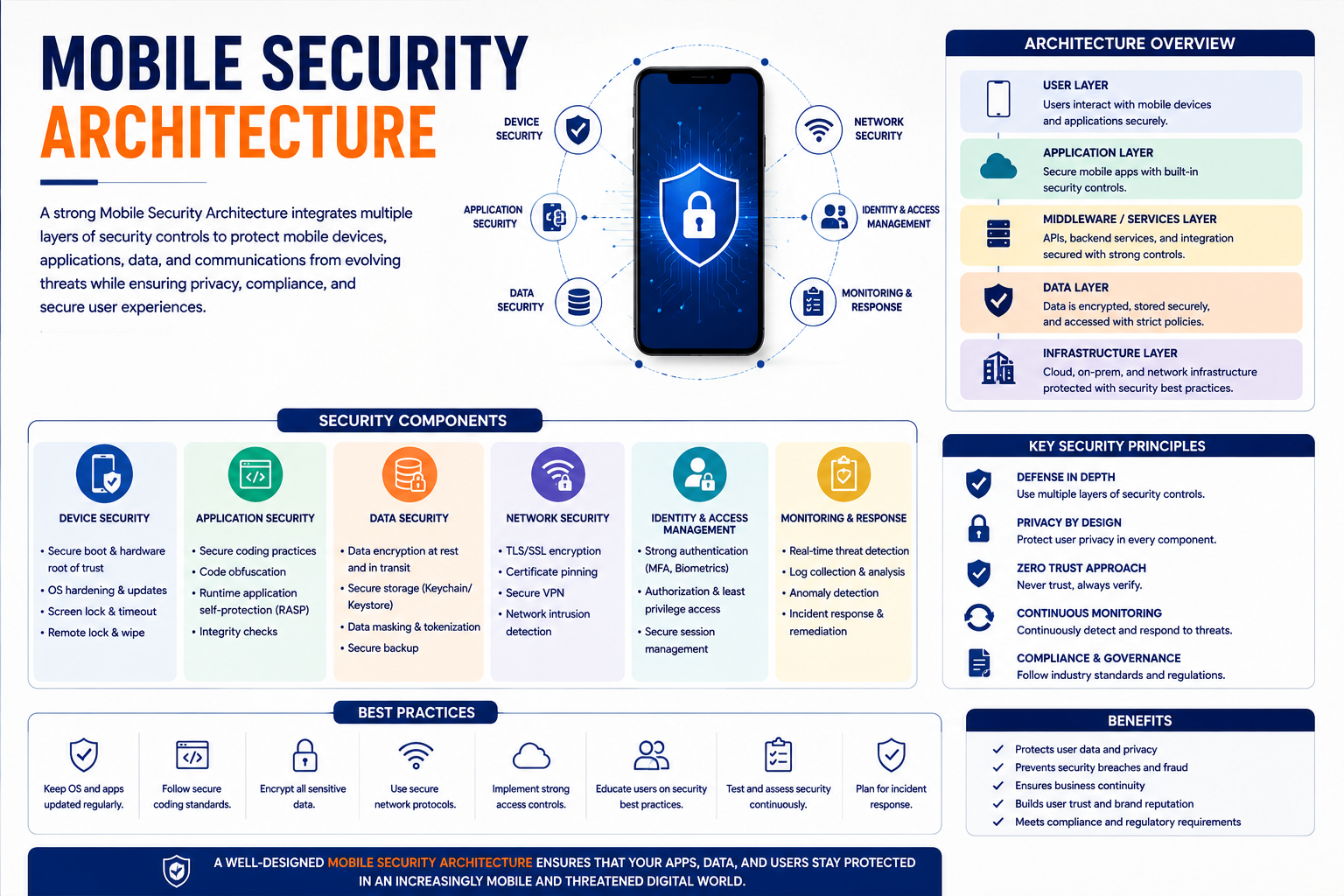
Mobile security architecture must account for every stage of the application lifecycle .
The Four Pillars of Mobile Security Architecture
1. Secure by Design: Build Security In
Security cannot be bolted on after development . It must begin during the requirements phase with threat modeling tailored to mobile contexts.
Essential practices:
-
Threat modeling: Map attack vectors specific to mobile, such as insecure data storage, unintended permissions, and weak session management. A systematic threat modeling approach helps identify high-priority risks before a single line of code is written .
-
Least privilege: Apply least privilege principles to app permissions. Request only the permissions your app actually needs—and only when they're needed .
-
Privacy by design: Embed privacy requirements GDPR, CCPA, HIPAA into the architecture from the start .
-
Secure-by-default configurations: Products should be delivered in a hardened, resilient configuration against likely exploitation techniques without additional steps to secure them .
2. Code Protection: Securing Distributed Binaries
Mobile code is uniquely vulnerable because it is distributed openly via app stores. Reverse engineering is a constant risk .
Essential controls:
-
Obfuscation: Obfuscation slows down reverse engineering, making it harder for attackers to understand your application logic .
-
Encryption: Encrypt sensitive data at rest and in transit. Never store sensitive data unencrypted on the device .
-
Integrity checks: Implement runtime checks for tampering, debugging, or emulator use .
-
Certificate pinning: Implement certificate pinning for network connections to prevent man-in-the-middle attacks .
3. Runtime Protection: The Hostile Environment
Mobile apps can't assume the device or OS is secure. Runtime Application Self-Protection (RASP) enables apps to detect and respond to threats in real-time .
Essential controls:
-
Jailbreak/root detection: Detect compromised devices and adjust behavior accordingly .
-
Tamper detection: Block execution when tampering is detected .
-
Malicious injection detection: Identify API hooking or injection attempts .
-
Response capability: Shut down sensitive functions when threats are detected .
4. Continuous Monitoring: Security After Deployment
Security doesn't end at deployment. Apps must be continuously monitored for emerging threats and vulnerabilities .
Essential practices:
-
Mobile DevSecOps: Integrate security testing into CI/CD pipelines .
-
Threat monitoring: Implement anomaly detection for suspicious behavior .
-
Security updates: Establish patching pipelines for rapid response .
-
MTD integration: Mobile Threat Defense telemetry should feed into SIEM platforms for enterprise-wide visibility .
Zero Trust for Mobile
The Zero Trust model "never trust, always verify" applies directly to mobile, but requires extension beyond enterprise frameworks. A proposed six-pillar framework for mobile Zero Trust addresses the unique challenges of user-controlled devices and hostile networks :
| Pillar | Focus |
|---|---|
| Device Integrity | Verify device health and security posture |
| User Identity | Continuous validation of user identity |
| Data Protection | Encrypt data at rest and in transit |
| API Security | Secure all application-to-backend calls |
| Behavioral Monitoring | Detect anomalous user and app behavior |
| Live Application Protection | Real-time threat detection and response |
This framework supports runtime enforcement of trust, aligning real-time protection with Zero Trust principles .
Managing Diversity: Multiple Ownership Models
Enterprise mobile environments rarely consist of a single ownership model. The coexistence of COPE, BYOD, and COBO within a single organization creates architectural heterogeneity that a single-layer solution cannot address .
| Model | Capabilities | Constraints |
|---|---|---|
| COPE (Corporate-Owned, Personally Enabled) | Full device encryption, remote wipe, location tracking | More control, but employees have personal use |
| BYOD (Bring Your Own Device) | Managed application container, selective wipe only | Cannot enforce full device controls due to privacy laws |
| COBO (Corporate-Owned, Business Only) | Full control, device-level enforcement | Employee adoption challenges |
Each ownership model carries different legal constraints, particularly in states with employee privacy protections .
Data Sensitivity Classification
Data sensitivity tier determines which controls are required :
| Classification | Controls Required |
|---|---|
| Public | No special controls |
| Internal Use | MDM enrollment, device encryption |
| Confidential | MDM plus MFA and conditional access |
| Restricted/Regulated | Full COPE enrollment, MTD deployment, audit logging |
The Developer-Workflow Integration
Security often fails because it is seen as a burden rather than an enabler. Developers must be empowered with tools and automation that make security seamless :
-
Mobile-specific secure coding training for developers .
-
Automated code scanning integrated into CI/CD pipelines .
-
Guided platforms that help developers configure static and dynamic protections .
-
Infrastructure as code scanning to ensure secure continuous testing .
The key is to avoid bottlenecks: "Security gates should be guardrails, not roadblocks" .
Implementation Roadmap
Phase 1: Foundation (Weeks 1-4)
-
Audit your app estate: Identify all mobile applications, their data sensitivity, and security gaps.
-
Define ownership model strategy: Choose MDM, MAM, or a mix based on legal and operational constraints .
-
Establish threat modeling practice: Use STRIDE adapted for mobile .
-
Select security tools: Choose static analysis, obfuscation, and runtime protection tools.
Phase 2: Build Security In (Weeks 5-8)
-
Implement CI/CD security gates: Integrate static code analysis, dependency scanning, and obfuscation into your pipeline .
-
Deploy RASP capabilities: Implement runtime self-protection .
-
Enable certificate pinning: Prevent man-in-the-middle attacks .
-
Set up encryption: Encrypt data at rest and in transit.
Phase 3: Monitor and Respond (Weeks 9-12+)
-
Deploy MTD: Implement Mobile Threat Defense for continuous monitoring .
-
Integrate with SIEM: Feed mobile telemetry into enterprise security monitoring .
-
Establish incident response: Define processes for mobile-specific security events.
-
Continuous improvement: Review and update security controls based on emerging threats.
Frequently Asked Questions
Q1: Does MDM enrollment alone provide mobile security?
No. MDM manages device configuration but does not provide threat detection, application vetting, or network-layer protection. MDM enrollment without MTD and application security controls leaves the application and network threat surfaces unaddressed .
Q2: How is mobile security different from traditional enterprise security?
Traditional security assumes controlled devices and networks. Mobile apps run on devices beyond organizational control, communicate over hostile networks, and are distributed via app stores where reverse engineering is a constant risk .
Q3: What is RASP and why do I need it?
Runtime Application Self-Protection enables apps to detect and respond to threats in real-time detecting jailbroken devices, identifying malicious injections, and blocking execution when tampering is detected .
Q4: What is certificate pinning?
Certificate pinning is a technique that binds an application to specific certificates or public keys, preventing man-in-the-middle attacks even if a Certificate Authority is compromised .
Q5: How can Innovative AI Solutions help?
We help organizations design, build, and operationalize mobile security architectures from threat modeling and CI/CD integration to runtime protection and continuous monitoring. Based in Delhi, serving clients across India.
Why Delhi is a Great Hub for Mobile Security Innovation
India's mobile-first digital ecosystem makes Delhi a natural hub for mobile security innovation. With the majority of Indian enterprises relying on mobile applications for customer engagement, workforce productivity, and business operations, mobile security architecture has become a strategic priority. Delhi's deep pool of mobile developers, security professionals, and enterprise architects enables organizations to build secure mobile applications at scale.
What We Offer at Innovative AI Solutions
-
Mobile Security Architecture: We help you design comprehensive mobile security frameworks.
-
CI/CD Security Integration: We help you embed security into mobile development pipelines.
-
Runtime Protection: We help you deploy RASP and MTD capabilities.
-
Zero Trust for Mobile: We help you implement six-pillar Zero Trust frameworks for consumer-facing mobile apps .
Final Thought
Mobile security architecture requires more than compliance checklists. It demands a shift from treating security as a bolt-on to embedding it across the entire lifecycle from threat modeling to runtime protection to continuous monitoring. The organizations that architect security into their mobile applications from the start will be the ones that build trust, protect their users, and avoid the financial and reputational cost of breaches.
Contact Us:
Phone: +91 7464 099 059 / +91 9689967356
Email: info@innovativeais.com
Address: Netaji Subhash Place, Pitampura, Delhi – 110034
Website: https://innovativeais.com
About the Author
Abhishek Kumar
Founder & CEO, Innovative AI Solutions
5+ years building AI, security, and enterprise systems. Based in Delhi, serving clients across India.
Related services: to apply this in your business, explore our mobile app development and DevOps and CI/CD.