The Big Question
"Abhishek, we need an app for both iOS and Android. We cannot afford two separate teams. Should we use Flutter, React Native, or something else? What actually works in 2026?"
This is one of the most important decisions you will make. Get it right, and you save time, money, and headaches. Get it wrong, and you will be rewriting code in 12 months.
Here is the honest truth from someone who has built production apps with all three:
There is no single "best" framework. The right choice depends on your team, your app, and your priorities.
Let me help you decide.
Step 3: What Is Cross-Platform Development? (No Jargon, Just Honesty)
Here is a simple comparison of the three approaches.
| Factor | Flutter | React Native | Kotlin Multiplatform (KMP) |
|---|---|---|---|
| Owned by | Meta (Facebook) | JetBrains | |
| Release year | 2017 (stable 2018) | 2015 | 2020 (stable 2022) |
| Language | Dart | JavaScript / TypeScript | Kotlin |
| How it works | Custom rendering engine (Skia) | JavaScript bridge to native UI | Compiles to native (Kotlin/JVM, Swift/ObjC, JS) |
| UI approach | Own widgets (everything drawn by Flutter) | Native platform widgets (wrapped) | Native platform UI (write UI separately per platform) |
| Code sharing | 100% shared (UI + logic) | 80-95% shared (UI + logic) | 50-80% shared (logic only, UI separate) |
| Performance | Excellent (60-120fps) | Good (bridge can be bottleneck) | Excellent (native compiled code) |
| App size | Large (~15-25MB minimal) | Medium (~10-15MB minimal) | Small (~5-10MB minimal) |
| Learning curve | Moderate (new language: Dart) | Low (if you know React/JS) | Steep (Kotlin + platform specifics) |
| Maturity | Very mature | Very mature | Maturing rapidly |
The key insight:
-
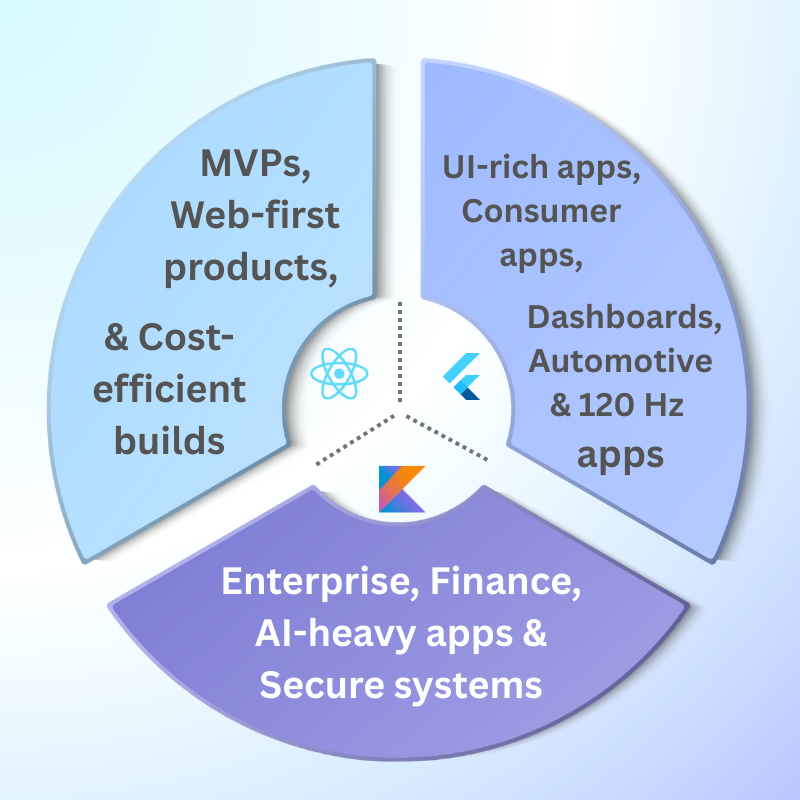
Flutter gives you complete control over every pixel. Great for custom designs.
-
React Native gives you the massive React ecosystem. Great for web teams moving to mobile.
-
Kotlin Multiplatform gives you true native performance. Great for Android-first teams.
Step 4: Real Examples – Which Framework for Which App?
Let me share which framework we chose for different client projects – and why.
Example 1: E-Commerce App – Chose React Native
The client:
Growing retail brand with an existing React web app. Needed iOS + Android quickly. Limited mobile budget.
Why React Native:
-
Team already knew React (no retraining)
-
Large component library saved development time
-
Hot reload sped up UI iterations
-
Web and mobile could share some logic
Results:
-
Development time: 4 months (vs 6-7 months for native)
-
Team size: 2 developers (vs 4 for native)
-
App performance: Good enough for e-commerce (60fps)
-
User reviews: 4.6/5
Verdict: Perfect for teams with React/web experience.
Example 2: Fintech Dashboard – Chose Flutter
The client:
A fintech startup needing a highly customized, data-rich dashboard with complex animations and charts. iOS and Android needed to look identical.
Why Flutter:
-
Custom UI required (not possible with native widgets)
-
Complex animations needed 60fps performance
-
Skia rendering ensured identical look on both platforms
-
Fast iteration with hot reload
Results:
-
Development time: 5 months
-
Beautiful, custom animations that impressed investors
-
Performance: Smooth 60fps even with real-time data
-
App size: 22MB (acceptable for fintech users)
Verdict: Excellent for custom designs and data-heavy apps.
Example 3: Enterprise Logistics App – Chose Kotlin Multiplatform
The client:
A logistics company with an existing Android app. They wanted an iOS version but had a Kotlin-fluent team. Needed to share business logic (routing, calculations) but keep native UI for platform-specific patterns.
Why Kotlin Multiplatform:
-
Android team already knew Kotlin (zero retraining)
-
Business logic (routing engine, pricing calc) shared 100%
-
iOS team wrote native SwiftUI for UI (what iOS users expect)
-
Shared code compiled to native Swift – no performance hit
Results:
-
Android codebase: reused 80% for iOS (logic only)
-
iOS development time: 3 months (instead of 6 with native)
-
Performance: Native speed on both platforms
-
App size: iOS app 8MB, Android app 6MB
Verdict: Best for Android-first teams or apps with complex shared logic.
Example 4: Social Media App – Chose React Native
The client:
A startup building a social platform with news feed, chat, and video. Needed fast iterations and a large pool of developers.
Why React Native:
-
Large developer pool (easier to hire)
-
Fast iteration with over-the-air updates (CodePush)
-
Rich ecosystem for chat, video, and media
-
Meta uses it for parts of Facebook/Instagram (battle-tested)
Results:
-
Hired 3 React Native developers in 2 weeks
-
Launched MVP in 3 months
-
Over-the-air updates: fixed bugs without app store review
-
Performance: Good, but chat scrolling needed optimization
Verdict: Best for teams needing fast hiring and iteration.
Step 5: Deep Dive – Architecture Comparison
Let me explain how each framework actually works under the hood.
Flutter Architecture
┌─────────────────────────────────────────┐
│             Dart Code (Your App)         │
├─────────────────────────────────────────┤
│          Flutter Framework               │
│     (Widgets, Rendering, Animation)      │
├─────────────────────────────────────────┤
│            Skia Rendering Engine         │
│    (Draws everything – no OEM widgets)   │
├─────────────────────────────────────────┤
│     Platform Embedder (iOS/Android)      │
└─────────────────────────────────────────┘
How it works:
Flutter does not use the device's native UI components. Instead, it draws every pixel using the Skia graphics engine. Your app is essentially a game engine for UI.
Pros:
-
Complete control over every pixel
-
Identical UI on iOS and Android
-
Excellent performance (60-120fps)
-
No bridge – no serialization overhead
Cons:
-
Large app size (bundles Skia and Flutter engine)
-
Cannot use many native libraries (no direct access to UIKit/Android Views)
React Native Architecture
┌─────────────────────────────────────────┐
│      JavaScript Code (Your App)          │
├─────────────────────────────────────────┤
│              React Native                │
├─────────────────────────────────────────┤
│         JavaScript Bridge                │
│    (Serializes data between JS and native)│
├─────────────────────────────────────────┤
│   Native Platform (UIKit/Android Views)  │
└─────────────────────────────────────────┘
How it works:
Your JavaScript code runs in a separate thread. It communicates with native UI components via a bridge. Each UI interaction requires serialization/deserialization.
Pros:
-
Huge ecosystem (npm, React, Expo)
-
Easy for web developers to learn
-
Large community and hireable talent pool
-
Over-the-air updates
Cons:
-
Bridge can be a performance bottleneck (especially for animations)
-
Debugging can be tricky
-
Native modules require platform-specific code
Kotlin Multiplatform Architecture
┌─────────────────────────────────────────┐
│         Shared Kotlin Code               │
│   (Business logic, networking, models)   │
├───────────────┬─────────────────────────┤
│   Android     │        iOS              │
│  (Kotlin/JVM) │  (Swift/ObjC via export)│
├───────────────┼─────────────────────────┤
│ Compose UI    │       SwiftUI           │
│ (Optional)    │    (or UIKit)           │
└───────────────┴─────────────────────────┘
How it works:
You write shared logic in Kotlin. It compiles to JVM bytecode for Android and to native binaries (via LLVM) for iOS. UI is written separately using platform-native tools (Compose, SwiftUI, or UIKit).
Pros:
-
True native performance (no bridge, no custom engine)
-
Small app size (no bundling large runtimes)
-
Excellent Kotlin tooling (IntelliJ, Android Studio)
-
Share exactly what you want – no more, no less
Cons:
-
Steeper learning curve (Kotlin + platform specifics)
-
UI code is separate (need iOS+Android UI knowledge)
-
Smaller community than Flutter/RN
-
Still maturing (some libraries missing)
Step 6: Cost Based on Framework Choice (2026 Realistic Pricing)
Here is what you will actually pay to build a medium-complexity app (e.g., e-commerce, social, dashboard) with each framework.
| Cost Factor | Flutter | React Native | Kotlin Multiplatform | Native (separate teams) |
|---|---|---|---|---|
| Initial development (₹) | 8,00,000 – 20,00,000 | 7,00,000 – 18,00,000 | 10,00,000 – 25,00,000 | 15,00,000 – 35,00,000 |
| Monthly maintenance (₹) | 30,000 – 80,000 | 30,000 – 80,000 | 40,000 – 1,00,000 | 60,000 – 1,50,000 |
| Team size needed | 2-3 developers | 2-3 developers | 3-4 developers (Android + iOS + shared) | 4-6 developers (Android + iOS separately) |
| Time to MVP | 3-5 months | 3-5 months | 4-6 months | 5-8 months |
| Developer monthly rate (₹) | 60,000 – 1,20,000 | 50,000 – 1,00,000 | 70,000 – 1,50,000 | 60,000 – 1,20,000 (per platform) |
Cost-saving notes:
-
React Native is cheapest if you already have React/web developers (no retraining)
-
Flutter is cheaper than native for custom designs (shared UI code)
-
KMP has higher upfront cost but lower long-term maintenance (shared logic)
-
Native is only worth it if you need platform-specific features or absolute best performance
Step 7: Breakdown by Developer Type (2020 – 2026 Rates)
Here is what you should expect to pay for cross-platform developers in 2026.
| Role | 2020 Rate (₹/month) | 2024 Rate (₹/month) | 2026 Rate (₹/month) | Notes |
|---|---|---|---|---|
| Flutter Developer | 40,000 – 70,000 | 50,000 – 90,000 | 60,000 – 1,20,000 | Demand increased, supply catching up |
| React Native Developer | 45,000 – 80,000 | 55,000 – 1,00,000 | 50,000 – 1,00,000 | Saturated market = stable rates |
| Kotlin Multiplatform Developer | Did not exist | 70,000 – 1,20,000 | 80,000 – 1,80,000 | Rare skill, premium rates |
| Native iOS (Swift) | 50,000 – 90,000 | 60,000 – 1,10,000 | 60,000 – 1,20,000 | Stable demand |
| Native Android (Kotlin) | 45,000 – 80,000 | 55,000 – 1,00,000 | 55,000 – 1,10,000 | Stable demand |
The 2026 reality:
-
React Native developers are the easiest to find and most affordable (saturated market)
-
Flutter developers are more expensive than RN but worth it for custom UI
-
Kotlin Multiplatform developers are rare and expensive – only hire if you truly need shared logic with native UI
Step 8: Pro Tips to Choose the Right Framework
Here is my decision framework after 5+ years of cross-platform development.
Choose Flutter If:
✅ You need pixel-perfect, custom designs that look identical on iOS and Android
✅ You need complex animations at 60-120fps
✅ Your team is willing to learn Dart (it is easy)
✅ App size is not a primary concern (15-25MB is fine)
✅ You are building from scratch (no existing code to integrate)
Choose React Native If:
✅ Your team already knows React or JavaScript
✅ You need fast development and a huge ecosystem of libraries
✅ You need over-the-air updates (bypass app store for bug fixes)
✅ You want the largest talent pool for hiring
✅ You are building a CRUD-heavy app (forms, lists, navigation – not heavy animations)
Choose Kotlin Multiplatform If:
✅ Your team already knows Kotlin (Android-first shop)
✅ You have complex business logic that must be identical on both platforms
✅ You need true native performance (games, heavy computation, real-time)
✅ You care about app size (KMP apps are small)
✅ You can afford separate UI teams (or developers comfortable with both SwiftUI and Compose)
Choose Full Native (No Cross-Platform) If:
✅ You need the absolute best performance (no compromises)
✅ You need deep platform integration (advanced camera, AR, Bluetooth, etc.)
✅ You have unlimited budget and timeline
✅ Your app is platform-specific (e.g., iPad-only or Android Auto)
Step 9: Questions to Ask Before Choosing a Framework
For Your Team
1. "What does my team already know?"
Best framework = the one your team can learn fastest.
2. "How many developers can I hire?"
React Native has the largest pool. KMP has the smallest.
3. "Do I have iOS and Android expertise?"
For KMP, you still need platform-specific UI knowledge.
For Your App
4. "Does my app need complex animations?"
Flutter wins here. React Native's bridge struggles with heavy animations.
5. "Does my app need deep platform features?"
KMP or native. Flutter and RN have workarounds but they are not perfect.
6. "Do I need over-the-air updates?"
React Native (CodePush) is the only one with mature OTA.
7. "How important is app size?"
KMP wins (smallest). Flutter loses (largest).
For Your Business
8. "What is my timeline?"
Flutter and RN are fastest. KMP takes longer (separate UI).
9. "What is my budget for maintenance?"
Shared UI (Flutter/RN) = lower maintenance. Separate UI (KMP) = higher.
10. "Do I plan to add web or desktop later?"
Flutter supports web/desktop. React Native has web (React). KMP supports web (Kotlin/JS but immature).
Step 10: Why Delhi is a Great Hub for Cross-Platform Development
I am based in Delhi. I am biased. But here is why Delhi is becoming a global center for cross-platform development.
1. Massive Talent Pool Across All Frameworks
Delhi NCR has thousands of developers experienced in:
-
Flutter (many startups adopted early)
-
React Native (huge demand from service companies)
-
Kotlin (Android dominance in India)
-
Native iOS (smaller but growing)
2. Cost Advantage Without Quality Drop
| Framework | Delhi Rate (₹/month) | US Rate (₹/month equivalent) |
|---|---|---|
| Flutter | 60,000 – 1,20,000 | 3,00,000 – 8,00,000 |
| React Native | 50,000 – 1,00,000 | 2,50,000 – 7,00,000 |
| KMP | 80,000 – 1,80,000 | 5,00,000 – 12,00,000 |
3. English-First Work Culture
No translation needed. No cultural friction. We work seamlessly with global clients.
4. Time Zone Overlap
Morning in Delhi = late night in US.
Afternoon in Delhi = early morning in UK.
We overlap with everyone.
Our office:
Netaji Subhash Place, Pitampura, Delhi – 110034
You are welcome to visit. Meet our team. See how we build cross-platform apps.
Step 11: What We Offer (And What We Do Not)
At Innovative AI Solutions, we build cross-platform apps using all three frameworks – and we recommend the right one for your specific needs.
What We Do
-
Flutter app development (custom UI, complex animations, data-heavy apps)
-
React Native app development (fast MVPs, e-commerce, social apps)
-
Kotlin Multiplatform (shared business logic, native UI, Android-first teams)
-
Native iOS and Android (when cross-platform is not the right answer)
-
Migration services (moving from one framework to another)
-
Performance optimization (fixing slow cross-platform apps)
What We Do Not Do
-
We do not push one framework over others (we recommend what fits your needs)
-
We do not hide the limitations of cross-platform (we are honest)
-
We do not lock you into our choice (you decide after we present options)
Step 12: Frequently Asked Questions
Q1: Which framework is fastest?
For UI rendering: Flutter and KMP tie (both 60-120fps). React Native is slightly slower (bridge overhead).
For startup time: KMP (small bundle) > React Native > Flutter (largest engine).
For real-world usage: All three are fast enough for 95% of apps.
Q2: Which framework has the best job market?
React Native by far. Largest community, most jobs, easiest to hire.
Flutter is growing rapidly. KMP is niche but growing.
Q3: Can I use platform-specific features (camera, Bluetooth, etc.)?
Yes, all three support native modules. Flutter and RN have rich plugin ecosystems. KMP requires writing platform-specific code.
Q4: Which framework is best for startups?
For speed and low cost: React Native (fastest dev, largest talent pool)
For custom design and animations: Flutter (beautiful UI without two UI teams)
For Android-first teams with iOS aspirations: Kotlin Multiplatform
Q5: Can I share code with web and desktop?
-
Flutter: Yes – web, iOS, Android, Windows, macOS, Linux
-
React Native: Yes – iOS, Android, web (React), Windows (limited), macOS (limited)
-
KMP: Yes – iOS, Android, web (Kotlin/JS, maturing), desktop (Compose Multiplatform)
Q6: What is the smallest budget cross-platform project you have built?
₹4 lakhs for a simple React Native MVP (3 screens, basic API integration, launched in 6 weeks).
Q7: What is the largest?
₹1.8 crore for a complex Flutter app with custom animations, real-time data, and 50+ screens.
Q8: How long does a typical cross-platform app take?
-
Simple app (MVP, 5-10 screens): 2-4 months
-
Medium app (e-commerce, social): 4-7 months
-
Complex app (heavy animations, real-time): 6-12 months
Q9: Can I switch frameworks later?
Yes, but it is expensive (rewriting 50-100% of your app). Choose carefully upfront.
Q10: Why should I choose Innovative AI Solutions?
Because we have built production apps with all three frameworks. Because we do not have a favorite – we recommend what fits your needs. Because we are based in Delhi – you can visit our team. And because 80% of our clients return for more.
Step 13: Final Tagline (SEO & Social Media Friendly)
"Flutter vs React Native vs Kotlin Multiplatform – there is no single best framework. But there is a best framework for you. Here is how to choose."
Short version for Twitter/LinkedIn:
Flutter, React Native, or Kotlin Multiplatform? I have built apps with all three. Here is which one to choose – based on your team, your app, and your budget.
Hashtags:
#Flutter #ReactNative #KotlinMultiplatform #CrossPlatform #MobileDev #AppDevelopment2026 #InnovativeAISolutions #DelhiAI
Ready to Choose Your Framework?
You do not need to guess which framework is right for you. Let us help you decide – with a free consultation and a small pilot project.
Contact Us
Phone:
+91 7464 099 059
+91 96899 67356
Email:
info@innovativeais.com
Office Address:
Netaji Subhash Place, Pitampura, Delhi – 110034
(Netaji Subhash Place metro station, 2 minutes walk)
Working Hours:
Monday–Friday, 10:00 AM – 7:00 PM IST
(We also accommodate US, UK, and Australia time zones by appointment)
Related services: to apply this in your business, explore our web development and mobile app development.