The Big Question
What happens when your app's core functionality collapses the moment network connectivity drops? When a field worker in a remote location, a traveler on a plane, or a user in a rural area loses the ability to use your app because the server is unreachable?
This is the problem offline-first architecture solves. But the real question is deeper: What if your app was designed to work without the network from the very beginning?
Offline-First vs. Offline-Capable: The Critical Distinction
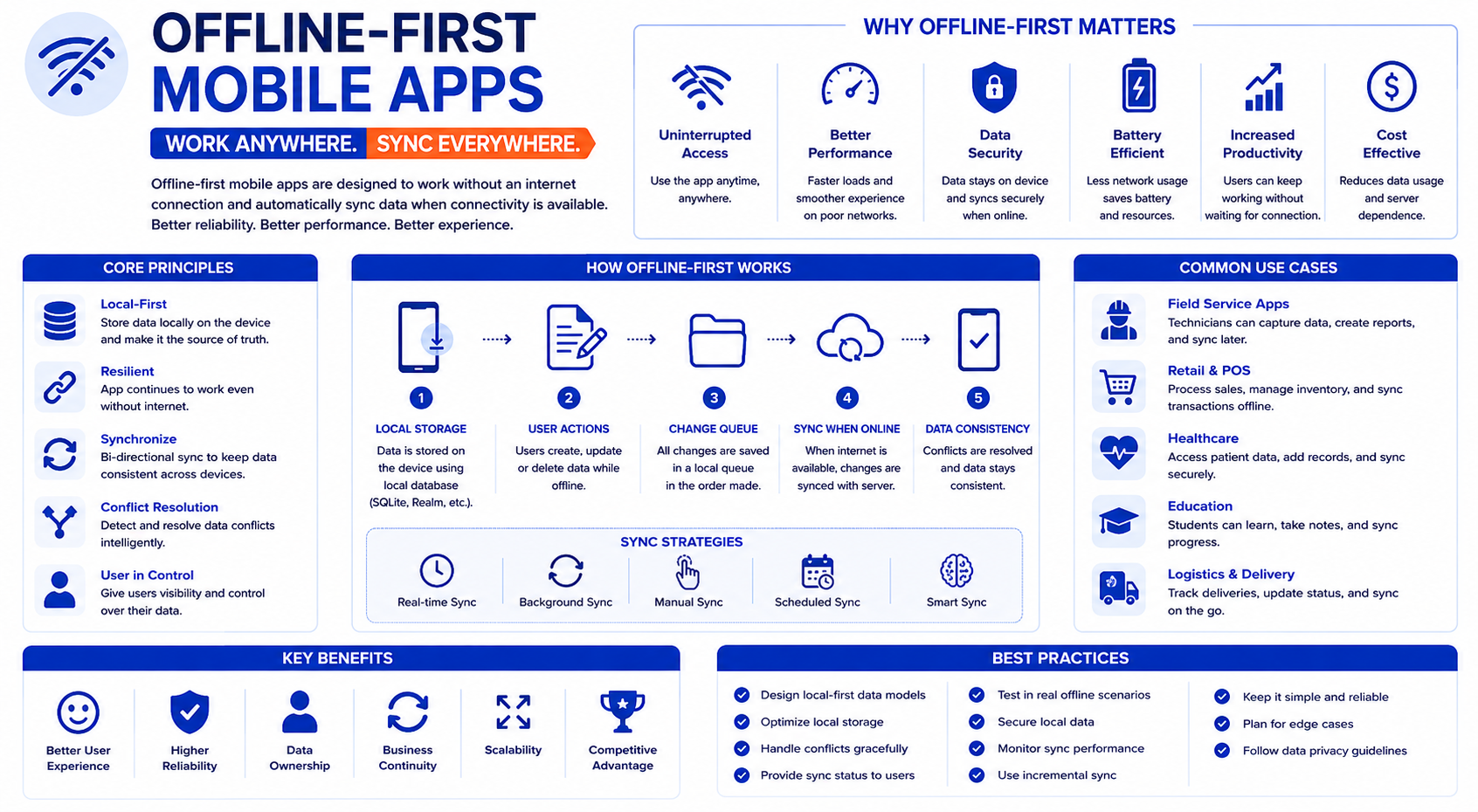
Not every app that works offline is built the same way. The distinction between "offline-first" and "offline-capable" reveals fundamentally different architectural philosophies.
| Characteristic | Offline-First | Offline-Capable |
|---|---|---|
| Data source | Local database is primary | Server is primary, local cache |
| Default state | App works without network | App degrades without network |
| Sync direction | Bidirectional (local ↔ server) | Mostly server → local |
| Write path | Writes to local, syncs later | Writes to server, caches locally |
| Conflict handling | Must resolve conflicts | Minimal conflicts (server wins) |
| Complexity | High | Medium |
Choose offline-first when:
-
Users regularly have no connectivity (field work, travel, rural areas)
-
Data entry happens offline (forms, surveys, inspections)
-
App must be fully functional without network
-
Sync can be deferred for hours or days
Choose offline-capable when:
-
Users are usually online but need graceful degradation
-
Reads are more common than writes
-
Stale data is acceptable for short periods
-
Server is the authority for most operations
The key principle is simple but transformative: The network is optional, not required, for core functionality.
The Business Case: Why Offline-First Matters
User Retention
The data is stark. Mobile apps that freeze too often or take too long to load are immensely frustrating for users. Over 70% of mobile app users stop using an app if it responds too slowly, and 84% give up if it fails just twice. Offline-first architecture eliminates these failure points.
Field Work and Remote Operations
In industries like logistics, field service, construction, and agriculture, employees often work without stable connectivity. An offline-first architecture ensures that business processes continue seamlessly instead of having to wait for the network to return. This increases productivity and significantly shortens process chains.
Privacy and Data Sovereignty
Offline-first apps store data locally on the device. For sensitive applications—healthcare, finance, personal notes—this means users maintain control over their data. No internet connection means no data transmission, no exposure to network-based attacks, and no cloud storage vulnerabilities.
The "Magic Moment"
One of the most powerful user experiences in offline-first apps is the "magic moment" when you demonstrate the app working flawlessly with Airplane Mode enabled—creating, editing, and deleting data—then watch it sync instantly when connectivity is restored.
The Architecture: Four Key Components
1. Local Database: The Single Source of Truth
In offline-first architecture, the local database is the primary source of truth. The app reads from and writes to local storage first. The server is secondary—it receives data during synchronization.
Platform-specific database options:
-
Core Data and SwiftData for iOS-only apps
-
Room for Android-only apps
-
WatermelonDB for React Native offline-first apps with lazy-loading ORM
-
Realm for cross-platform object database with sync capabilities
-
SQLite for full control on all platforms
For React Native developers: Starting with AsyncStorage is compatible with Expo Go, but production apps should migrate to MMKV—which is 30-50x faster with synchronous API access.
2. The Sync Engine: Keeping Data Consistent
Synchronization is the heart of any offline-first system. Changes made locally must eventually reach the server, and server changes must reach the client.
Sync strategies:
| Strategy | Direction | Latency | Complexity | Best For |
|---|---|---|---|---|
| Push-based | Client → Server | Low | Medium | Write-heavy apps |
| Pull-based | Server → Client | Higher | Low | Read-heavy apps |
| Batch | Bidirectional | Highest | Medium | Periodic sync |
| Delta sync | Bidirectional | Medium | High | Large datasets |
The Outbox Pattern (Command Queue):
Operations are queued locally and replayed when the device is online. Each queued operation tracks status (pending, processing, failed, completed), retry count, and max retries. This ensures that no data is lost even if the device goes offline mid-operation.
3. Conflict Resolution: When Two Versions Collide
When multiple devices modify the same data offline, conflicts are inevitable. The strategy you choose determines data integrity:
| Strategy | How It Works | Data Loss Risk | Best For |
|---|---|---|---|
| Last-write-wins (LWW) | Most recent timestamp wins | Medium | Simple apps, non-critical data |
| Client-wins | Local change always wins | Low for user | Single-user apps |
| Server-wins | Server change always wins | Low for system | Server-authoritative data |
| Field-level merge | Merge non-conflicting fields | Low | Forms, profiles |
| Manual resolution | Present both versions to user | None | Critical data, collaborative |
Why LWW works for many apps: Simple to implement and understand, works well where conflicts are rare, and has low overhead. The system compares timestamps and keeps the most recent version.
4. Optimistic UI: Instant Feedback
Optimistic UI is what makes offline-first apps feel fast. The UI updates immediately, and the sync happens in the background.
How it works:
-
User performs an action (e.g., creates a task)
-
UI updates instantly with the optimistic version
-
The operation is added to the offline queue
-
When connectivity returns, the operation syncs to the server
-
If the sync fails, the UI rolls back to the previous state
Benefits: Perceived latency drops from 200-500ms to 0ms, users see immediate feedback, and offline errors are handled silently.
Real-World Applications
AI at the Edge: Complete Privacy
The Edge AI SLM App demonstrates a production-ready, privacy-first AI assistant that runs entirely on-device:
-
Runs TinyLlama 1.1B completely offline
-
AES-256 encryption with zero telemetry—data never leaves the device
-
Auto-unloads models when RAM exceeds 85%
-
Throttles inference during low battery
This isn't just an academic exercise—it's a practical approach for applications where data privacy, zero API costs, and offline availability are non-negotiable.
Community Health in Remote Areas
Trij is an offline-first progressive web app that brings AI-assisted medical triage to community health workers in remote areas:
-
Powered by Google DeepMind's Gemma 4 entirely on-device
-
No internet, no cloud costs, no patient data leaving the phone
-
Voice-guided assessments in 7 languages
-
Async telemedicine with offline queuing
The project's premise captures the essence of offline-first: 1 billion people lack access to a physician within a 2-hour travel radius. Smartphone penetration in these regions is >60%, but reliable internet is rare.
Agricultural Support in Rural India
Kisan-Sathi (किसान साथी) is a mobile-first, fully offline agricultural support tool designed to run directly on a farmer's device:
-
Targets real-world agricultural problems in areas with poor connectivity
-
Executes inference locally using Gemma 4 E2B
-
Features include dual-language chatbot, digital ledger, personalized crop calendar, and local emergency directory
-
Safety guardrails: High-risk keywords bypass LLM to present emergency cards
-
First-run bootstrap search performs web search for local agricultural listings, saves locally for offline reference
The "Double-Update" Problem Solved
A production React Native app with Appwrite demonstrates solving the "double-update" problem—where optimistic updates, mutation responses, and realtime events all try to update the same data.
The solution uses direct cache updates from realtime events instead of refetching, eliminating duplicate updates and providing instant synchronization across devices.
Implementation Roadmap
Phase 1: Foundation (Weeks 1-4)
-
Define your offline requirements: Do users need full functionality offline or just read access? What's the sync frequency?
-
Choose your local database: SQLite, Realm, WatermelonDB, or platform-specific options
-
Establish sync strategy: Push, pull, batch, or delta? What's the acceptable latency?
-
Design conflict resolution: Last-write-wins, manual resolution, or field-level merge?
Phase 2: Build Core Capabilities (Weeks 5-8)
-
Implement local data storage: Make the local database the single source of truth
-
Build optimistic UI patterns: Instant updates with rollback on failure
-
Implement the outbox pattern: Queue operations for deferred sync
-
Add network state detection: iOS NWPathMonitor, Android ConnectivityManager, or React Native NetInfo
Phase 3: Scale and Refine (Weeks 9-12+)
-
Implement delta sync: Only transfer changes since last sync
-
Add conflict resolution UI: For manual resolution scenarios
-
Enable background sync: Silent synchronization when connectivity returns
-
Test thoroughly: Intensive testing in offline mode
Frequently Asked Questions
Q1: What's the difference between offline-first and online-first?
Online-first apps require a network connection for core functionality. Data is stored on the server, and the app degrades or fails without connectivity. Offline-first apps store data locally first and sync to the server when a connection is available—the network is optional.
Q2: What are the benefits of offline-first for users?
Continuity of use (works on planes, in rural areas, in basements), speed (no loading indicators), privacy (data stays on device), and transparency (clear communication about sync status).
Q3: What are the business benefits?
Increased user loyalty (84% abandon after two failures), reduced server load (fewer queries), improved productivity in field operations, and a stronger brand image.
Q4: What are the challenges?
Synchronization complexity (conflicts must be resolved), security (local data must be encrypted), resource planning (more development time), and data consistency (information may not be identical across devices immediately).
Q5: How can Innovative AI Solutions help?
We help organizations design, build, and operationalize offline-first mobile apps—from architecture selection and database choice to sync implementation and conflict resolution. Based in Delhi, serving clients across India.
Why Delhi is a Great Hub for Offline-First Development
Delhi is emerging as a hub for mobile-first and offline-first innovation, backed by a thriving developer ecosystem and real-world use cases in agriculture, healthcare, and logistics. India's diverse connectivity landscape—from high-speed urban networks to rural areas with limited coverage—makes offline-first architecture a practical necessity, not just a theoretical exercise. Projects like Kisan-Sathi demonstrate how Indian developers are solving local problems with global relevance.
What We Offer at Innovative AI Solutions
-
Offline-First Strategy: We help you define requirements and design an offline-first architecture
-
Database Selection: We help you choose between SQLite, Realm, WatermelonDB, and platform-specific options
-
Sync Implementation: We help you build outbox patterns, delta sync, and background sync
-
Conflict Resolution: We help you design and implement conflict handling strategies
-
Optimistic UI: We help you build instant, responsive interfaces with smart rollback
Final Thought
The verdict is clear: Offline-first is not a niche capability—it's a fundamental design choice that determines whether your app survives network unreliability, retains users, and delivers a seamless experience. From rural healthcare workers in India to field technicians in remote mining sites, offline-first architecture is enabling applications that were previously impossible.
The shift is clear: from designing for the connected case and falling back to offline, to designing for the offline case and syncing when connectivity exists.
Contact Us:
Phone: +91 7464 099 059 / +91 9689967356
Email: info@innovativeais.com
Address: Netaji Subhash Place, Pitampura, Delhi – 110034
Website: https://innovativeais.com
About the Author
Abhishek Kumar
Founder & CEO, Innovative AI Solutions
5+ years building AI and mobile systems for enterprises. Based in Delhi, serving clients across India.