The Big Question
What does a version number actually promise?
Most developers treat version numbers as labels. Increment a number. Push a tag. Move on.
That's a mistake.
A version number is a contract. When you release "2.0.0," you're telling users: this is different from 1.x in ways that might break your integration. When you release "1.2.0," you're saying: this adds functionality, but nothing existing should stop working. When you release "1.2.3," you're saying: this fixes a bug, and upgrading is safe.
This contract matters more as teams grow. A small team can keep versioning in their heads. A growing team needs documented rules, automated enforcement, and consistency across dozens of repositories and services.
The stakes are higher than most teams realize. When floating version ranges propagate a sabotaged package across thousands of build pipelines overnight as happened with the left-pad and colors.js incidents the cost of poor versioning discipline becomes painfully clear .
The question isn't whether to have a versioning strategy. It's which strategy fits your team's stage and scale.
SemVer: The Meaning-Based Contract
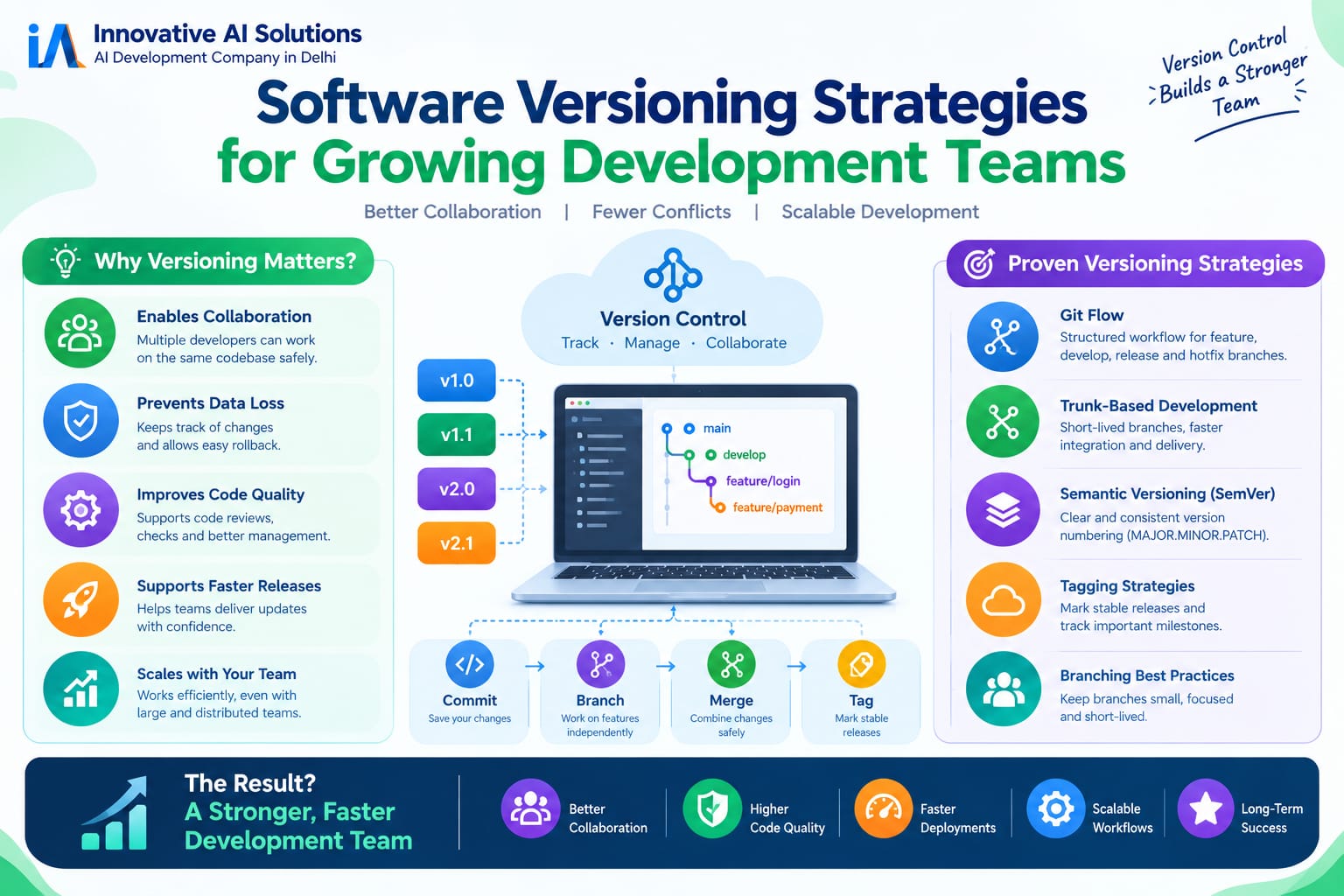
Semantic Versioning (SemVer) is the industry standard. Format: MAJOR.MINOR.PATCH .
The rules are simple:
MAJOR increments for incompatible API changes. Something that worked before may break. Users must read the changelog before upgrading.
MINOR increments for backward-compatible additions. New features. New capabilities. But existing integrations keep working.
PATCH increments for backward-compatible bug fixes. Safe to upgrade. Nothing breaks.
Pre-release labels add context: -alpha for early development, -beta for feature complete but testing, -rc for release candidate .
When to use SemVer:
Libraries and packages with APIs. Tools with clear breaking/non-breaking boundaries. Any code that consumers import or depend on . If your users need to know what changed before upgrading, SemVer is the right choice.
The benefit: Version numbers communicate intent. Dependency managers understand SemVer. Automated tools can resolve compatible versions. The number itself tells users whether upgrading is safe .
The cost: SemVer requires discipline. Every change must be classified breaking, feature, or fix. Teams must agree on what constitutes a "breaking change." And they must enforce it consistently.
CalVer: The Recency-Based Alternative
Calendar Versioning (CalVer) takes a different approach. Format: YYYY.MM.MICRO or similar date-based schemes .
Instead of communicating what changed, CalVer communicates when it was released.
When to use CalVer:
Content-driven projects where temporal context matters more than API compatibility. Documentation repositories. Projects where "how fresh is this" is more important than "what broke" . Tools tracking external targets that move continuously—scrapers, linters, format converters .
Ubuntu uses CalVer. Python considered adopting it. Black, pip, and PyCharm use date-based versions .
The benefit: Clarity at a glance. If you see "2026.05," you know exactly when it shipped. No need to dig through changelogs to understand recency. Support timelines become obvious add five years to the year, and you know when support ends .
The cost: The number alone never tells users whether upgrading will break them. CalVer projects need a separate, written compatibility policy. You still need pre-release labels and promotion workflows .
The decision framework: If your users primarily ask "is this current?" choose CalVer. If they ask "will this break me?" choose SemVer.
Repository Strategy: Monorepo vs Polyrepo
Versioning strategy and repository strategy are connected. How you organize code affects how you version it.
Monorepo (single repository):
All code in one repository. Ideal for small teams building related . Benefits: simplified sharing, coordinated changes, single CI/CD pipeline .
The challenge: As teams grow, monorepo complexity increases. Knowledge becomes harder to share. Unintentional coupling emerges. Change tracking becomes difficult .
Polyrepo (separate repositories):
Each service or product in its own repository. Better for larger teams with independent deployments. Benefits: clear service boundaries, easier integration, independent release cycles .
The challenge: More initial configuration. Coordination across repositories requires discipline. Shared libraries need their own versioning strategy.
The scaling path: Start with a monorepo for small teams. Transition to separate repositories as your organization grows and complexity increases .
The cohesion principle: Classes and modules grouped into a component should be releasable together. A component should have its own version number, release notes, and clear documentation. This is the Reuse/Release Equivalence Principle and it's foundational for scaling .
The Documented Strategy: Non-Negotiable
Whatever scheme you choose, write it down.
A documented versioning strategy ensures consistency, predictability, onboarding, and quality. New team members understand the approach. Users know what to expect. Errors decrease .
What to document:
Version scheme: SemVer, CalVer, or custom. The format and rules.
Increment rules: When to bump major, minor, patch. What constitutes a breaking change.
Pre-release labels: What @alpha, @beta, @rc mean. How packages move between them.
Promotion workflow: What qualifies a package for each view. Unit tests? QA approval? Security scan?
Special cases: How to handle hotfixes, backports, deprecated features.
Example documentation:
# Versioning Strategy

## Version Format
Semantic Versioning 2.0 (Major.Minor.Patch-label)

## Increment Rules
- Major: Breaking changes, removed APIs
- Minor: New features, backward compatible
- Patch: Bug fixes only

## Prerelease Labels
- alpha: Early development, unstable
- beta: Feature complete, testing in progress
- rc: Release candidate, final testing

## Promotion Workflow
1. All packages start in @Local
2. Promote to @Prerelease after unit tests pass
3. Promote to @Release after QA approval and security scan
This documentation isn't bureaucracy. It's the foundation for consistency across a growing team .
Dependency Management: Pinning vs Floating
Versioning strategy extends to dependencies. How you specify dependency versions affects reproducibility and security.
Floating versions (e.g., ^1.2.0 or ~1.2.0) allow automatic updates within a range. Convenient, but risky. When a dependency publishes a breaking change or malicious version, your build inherits it automatically .
Pinned versions (e.g., 1.2.3) specify exact versions. Reproducible, but requires manual updates for patches.
The lockfile approach: Modern languages use lockfiles that record exact versions and content hashes of every transitive dependency. JavaScript uses package-lock.json, Python uses poetry.lock, Rust uses Cargo.lock .
The principle: Floating versions outsource your release engineering to strangers. A reproducible build pins every dependency, transitively, by exact version and ideally by content hash .
The practice: Use floating ranges in your manifest for flexibility. Use lockfiles for reproducibility. Review dependency updates as part of your regular workflow.
Automation: Making Versioning Invisible
Manual versioning doesn't scale. As teams grow, automation becomes essential.
GitVersion automates semantic versioning based on branch type and commit messages. Main branch produces release versions. Develop branch produces integration versions. Feature branches produce test versions. Release branches produce QA candidates .
Conventional Commits standardize commit messages to enable automatic version bumping. A commit marked +semver: breaking triggers a major version. A feat: commit triggers a minor version. A fix: commit triggers a patch .
git-bump provides configurable versioning conventions for both SemVer and CalVer. Support for multiple formats. Automatic increment logic. Simple command-line interface .
The benefit: Developers don't think about version numbers. The system handles it. Consistency is enforced automatically. Human error is eliminated.
What This Means for Your Business
For engineering leaders:
Versioning is not a technical detail. It's a communication system. The numbers you choose tell users, dependencies, and future developers what to expect. Document your strategy. Automate enforcement. Review it as you scale.
For growing teams:
The versioning practices that work for 5 developers don't work for 50. Move from implicit to explicit. Document rules. Automate bumps. Use lockfiles. The investment pays off in reduced confusion and faster onboarding.
For product leaders:
Version numbers affect customer experience. Users decide whether to upgrade based on what the number promises. A clear versioning strategy builds trust. A confusing one creates support tickets and upgrade friction.
For Indian businesses:
The practices are accessible. GitVersion, Conventional Commits, and lockfiles are standard tools. The challenge is discipline consistently applying them as teams grow. Start now. Don't wait until version chaos becomes a crisis.
Frequently Asked Questions
Q1: What is the difference between SemVer and CalVer?
SemVer (MAJOR.MINOR.PATCH) communicates what changed breaking, feature, or fix. CalVer (YYYY.MM.MICRO) communicates when it was released. Use SemVer when API compatibility matters. Use CalVer when recency matters more than compatibility .
Q2: When should I use SemVer?
For libraries and packages with APIs. For tools with clear breaking/non-breaking boundaries. For any code that consumers import or depend on. If users need to know whether upgrading will break them, use SemVer .
Q3: When should I use CalVer?
For content-driven projects. Documentation repositories. Projects where temporal context matters more than API compatibility. Tools tracking continuously moving external targets. CalVer communicates recency, not compatibility .
Q4: What is the difference between monorepo and polyrepo?
Monorepo puts all code in one repository. Polyrepo puts each service in its own repository. Start with monorepo for small teams. Transition to polyrepo as you grow and services need independent release cycles .
Q5: What should I document in my versioning strategy?
Version scheme (SemVer, CalVer). Increment rules. Pre-release labels and their meanings. Promotion workflow. Special cases (hotfixes, backports) .
Q6: What are lockfiles and why do they matter?
Lockfiles record exact versions and content hashes of every transitive dependency. They ensure reproducible builds. Floating versions outsource your release engineering to strangers lockfiles bring it back under your control .
Q7: How do I automate versioning?
Use tools like GitVersion with Conventional Commits. Commit messages like +semver: breaking, feat:, and fix: trigger automatic version bumps. The system enforces consistency without manual effort .
Q8: What is the Reuse/Release Equivalence Principle?
Classes and modules grouped into a component should be releasable together. A component should have its own version number, release notes, and documentation. This enables independent release cycles for different parts of your system .
Q9: What is a pre-release label?
Labels like -alpha, -beta, and -rc that indicate the stability level of a version. They're extensions to the standard version format. They help users understand what to expect before upgrading .
Q10: What was the left-pad incident?
A developer unpublished an 11-line package from npm, causing builds across the JavaScript ecosystem to fail. The incident demonstrated the risk of floating version ranges and the importance of pinning dependencies .
Frequently Asked Questions (Continued)
Q11: How does versioning affect team scaling?
Small teams can keep versioning implicit. Growing teams need documented rules, automated enforcement, and consistency across repositories. Versioning chaos compounds as teams grow.
Q12: What is a VERSION file?
A canonical file that serves as the single source of truth for a repository's version. Used by some organizations to standardize versioning across projects .
Q13: Can I mix SemVer and CalVer?
Yes. Use SemVer for libraries and APIs. Use CalVer for documentation and content repositories. The choice should match what users need to know .
Q14: What is a breaking change?
An incompatible API change. Something that worked before may stop working. Users must read the changelog before upgrading. In SemVer, breaking changes trigger a MAJOR version increment .
Q15: Why should I choose Innovative AI Solutions?
Because we build software with versioning strategies that scale. Because we understand that version numbers are promises, not labels. Because we've delivered 100+ projects. Because your code is always yours.
Contact Us
Phone:
+91 7464 099 059
+91 9689967356
Email:
info@innovativeais.com
Address:
9th Floor, Pearls Best Heights-I,
Head Office: 904, Netaji Subhash Place,
Delhi – 110034