We'll get back to you within 24 hours.
LeadGenPlus.ai (branded in-app as LeadGenAI+) is a sales engagement platform we built in-house at Innovative AI Solutions — a lead database, outbound dialer, sequences, call recordings, and a real-time Ops Overview dashboard, used daily by our own sales team before we ever considered offering it to anyone else.
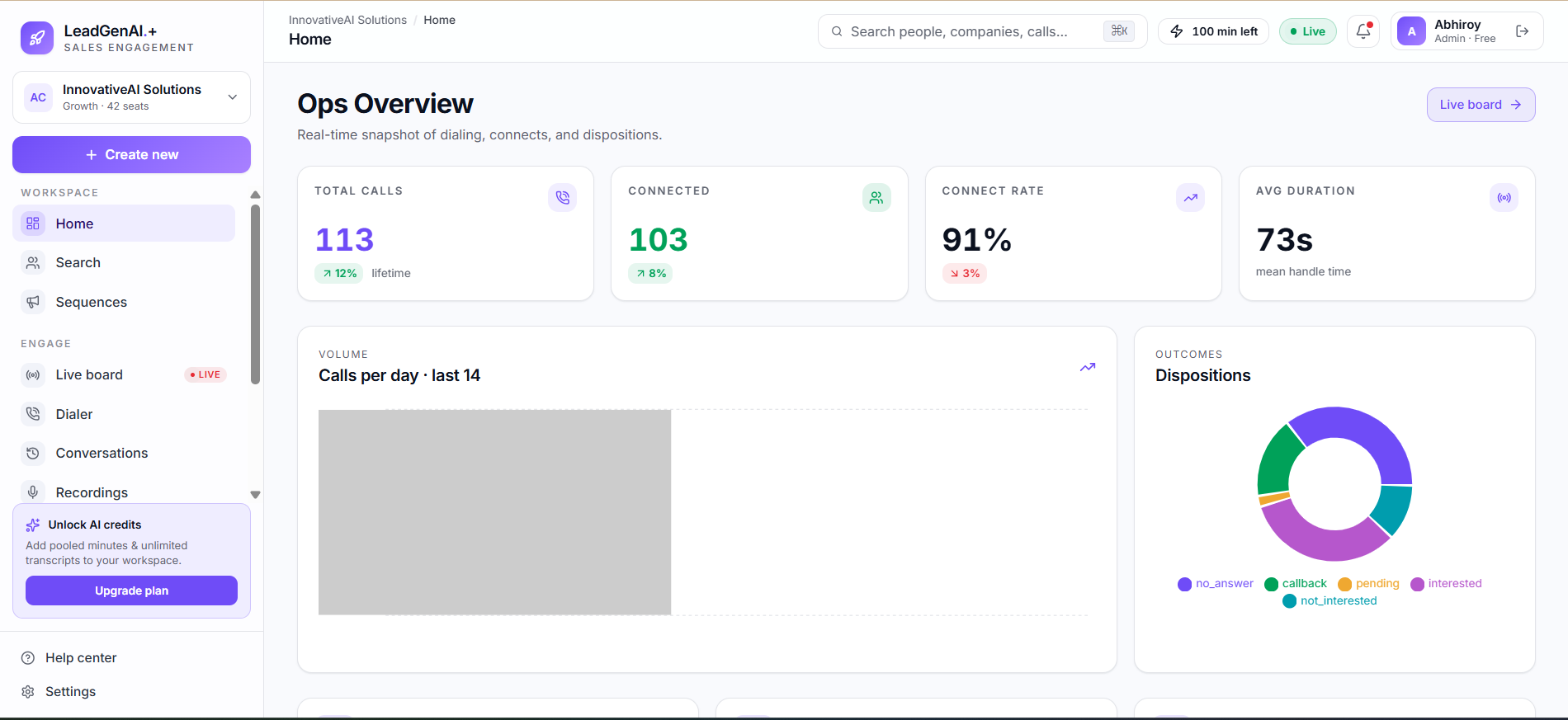
These aren't marketing numbers — they're pulled directly from the "InnovativeAI Solutions" workspace inside LeadGenPlus.ai, the same one our sales team uses every day, captured at a single point in time.
Everything an outbound sales team needs in one workspace — from finding leads to reviewing what happened on the call.
A real-time snapshot of dialing activity — total calls, connects, connect rate, average handle time, a 14-day call volume chart, and a dispositions breakdown. It's the first screen anyone on the team sees after logging in, so pipeline health is visible before a single filter is touched.
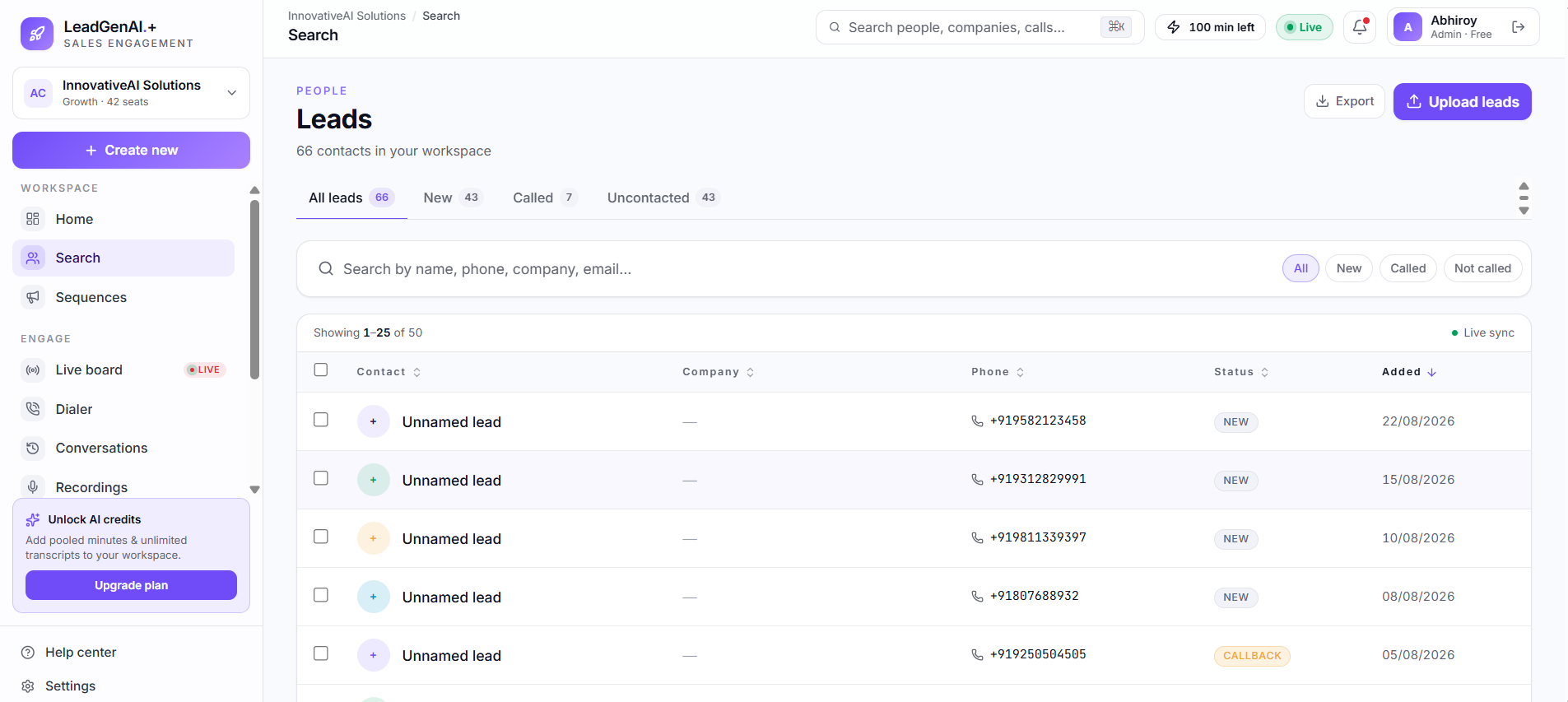
A centralized contact database with status tabs (New, Called, Uncontacted), CSV lead upload/export, and live sync as the team works through the list. A dedicated search bar lets reps jump straight to a name, phone number, company, or past call.
Multi-step outbound engagement plans, so leads move through a consistent follow-up cadence instead of relying on memory. It sits in its own section of the sidebar, separate from one-off dialing.
A click-to-call dialer built directly into the workspace, so reps can move from a lead record straight into a call without switching to a separate phone app or browser tab.
A real-time activity board for the team, marked "Live" in the sidebar — visibility into what's happening across the workspace as it happens, useful for a manager checking in without interrupting reps mid-call.
A running history of conversations tied to each lead, so context isn't lost between calls or between reps if a lead is picked up by someone else next time.
Call recordings stored against each lead for coaching, quality review, and dispute resolution — sitting in the same sidebar group as Conversations and the Live Board.
Pooled AI minutes for the workspace that power unlimited call transcripts once unlocked on a paid plan — shown in-app as a running "minutes left" counter next to the workspace's live status.
Every logged call in LeadGenPlus.ai ends with a disposition — a single label that says what actually happened. It's what turns a list of calls into a pipeline the team can act on, and it's the same breakdown shown as a donut chart on the Ops Overview dashboard.
The call went out but nobody picked up — queued back into the list for a later attempt.
The lead asked to be contacted again at a specific time, rather than being called cold a second time.
The conversation is still in progress — waiting on a document, an internal decision, or a follow-up step.
A genuine positive outcome — the lead is qualified to move further down the funnel.
A clear no, logged so the lead isn't called again and skewing the team's active pipeline.
LeadGenPlus.ai is built as a multi-seat workspace product, not a single-user tool — the same shape as the SaaS platforms we build for clients.
The workspace shown in these screenshots is on a "Growth" plan with 42 seats, while the individual account is tagged "Admin · Free" — reflecting a tiered model where the workspace plan and an individual's own usage allowance (a running "minutes left" counter) are tracked separately.
An "Unlock AI credits" panel in the sidebar offers pooled minutes and unlimited transcripts at the workspace level, with an in-app "Upgrade plan" action — the same self-serve upgrade pattern used across most modern SaaS products, built here for our own team first.
LeadGenPlus.ai started as an internal tool. Our own sales team needed a way to work a lead list without juggling spreadsheets, a separate dialer app, and a notes document — so we built one, and kept refining it against how our team actually works:
Ops Overview
Leads & Search
The workspace is built around one continuous loop, from a fresh lead list to a reviewed call.
New contacts come in via CSV upload into the Leads database, landing in the "New" tab.
Leads are placed into a multi-step outreach sequence instead of being called one-off.
Reps work the queue through the built-in dialer; each call updates the lead's status automatically.
Call recordings and conversation history stay attached to the lead for the next follow-up.
Connect rate, call volume, and dispositions roll up in real time on the team's dashboard.
Before LeadGenPlus.ai existed, our own outbound process looked like most small teams' does — a shared spreadsheet of contacts, a phone for dialing, and a running mental note (or a sticky note) of who still needed a callback. It worked, in the sense that calls got made, but nothing about it scaled past a couple of people without someone spending half their day reconciling who called whom.
Status updates lived in whoever's head made the call. If a rep was out sick, their leads sat untouched because no one else had visibility into where those conversations had left off. Reporting on "how many calls did we make this week" meant manually counting rows in a spreadsheet, and it was usually out of date by the time anyone looked at it.
The same team now works from one shared workspace: leads land in a synced database instead of a spreadsheet, sequences enforce a consistent follow-up cadence instead of relying on memory, and every call's outcome is logged as a disposition the moment it happens. The Ops Overview dashboard reflects that in real time — the 113 calls, 103 connects, and 91% connect rate shown earlier in this page updated automatically as the team worked, with nobody counting anything by hand.
That shift — from "someone has to go find the answer" to "the answer is already on the dashboard" — is the actual problem LeadGenPlus.ai was built to solve, and it's the same shift we aim for whenever we build an internal ops tool for a client.
A workspace holding real customer contact data has to take access seriously, even as an internal tool.
Leads, calls, and recordings all live inside a single named workspace — "InnovativeAI Solutions" in this case — rather than a shared pool across unrelated accounts, and every screen in the app carries that workspace context in its breadcrumb.
Each person signs in with their own account — shown here as an "Admin" seat — rather than a single shared login, which keeps an audit trail of who made or logged which call as the team scales past a couple of reps.
Most sales engagement tools are priced and built for large outbound teams, with setup that takes longer than it's worth for a lean team. As a development company that also runs its own outbound outreach, we felt that gap directly — so instead of forcing our process into someone else's tool, we built the workspace around how our team already works.
That's also why the numbers on this page are real, not staged. The 42-seat Growth workspace, the 66 contacts, and the 91% connect rate are what our own team was looking at when these screenshots were taken — not a demo environment built for a case study.
Building it in-house also meant we could treat it the way we treat client projects: real usage first, feature requests coming from the people actually dialing, not from a roadmap written in isolation. The Dialer, Sequences, and Recordings modules all exist because our own reps asked for them after using an earlier, simpler version of the workspace.
LeadGenPlus.ai is designed around the same problem for any B2B outbound team: a lead list that needs to be worked consistently, a dialer that doesn't require switching apps, and a manager's view of what's actually happening — calls made, connects, and where each lead stands — without exporting a spreadsheet to find out.
It's currently our own internal tool, refined against real day-to-day use inside Innovative AI Solutions before we'd consider offering it more broadly. If you're building something similar for your own sales team, this project is a good example of the kind of internal SaaS tooling we build.
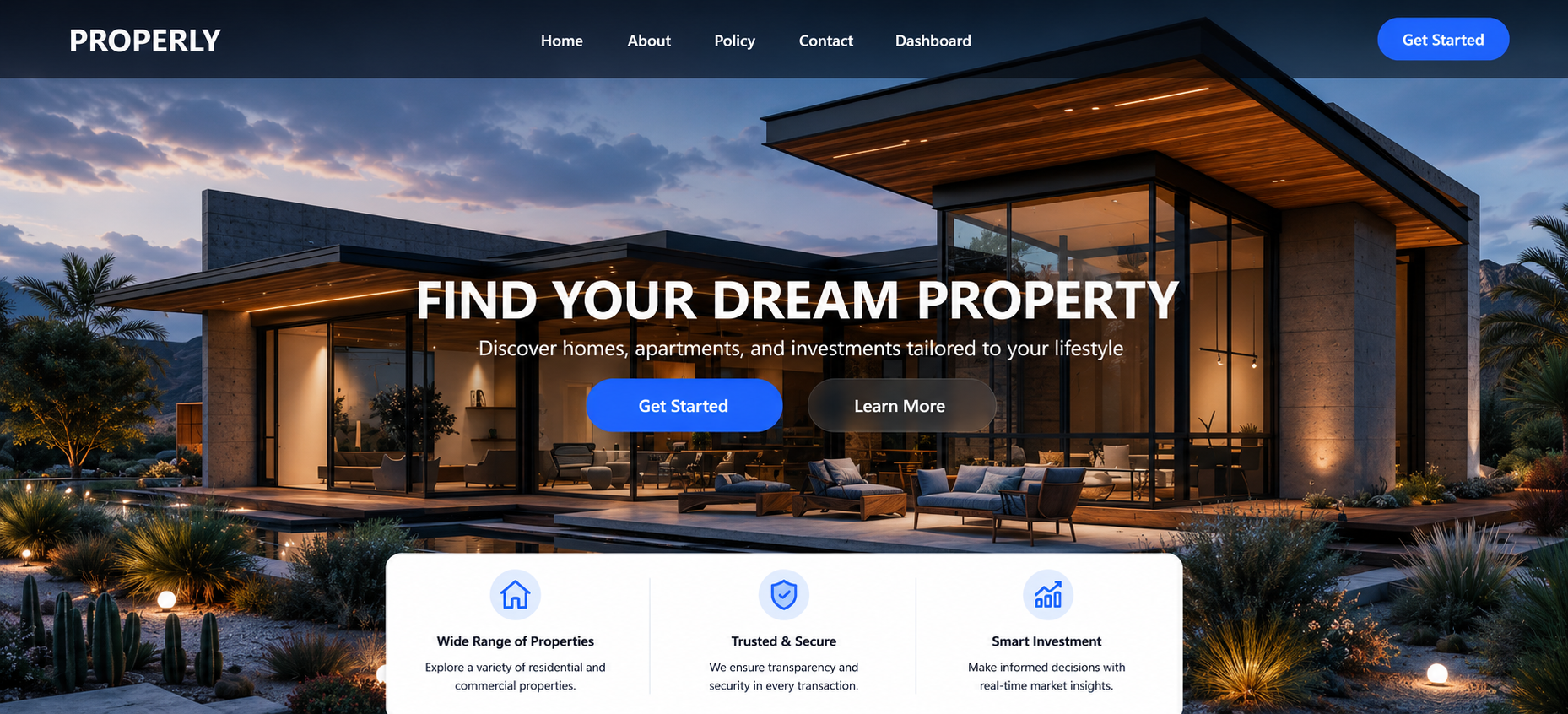
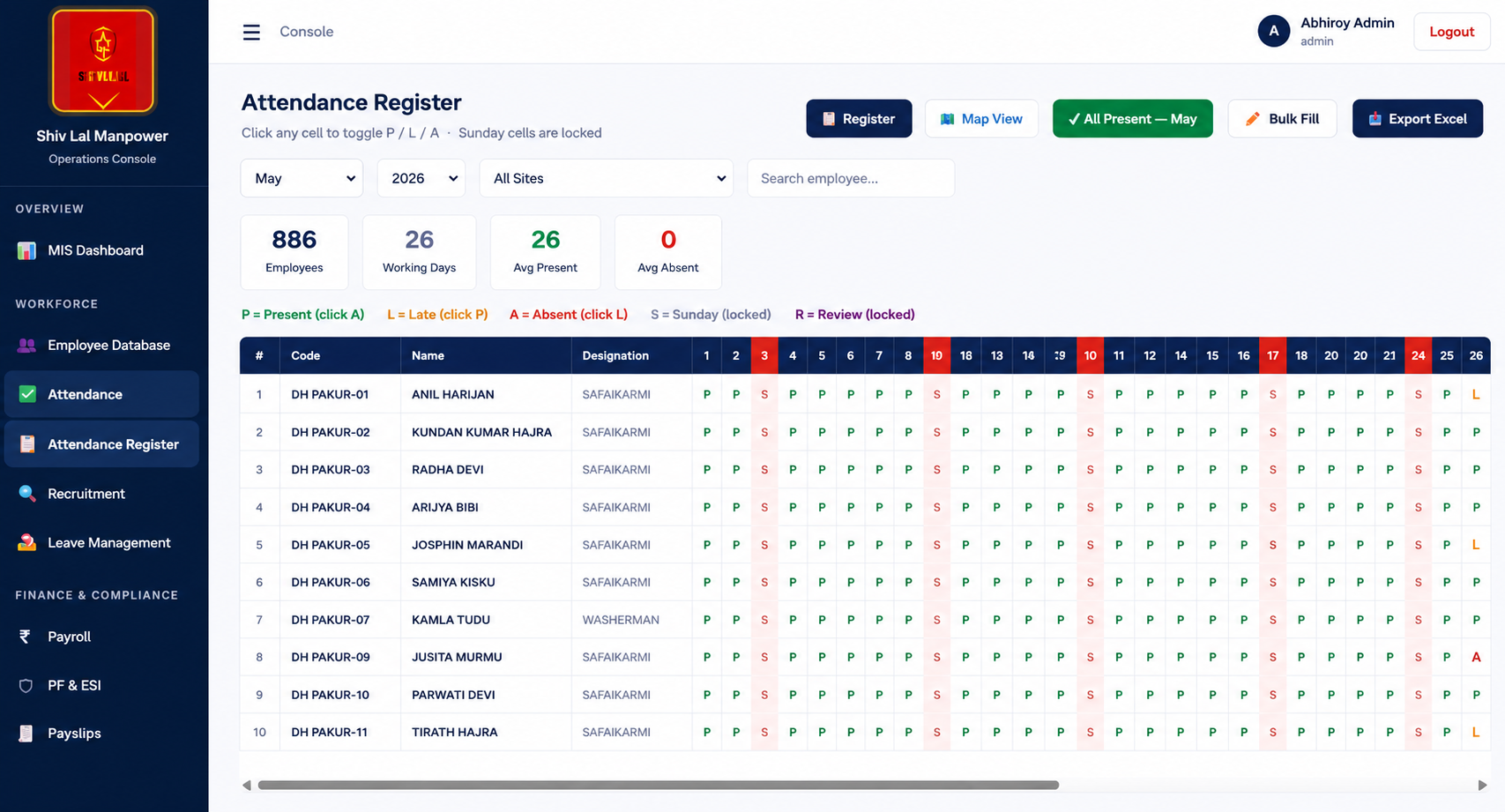
The same underlying pattern — a workspace with role-based seats, a live-syncing database, and a real-time analytics view — shows up across most of the SaaS-style platforms in our portfolio, from Properly's investor dashboard to Shivlal Manpower's operations console. LeadGenPlus.ai is simply the version we built for ourselves.
There's a difference between a tool a company builds to sell and a tool a company builds to actually run its own operations on. LeadGenPlus.ai is the second kind. Every module on this page — the dialer, the lead statuses, the dispositions chart — earns its place because our own team relies on it to hit its own call targets, not because it looked good on a features list.
That's also the standard we hold client work to. If we wouldn't run our own team on it, we don't ship it to a client either.
As our own sales team's usage grows past the current 42-seat Growth workspace, the areas we're watching most closely are deeper reporting on the dispositions breakdown over time, and tighter integration between the Sequences and Dialer modules so a rep spends less time deciding what to do next and more time on the call itself.
None of that is a public roadmap commitment — it's simply where our own internal usage is pushing the product next, the same iterative process any team goes through with software it depends on daily.
We build internal SaaS tools the same way we built LeadGenPlus.ai — around how your team actually works, not a generic template. Let's talk about what you're building.
Start Your Project →Can't find the answer you're looking for? Our team is happy to walk you through anything about our AI services, pricing, or process.
Talk to us →Copyright © 2015–2026 Innovative AI Solutions. All Rights Reserved. | Privacy Policy | Terms & Conditions