The Big Question
What happens when your infrastructure configuration is no longer scattered across manual scripts, stale documentation, and a live system that has drifted from both? How do you track who changed what, and how do you recover from a catastrophic failure when no one remembers the exact configuration?
Traditional infrastructure management often suffers from a lack of version control, transparency, and consistency . GitOps addresses these problems by turning Git into the control plane for your entire system, making infrastructure as manageable as application code .
What Is GitOps?
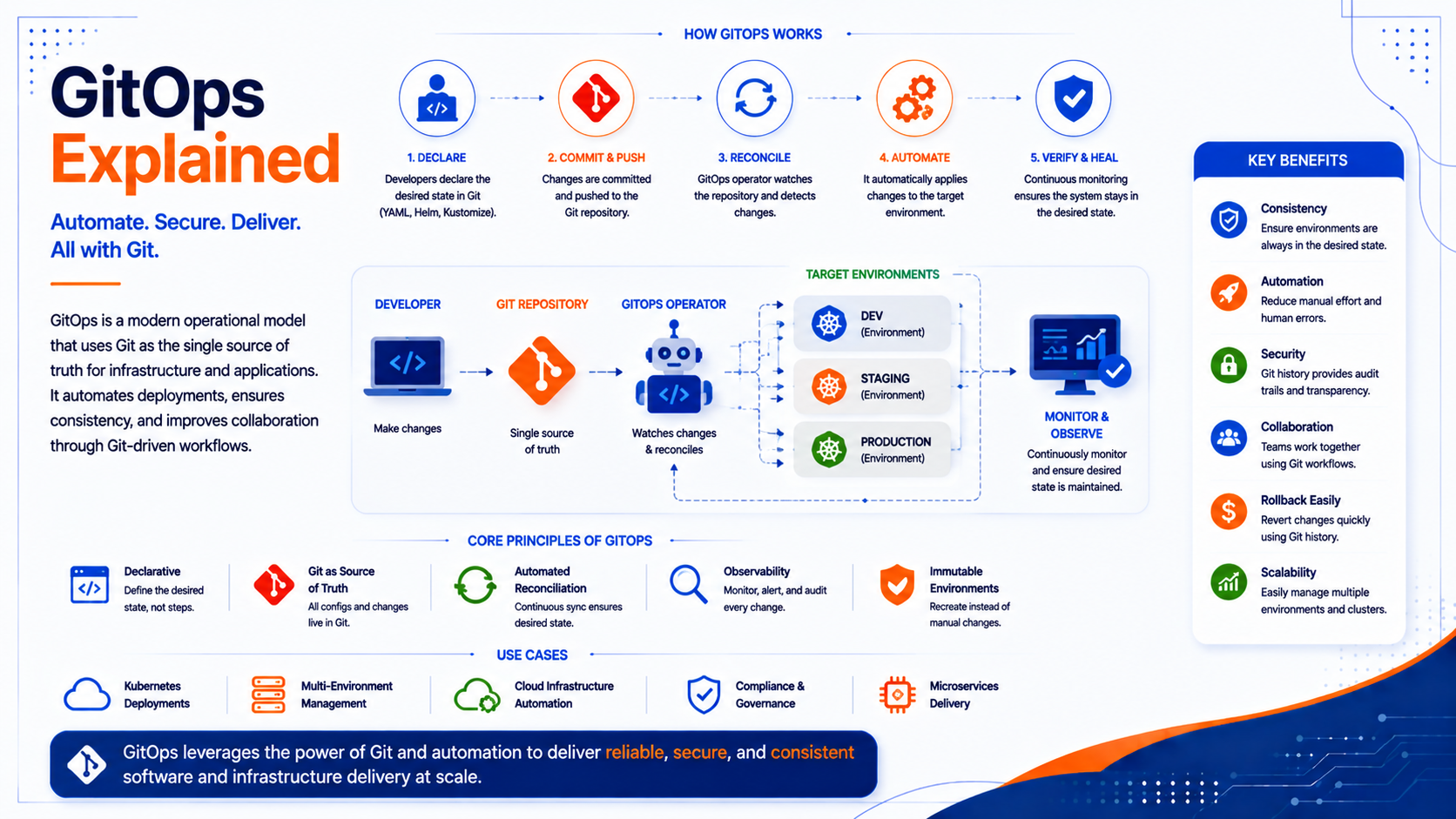
GitOps is an operational framework where a Git repository is the single source of truth for declarative infrastructure and application configurations . An automated agent, sometimes called a GitOps operator, continuously monitors the repository and reconciles the live environment to match the desired state defined in it . The term was first introduced by Weaveworks in 2017 and has since become a widely adopted approach for managing cloud-native and Kubernetes-based infrastructure .
The Core Principles
GitOps is built on four foundational principles:
-
Declarative Configuration: You describe the desired state of your system (e.g., "three replicas of this service running") rather than a sequence of steps to achieve it. This is in contrast to imperative scripts that execute a series of commands .
-
Git as the Single Source of Truth: All configuration files, which define your desired state, are stored in a Git repository. This makes every change versioned, auditable, and reversible .
-
Automated Reconciliation: A GitOps operator continuously checks the live system against the desired state in Git. If it detects a difference (a "drift"), it automatically applies the necessary changes to sync them .
-
Agent-Based Pull Deployment: Instead of a CI/CD pipeline pushing changes to the environment, an agent running inside the environment pulls the desired configuration from Git. This model improves security by avoiding the need to distribute production credentials to external systems .
GitOps vs. DevOps: What's the Difference?
GitOps is not a replacement for DevOps but a specific implementation pattern within the broader DevOps philosophy .
-
DevOps is a cultural and organizational model focused on collaboration between development and operations teams, automation, and shared ownership of the entire software delivery lifecycle .
-
GitOps is a more prescriptive methodology that applies DevOps principles to infrastructure management. It dictates specific practices: declarative configuration, a single source of truth in Git, and automated reconciliation .
A common point of confusion is the role of CI/CD. In a GitOps workflow, the CI pipeline builds and tests the application code, often producing a container image. However, the deployment is handled by the GitOps operator, which pulls the new configuration from Git rather than a CI system pushing it directly to the production environment .
How GitOps Works: The Workflow
A typical GitOps workflow follows a clear, automated path :
-
Commit: A developer makes a change to the application code or infrastructure configuration and pushes it to a Git repository .
-
Pull Request: The developer opens a pull request to review the change. This triggers automated checks (like policy-as-code) and requires peer approval .
-
Merge: Once approved and merged into the main branch, the change becomes the new desired state.
-
CI Pipeline (Optional): The merge can trigger a CI pipeline that builds and tests the application, pushing a new container image to a registry. The pipeline then updates a deployment manifest in the configuration repository with the new image tag .
-
Reconciliation: The GitOps operator (e.g., Argo CD or Flux) running inside the target environment detects the change in the Git repository. It compares the desired state with the actual state of the system .
-
Sync/Deploy: The operator applies the necessary changes to the live environment to reconcile it with the desired state declared in Git .
This pull-based workflow ensures that the live environment is always an exact reflection of what is defined in Git, eliminating manual changes and configuration drift .
Key Benefits of GitOps
Implementing GitOps provides significant operational advantages.
Enhanced Security and Compliance
The pull-based deployment model significantly reduces the security attack surface by eliminating the need to grant CI/CD systems direct credentials to the production environment . Furthermore, all changes are gated through pull requests, which can be protected with required reviews and static analysis, creating a clear audit trail of who changed what, when, and why .
Improved Velocity and Reliability
Automation is central to GitOps, enabling faster and more frequent deployments. The declarative nature of the configuration ensures consistency and repeatability across all environments . If a deployment introduces a bug, rolling back is as simple as reverting a commit in Git, significantly reducing the Mean Time To Recovery (MTTR) .
Simplified Disaster Recovery
Because the entire desired state of the system is stored in Git, you can quickly redeploy your entire infrastructure and applications from scratch . Recovery becomes a matter of restoring the Git repository and allowing the operator to reconcile the system to its desired state.
Reduced Configuration Drift
In traditional environments, manual fixes and emergency changes can cause the live system to diverge from its configuration files. A GitOps operator continuously corrects this drift by automatically reverting any manual changes to the state defined in Git .
Challenges and Best Practices
While GitOps offers powerful benefits, it also introduces new challenges that teams must address.
Common Challenges
-
Learning Curve: Teams need a solid working knowledge of Git workflows and the target platform (usually Kubernetes) .
-
Secret Management: Storing raw secrets (like passwords and API keys) in a Git repository is a security risk. Tools like Sealed Secrets, SOPS, or HashiCorp Vault are required to manage secrets securely .
-
Repository Organization: As the number of services and environments grows, organizing Git repositories becomes complex. Teams need to decide between a single monorepo or multiple repositories .
-
YAML Complexity: A single service can require multiple manifests. As teams grow, the volume of YAML files can create significant cognitive overhead for developers .
Best Practices
-
Start Small: Begin with a pilot project using a single service and one environment before scaling .
-
Adopt Progressive Delivery: Use strategies like blue-green or canary deployments (via tools like Argo Rollouts or Flagger) to reduce the risk of new releases .
-
Implement Policy-as-Code: Enforce organizational rules automatically with tools like OPA/Gatekeeper or Kyverno to prevent misconfigurations .
-
Bridge IaC and GitOps: Use your Infrastructure as Code tool (e.g., Terraform, Pulumi) to provision the underlying cloud resources and write key metadata into Kubernetes resources that your GitOps operator can consume .
-
Standardize Workflows: Keep environment strategies simple (choose between branches or directories), standardize secret management, and provide scaffolding templates to reduce developer friction .
Implementation Roadmap
Phase 1: Foundation (Weeks 1-4)
-
Prepare Declarative Configuration: Ensure your application and its infrastructure are defined declaratively (e.g., as Kubernetes YAML) .
-
Choose a Git Repository: Set up a dedicated Git repository to store your configurations .
-
Select a GitOps Operator: Choose a tool like Argo CD or Flux CD to run inside your cluster .
Phase 2: Pilot and Automate (Weeks 5-8)
-
Deploy GitOps Operator: Install and configure your chosen operator to watch your Git repository.
-
Set Up a Simple CI Pipeline: Create a CI pipeline to build and test application changes and update image tags in the configuration repo .
-
Implement Validation: Add Kubernetes schema validation, YAML linting, and policy checks to every pull request to catch errors early .
Phase 3: Scale and Optimize (Weeks 9-12+)
-
Standardize Approach: Implement consistent repository structures, branch strategies, and templates for deployments and Helm values .
-
Secure Secrets: Integrate a secrets management solution into your workflow .
-
Expand Gradually: Once the process is stable and patterns feel repeatable, expand the GitOps workflow to more services and environments .
Frequently Asked Questions
Q1: What is GitOps?
GitOps is an operational framework where a Git repository is the single source of truth for declarative infrastructure and application configurations. An automated operator continuously reconciles the live system's state to match the desired state declared in Git .
Q2: What is the difference between GitOps and CI/CD?
CI/CD (Continuous Integration/Continuous Deployment) is a broad set of practices for automating the software delivery lifecycle. GitOps is a specific pattern for continuous deployment where a pull-based reconciliation agent ensures the live environment matches the state defined in Git. The CI pipeline typically builds and tests the application, while the GitOps operator handles the deployment .
Q3: Is GitOps only for Kubernetes?
GitOps is most commonly associated with Kubernetes and is a natural fit for its declarative APIs and controller-based architecture. However, the principles of declarative configuration, Git as the source of truth, and automated reconciliation can be extended to other platforms and Infrastructure as Code (IaC) tools .
Q4: How do I handle secrets in GitOps?
Storing raw secrets in a Git repository is not recommended and is a security risk. Instead, you should use tools like Sealed Secrets, SOPS, or HashiCorp Vault to encrypt secrets before committing them to Git. Your GitOps operator can then decrypt them during deployment .
Q5: How can Innovative AI Solutions help?
We help organizations design, implement, and scale GitOps workflows to modernize their infrastructure management, improve security, and increase deployment velocity. Based in Delhi, serving clients across India.
Final Thought
The shift is clear: from treating infrastructure as a set of fragile, manually maintained environments to managing it as a version-controlled, auditable, and automatically reconciling system. GitOps provides a proven model for achieving this transformation. By extending the familiar and trusted Git workflow to infrastructure, teams gain enhanced security, faster deployments, and a reliable path to recovery. GitOps is not just a technical pattern; it is becoming a default expectation for how serious teams manage infrastructure in the cloud-native era .
Contact Us:
Phone: +91 7464 099 059 / +91 9689967356
Email: info@innovativeais.com
Address: Netaji Subhash Place, Pitampura, Delhi – 110034
Website: https://innovativeais.com
About the Author
Abhishek Kumar
Founder & CEO, Innovative AI Solutions
5+ years building AI, cloud, and enterprise systems. Based in Delhi, serving clients across India.
Related services: to apply this in your business, explore our DevOps and CI/CD and cloud services.