The Big Question
Every application starts with a fixed capacity. You provision a server, or a cluster of servers, sized for what you expect the load to be. This works until it doesn't.
The problem is that traffic is not constant. It follows daily rhythms, weekly patterns, and unpredictable spikes. A retail site sees a surge on Friday nights. A news platform gets a flood when a story breaks. A SaaS product experiences a burst when a customer runs a batch import . If you provision for peak capacity, you pay for idle servers during quiet periods. If you provision for average capacity, you degrade or fail during spikes.
Manual scaling having an operator decide to add or remove servers works for predictable, slow-moving changes. It fails for everything else. By the time a human notices the load and reacts, the system is already struggling. The delay between detecting demand and provisioning new resources is a latency tax that users pay in slow responses and timeouts .
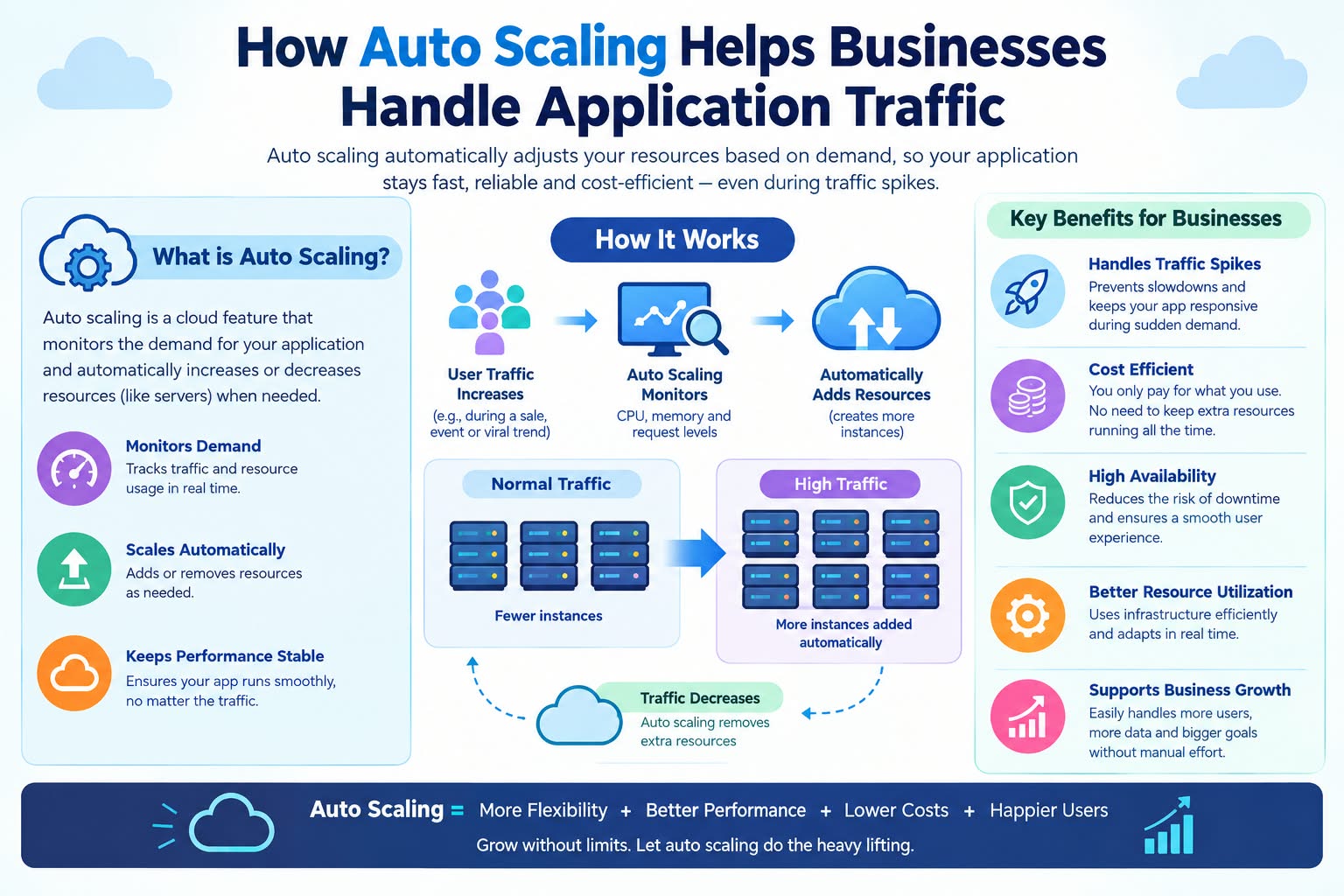
Auto scaling solves this by automating the provisioning decision. It monitors metrics CPU utilization, memory usage, queue depth, network throughput and adds or removes capacity based on rules you define . The goal is not just to handle spikes, but to match capacity to demand as closely as possible, eliminating both over-provisioning and under-provisioning .
The business outcome is straightforward: you pay for what you use, and you don't fail when demand exceeds expectations.
Cost Based on Scaling Model
Auto scaling costs depend on the scaling model you choose, the platform you run on, and increasingly the number of scaling events your infrastructure generates. Here's the 2026 landscape:
| Scaling Model | Implementation Cost (India) | Monthly Run Cost | Best For |
|---|---|---|---|
| Scheduled Scaling | ₹50,000 – ₹1,50,000 | ₹15,000 – ₹50,000 | Predictable traffic patterns, known peak hours |
| Metric-Based Autoscaling | ₹80,000 – ₹3,00,000 | ₹20,000 – ₹80,000 | Variable demand, unpredictable spikes |
| Predictive Autoscaling | ₹1,50,000 – ₹5,00,000 | ₹40,000 – ₹1,50,000 | Workloads with historical patterns and recurring peaks |
The new cost line item: autoscaling event fees.
In February 2026, AWS, Azure, and GCP began charging for Kubernetes node pool autoscaling decisions. A mid-sized fintech running 40 node pools across three regions saw $12,700 per month in scale-up event fees alone . The math is brutal: 40 node pools scaling up an average of 90 times per day generates 3,600 events per day, 108,000 events per month. At 10-15 cents per event, the fees stack up quickly .
Platform pricing (2026):
For non-Kubernetes workloads, the autoscaling feature itself is often free. AWS EC2 Auto Scaling has no additional fees you pay only for the resources consumed . Azure Virtual Machine Scale Sets follow the same model. The cost is in the compute, not the autoscaler.
For Kubernetes, the control plane charges apply: EKS at approximately $73/month per cluster**, AKS at **$0 for the base tier, and GKE at $73/month . The autoscaler software (Karpenter, Cluster Autoscaler) is Apache 2.0 and free. The billing is where the money goes .
The consolidation savings:
Switching to larger instances increased compute spend by 4% for one fintech but reduced autoscaling events by 62%, saving $7,900 per month . Consolidation using fewer, larger nodes reduces the number of scaling decisions your cluster has to make. For some workloads, fewer nodes with more capacity is cheaper than many small nodes that scale frequently.
Breakdown by Scaling Type
Auto scaling is not a single technique. There are two fundamental directions, and choosing the wrong one for your workload creates problems.
Vertical Scaling (Scale Up/Down)
Vertical scaling changes the capacity of an existing resource. You move an application to a larger VM, or increase CPU and memory allocated to a container . The advantage is simplicity no distributed state to manage. The disadvantage is downtime. Vertical scaling typically requires temporarily making the system unavailable while it is redeployed, which is why automating vertical scaling is less common .
When to use it: Stateful services, databases, and workloads where a single instance's capacity is the bottleneck. VPA (Vertical Pod Autoscaler) in Kubernetes handles this for pods, adjusting CPU and memory requests based on historical usage .
Horizontal Scaling (Scale Out/In)
Horizontal scaling adds or removes instances of a resource. The application continues running without interruption while new resources are provisioned . This is what most people mean when they say "auto scaling." It is the only direction that auto scaling tools natively handle automatic scaling is limited to horizontal .
When to use it: Stateless web servers, API tiers, worker pools, and any workload designed to run as multiple replicas behind a load balancer .
Metric-Based vs. Scheduled vs. Predictive
Metric-based scaling is reactive. It monitors a metric CPU usage, queue depth, network throughput and scales when the metric crosses a threshold . The delay between demand rising and new capacity coming online means you should never set your target too close to full utilization. Typical resource utilization targets range between 50-70% to account for the lag .
Scheduled scaling is proactive. You know you have increased workload on a specified date or period of time, so you scale before it happens . This works for predictable patterns: retail promotions, business hours, weekly batch jobs.
Predictive scaling combines both. It uses historical trends to forecast future load and scales proactively, while still responding to real-time anomalies . Google Cloud's predictive autoscaling recalculates forecasts every few minutes, adjusting to the latest load changes .
Breakdown by Developer Type (2020-2026)
Auto scaling implementation requires expertise in cloud platforms, metrics, and load balancing. The Indian talent market offers a range of options:
| Developer Type | Hourly Rate (India) | Typical Engagement | What They Deliver |
|---|---|---|---|
| Freelancer | ₹1,000 – ₹3,000 | ₹25,000 – ₹75,000 | Basic EC2 Auto Scaling groups, scheduled scaling rules |
| Small Agency | ₹2,500 – ₹6,000 | ₹1,50,000 – ₹5,00,000 | Metric-based autoscaling, load balancer integration |
| Mid-Size Firm | ₹6,000 – ₹12,000 | ₹5,00,000 – ₹25,00,000 | Kubernetes autoscaling (HPA, Cluster Autoscaler), multi-region |
| Enterprise Consultancy | ₹12,000 – ₹20,000+ | ₹25,00,000+ | Predictive autoscaling, Karpenter consolidation, FinOps governance |
The critical question before hiring: "Show me a production autoscaling deployment you built that handles both scale-up and scale-down correctly." Many teams can scale up. Fewer have built the scale-down logic that actually saves money without causing flapping .
Why Prices Changed in 2026
Three forces have reshaped auto scaling economics.
First, autoscaling event fees became a real line item. As of February 2026, AWS, Azure, and GCP charge for Kubernetes node pool autoscaling decisions. AWS charges per event (each node addition or removal is a separate event). GCP charges per scaling decision (one decision that adds three nodes is charged once). Azure falls somewhere in between . The billing model now matters as much as the autoscaler software.
Second, the consolidation calculus became clearer. A fintech running 40 node pools reduced autoscaling events by 62% by switching to larger instances, saving $7,900 per month despite a 4% increase in compute spend . Karpenter's consolidation capabilities aggressively removing underutilized nodes can reduce autoscaling-related charges by 40% for some teams . The goal is not to minimize node size, but to minimize the frequency of scaling decisions.
Third, AI-powered autoscaling emerged as a production-ready approach. AutoScaleAI, validated on Azure Kubernetes Service, demonstrated up to 38% operational cost savings and improved SLA compliance by combining gradient boosting and LSTM forecasting with anomaly detection . The system supports both forecast-driven proactive scaling and anomaly-driven reactive scaling for abrupt deviations .
Pro Tips to Save Money in 2026
1. Always use paired scale-out and scale-in rules. If you only scale out, you pay for peak capacity forever. If you only scale in, you fail during spikes. Use both, and use the same metric to control both directions. Otherwise, you risk flapping scaling out because CPU is high while scaling in because memory is low .
2. Set your target below full utilization. Metric-based scaling is a lagging operation. Utilization metrics take minutes to propagate, and provisioning new resources takes additional time. A typical target range is 50-70% utilization, not 90%. Setting the target too close to full capacity risks exhausting existing resources before new capacity comes online .
3. Consolidate to reduce scaling events. In the era of per-event billing, fewer nodes with more capacity can be cheaper than many small nodes that scale frequently. A 4% increase in compute spend reduced autoscaling events by 62% and saved $7,900 per month for one fintech .
4. Use predictive scaling for known patterns. If you know traffic spikes every Monday morning, predictive scaling can provision capacity before the spike arrives. Google Cloud's predictive autoscaling recalculates forecasts every few minutes, adapting to the latest load changes .
5. Don't neglect the load balancer. Auto scaling and load balancing are complementary. Amazon EC2 Auto Scaling automatically registers and deregisters instances from the load balancer as they launch or terminate . But the load balancer's health checks must be tuned to avoid routing traffic to instances that aren't ready.
6. Design stateless services for horizontal scaling. Auto scaling assumes your application can run as multiple identical replicas. If requests from the same user must always hit the same instance, horizontal scaling is difficult . Design for statelessness store session state externally, avoid instance affinity, and treat each request independently .
7. Test scale-down behavior, not just scale-up. Most teams test what happens when traffic spikes. Fewer test what happens when traffic drops. Long-running tasks can prevent clean shutdown, and instances might be terminated mid-request if scale-in protection isn't configured .
Questions to Ask Before Hiring
Before you commit budget to any auto scaling engagement, ask these questions.
1. "How do you handle scale-in without disrupting in-flight requests?" The right answer involves connection draining, lifecycle hooks, and scale-in protection for long-running tasks .
2. "What metrics do you use, and why?" CPU is the default, but it's not always the best. Queue depth, request latency, and custom application metrics often predict demand more accurately . A team that defaults to CPU for everything hasn't thought deeply about scaling.
3. "How do you avoid flapping?" Flapping happens when scale-out and scale-in rules use different metrics or thresholds that can both be satisfied simultaneously. The right answer involves using the same metric for both directions and setting hysteresis .
4. "How do you account for autoscaling event fees?" In 2026, this is a real cost. A team that doesn't monitor scaling event frequency is leaving money on the table .
5. "Show me a production autoscaling deployment you built that includes scale-down." Portfolios show scale-up demos. Production systems expose the harder problem: safely removing capacity without breaking the application.
Why Delhi is a Great Hub for Auto Scaling
Delhi-NCR has become a serious destination for cloud infrastructure work, and auto scaling is a core competency.
The region hosts a dense cluster of Global Capability Centers (GCCs) running cloud-native platforms on AWS, Azure, and GCP. These organizations operate at scale multi-account landing zones, managed EKS clusters, and fully automated CI/CD pipelines are table stakes. Auto scaling is not an optional feature; it's the difference between surviving a traffic spike and failing one.
India's engineering talent pool includes deep expertise in Kubernetes autoscaling, Karpenter consolidation, and FinOps governance. The region's GCCs are pioneering cost-efficient autoscaling architectures that rival global standards.
The time zone advantage matters too. A Delhi-based team can sync with Middle East morning, European afternoon, and US East Coast evening covering the full global support window.
What We Offer
At Innovative AI Solutions, we treat auto scaling as an engineering discipline, not a configuration checkbox.
Our approach:
-
Scaling Audit First. We map your current traffic patterns, scaling rules, and cost structure. You cannot optimize what you haven't measured.
-
Paired Scale-Out and Scale-In Rules. Same metrics, proper hysteresis, no flapping. Your application scales up when it needs to and scales down when it doesn't.
-
Consolidation Strategy. We help you reduce scaling events using larger instances, Karpenter consolidation, and right-sizing to minimize per-event billing.
-
Predictive Scaling for Known Patterns. Historical trends drive proactive provisioning for recurring peaks.
-
Load Balancer Integration. Health checks, connection draining, and instance registration handled correctly.
-
Retained Operations. Monitoring, tuning, and cost optimization. Your autoscaling doesn't rot because someone forgot the scaling calendar.
Our principle is simple: small steps, fast iteration, data speaks.
Frequently Asked Questions
Q: What is auto scaling in simple terms?
Auto scaling automatically adjusts the number of running instances for your application based on demand. When traffic increases, it adds instances. When traffic decreases, it removes them. The goal is to have the right amount of capacity at all times not too much, not too little .
Q: What's the difference between vertical and horizontal scaling?
Vertical scaling changes the size of an existing resource (a bigger VM). Horizontal scaling changes the number of instances (more VMs). Auto scaling tools primarily handle horizontal scaling adding or removing instances. Vertical scaling usually requires downtime and is less commonly automated .
Q: How does auto scaling save money?
By matching capacity to demand. You don't pay for servers you don't need during quiet periods. Organizations using AI-powered autoscaling report up to 38% operational cost savings . The FinOps discipline of right-sizing and consolidation further reduces costs .
Q: What metrics should I use for auto scaling?
CPU utilization is the default, but it's not always the best. Queue depth (for worker pools), request latency (for web services), and custom application metrics often predict demand more accurately. The key is to find a metric that tracks demand up and down memory usage often rises with load but doesn't fall when load decreases .
Q: What are autoscaling event fees?
Beginning in February 2026, cloud providers charge for Kubernetes node pool autoscaling decisions. AWS charges per event (each node addition or removal). GCP charges per scaling decision. A fintech running 40 node pools saw $12,700 per month in these fees . Consolidating to fewer, larger nodes can reduce this cost.
Frequently Asked Questions (Extended)
Q: What is flapping in auto scaling?
Flapping occurs when scale-out and scale-in rules are satisfied simultaneously, causing the system to repeatedly add and remove instances. This happens when different metrics are used for each direction. Use the same metric for both scale-out and scale-in, and set proper thresholds to avoid it .
Q: How does predictive autoscaling work?
Predictive autoscaling uses historical trends to forecast future load. It provisions capacity proactively, before demand rises. Google Cloud's predictive autoscaling recalculates forecasts every few minutes, adapting to the latest load changes .
Q: What is the biggest mistake companies make with auto scaling?
Setting the target utilization too high. Metric-based scaling is a lagging operation metrics take time to propagate, and provisioning takes time to complete. A target of 90% CPU risks exhausting capacity before new instances come online. 50-70% is the typical target range .
Q: Does auto scaling work for stateful applications?
Horizontal auto scaling is designed for stateless workloads. Stateful applications require different approaches vertical scaling, sharding, or externalizing state to a shared store. If your application requires instance affinity (requests from the same user always hitting the same server), horizontal scaling is difficult .
Q: What's the first step I should take tomorrow?
Audit your current scaling configuration. Check three things: Do you have both scale-out and scale-in rules? Are they using the same metric? What is your target utilization? If you're scaling out but not in, or targeting 90% CPU, you're leaving money on the table or risking an outage. Fix those two things first. Not with a strategy document about cloud elasticity.
Contact Us:
Phone: +91 7464 099 059 / +91 9689967356
Email: info@innovativeais.com
Address: 9th Floor, Pearls Best Heights-I, Head Office: 904, Netaji Subhash Place, Delhi, 110034