The Big Question
What happens when your web application takes three seconds to render the first meaningful content because the server must assemble the entire page before sending a single byte? When the browser waits, the user waits, and the largest contentful paint slips further behind?
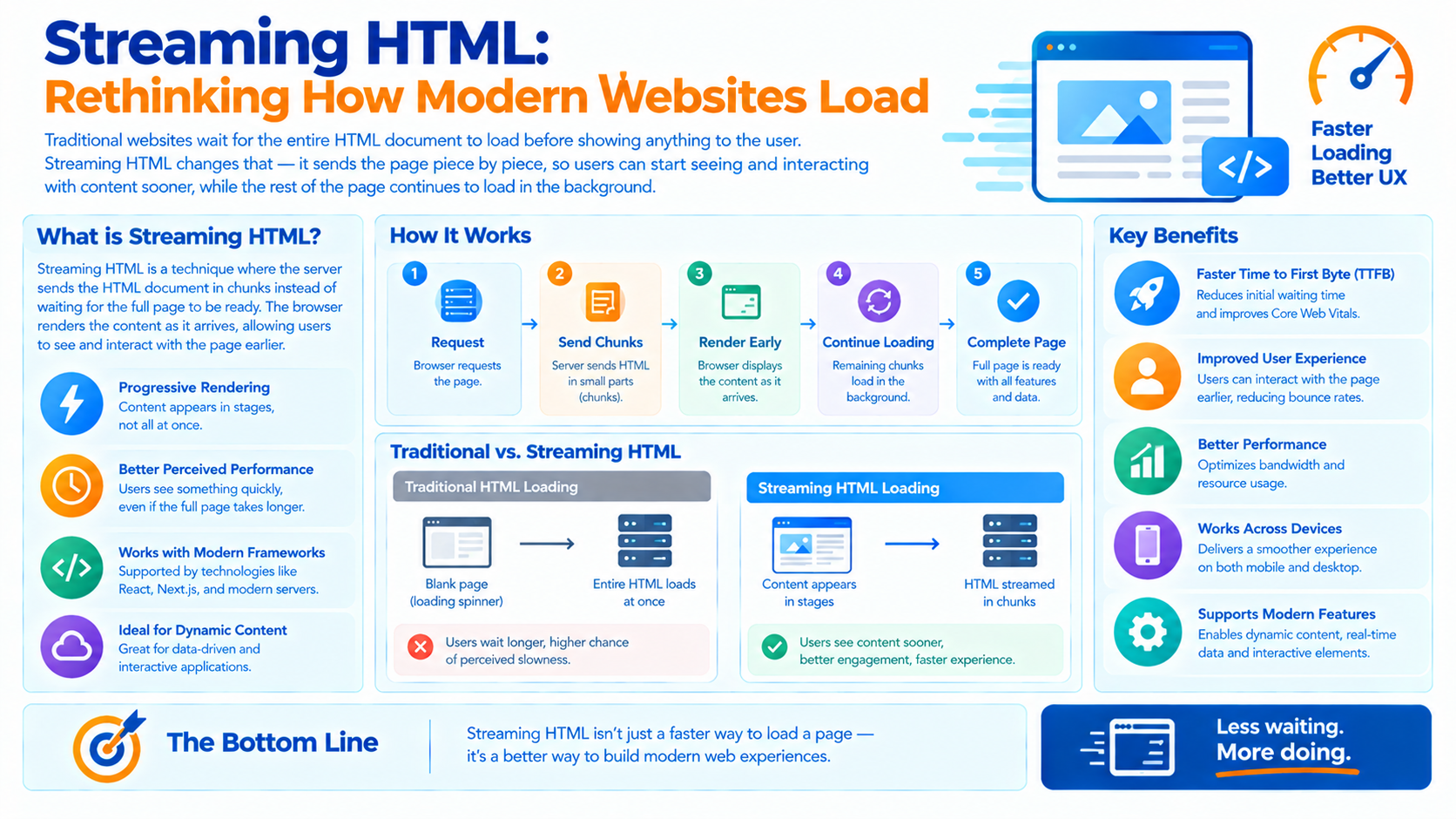
Streaming HTML solves this by sending the page in parts, as they are ready. The browser begins rendering immediately rather than waiting for the last piece of data.
The idea is not new. It is how the web worked before single-page applications and full-page server-side rendering became the norm. What is new is that modern frameworks now support it, and modern infrastructure makes it practical at scale.
What Streaming HTML Actually Means
Streaming HTML means the server sends the HTML response in chunks rather than as a single complete document. The browser receives the beginning of the document, begins parsing and rendering, and continues receiving additional chunks as they are produced.
The key properties:
-
The response is not buffered until complete
-
The browser starts rendering before the response finishes
-
Additional content and data can be delivered in the same response
-
The connection remains open until the stream is complete
This is fundamentally different from the traditional model, where the server assembles the full page often waiting on multiple data sources and then sends it in one piece.
Why the Traditional Model Is Slow
Traditional server-side rendering has a structural latency problem.
The sequence:
-
The request arrives.
-
The server fetches data from one or more sources.
-
The server renders the full page.
-
The server sends the complete HTML.
-
The browser parses and renders.
The critical problem is that the user sees nothing until step 4 completes. If any data source is slow, the entire page is delayed. The slowest dependency determines when the user sees anything.
This is sometimes called the "waterfall problem" the page cannot render until the last piece of data arrives, even if the first pieces were ready long ago.
How Streaming Fixes It
Streaming restructures the sequence.
The new sequence:
-
The request arrives.
-
The server sends the initial HTML shell immediately.
-
The browser begins parsing and rendering.
-
As data becomes available, the server streams additional HTML.
-
The browser renders each chunk as it arrives.
The user sees content immediately the header, the layout, the static portions while the dynamic portions stream in.
The critical insight: The slowest dependency no longer determines when the user sees anything. It determines only when the user sees that specific portion.
Streaming in Practice: The Two Approaches
Progressive HTML Streaming
The server renders HTML progressively and streams each portion as it completes. A typical pattern is to render the page shell first, then stream in the content sections as their data becomes available.
How it works:
-
The server sends the
<head>and initial layout immediately -
Content sections are streamed as placeholders, then filled
-
The browser renders each section as it arrives
Where it fits: Server-rendered applications, content-heavy sites, and pages where different sections have different data dependencies.
Suspense and Selective Hydration
Modern frameworks combine streaming with component-level boundaries. A component that requires data can be marked as "suspended" the server streams a fallback immediately and the actual content when ready.
How it works:
-
The initial HTML includes the page structure and fallbacks
-
Suspended components stream in as their data resolves
-
Client-side hydration happens selectively, prioritizing interactive components
Where it fits: Applications built with frameworks like React, where component boundaries define what can stream independently.
The Perceived Performance Effect
Streaming HTML improves both actual and perceived performance, but the perceived effect is often larger.
Actual performance: The total time to load the page may not change much. The server still fetches the same data and renders the same content.
Perceived performance: The user sees content much sooner. First Contentful Paint and Largest Contentful Paint improve because the browser is not waiting for the entire response.
This distinction matters. Users judge performance by what they see, not by when the last byte arrives. A page that renders its main content in 800 milliseconds and finishes streaming at 2 seconds feels faster than a page that renders everything at 1.5 seconds.
The Relationship to Core Web Vitals
Streaming HTML directly improves the metrics that measure user experience.
| Metric | How Streaming Helps |
|---|---|
| First Contentful Paint (FCP) | The browser renders the first content as soon as the initial chunk arrives |
| Largest Contentful Paint (LCP) | The main content can be streamed early rather than waiting for the full response |
| Interaction to Next Paint (INP) | Selective hydration prioritizes interactive components |
| Cumulative Layout Shift (CLS) | Streaming requires careful placeholder sizing to avoid layout shift |
The CLS consideration is important. Streaming content into placeholders can cause layout shifts if the placeholders are not sized correctly. This is a design requirement, not a reason to avoid streaming.
The Architectural Implications
Streaming changes how applications are structured.
Component Boundaries Matter
For streaming to be effective, the application must be structured so that independent sections can be rendered and streamed independently. A monolithic page render cannot stream; a page composed of independently resolvable sections can.
Data Fetching Moves Down the Tree
Instead of fetching all data at the top of the request and passing it down, data fetching moves into the components that need it. This allows each component to resolve independently and stream when ready.
Error Boundaries Become Essential
When a section streams independently, it can fail independently. Error boundaries ensure that one failed section does not break the entire page.
Caching Becomes More Granular
With streaming, different portions of the page may have different cache characteristics. A shared header can be cached aggressively; personalized content streams fresh.
When Streaming HTML Is the Right Choice
Streaming is not universally better. It has specific conditions where it excels.
Streaming helps when:
-
The page has multiple data dependencies with different latencies
-
Some content is static and some is dynamic
-
Perceived performance matters more than total load time
-
The application is server-rendered rather than fully client-rendered
Streaming helps less when:
-
The page depends on a single fast data source
-
The entire page must be consistent (no partial rendering)
-
The application is a single-page app with client-side data fetching
-
The architecture cannot be restructured around component boundaries
The Comparison with Client-Side Rendering
Single-page applications moved rendering to the client, which solved some problems and created others. Streaming HTML represents a partial return to server rendering, with the performance benefits of progressive delivery.
| Aspect | Client-Side Rendering | Streaming HTML |
|---|---|---|
| Initial render | After JavaScript loads | As soon as first chunk arrives |
| Data fetching | After render, client-side | During render, server-side |
| Perceived performance | Slower first paint | Faster first paint |
| SEO | Requires additional work | Native |
| Complexity | High (state management, hydration) | Lower (server-rendered) |
| Interactivity | Immediate after load | Selective hydration |
Streaming does not eliminate client-side interactivity. It changes when the user sees content sooner and when interactivity becomes available progressively.
Implementation Roadmap
Phase 1: Assess (Weeks 1-2)
-
Measure current performance. What are your FCP, LCP, and INP?
-
Identify slow data dependencies. Which sections wait on which data sources?
-
Evaluate architectural readiness. Can your application be structured around component boundaries?
Phase 2: Implement (Weeks 3-6)
-
Adopt a streaming-capable framework or rendering approach.
-
Restructure data fetching to move down the component tree.
-
Define component boundaries for independent streaming.
-
Implement error boundaries for independent failure.
-
Size placeholders to avoid layout shift.
Phase 3: Optimize (Weeks 7-10)
-
Measure FCP, LCP, and CLS improvements.
-
Tune streaming priorities so the most important content arrives first.
-
Optimize hydration for interactive components.
-
Monitor perceived performance through real user metrics.
Frequently Asked Questions
Q1: What is streaming HTML?
Streaming HTML means the server sends the HTML response in chunks rather than as a single complete document, allowing the browser to render progressively as content arrives.
Q2: Does streaming reduce total load time?
Not necessarily. It improves the time until the user sees content. Total load time may be similar, but perceived performance improves significantly.
Q3: Does streaming work with client-side frameworks?
Yes. Modern frameworks support streaming with component-level boundaries and selective hydration. The framework streams HTML for suspended components as their data resolves.
Q4: What about layout shift?
Streaming content into placeholders can cause layout shift if placeholders are not sized correctly. This is a design requirement—sized placeholders prevent the shift.
Q5: Is streaming HTML a replacement for single-page applications?
Not entirely. It is a different architecture with different trade-offs. Streaming suits content-heavy pages and server-rendered applications. SPAs suit highly interactive applications where client-side state dominates.
Q6: How can Innovative AI Solutions help?
We help organizations modernize web architectures from streaming HTML and selective hydration to performance measurement and Core Web Vitals optimization. Explore our services to see how we approach web engineering. Based in Delhi, serving clients across India.
Why Delhi is a Great Hub for Web Performance Engineering
Delhi is emerging as a hub for web and product engineering, backed by a thriving developer ecosystem and a mobile-first user base. In a market where network conditions vary widely and users expect fast experiences on modest devices, techniques like streaming HTML deliver measurable improvements in perceived performance.
What We Offer at Innovative AI Solutions
-
Web Performance Assessment: We measure FCP, LCP, INP, and CLS.
-
Streaming Architecture Design: We help structure applications for progressive rendering.
-
Framework Implementation: We implement streaming with appropriate frameworks and boundaries.
-
Core Web Vitals Optimization: We tune for the metrics that measure user experience.
-
Continuous Monitoring: We track real user performance over time.
Final Thought
The shift is clear: from waiting for the complete page to rendering as content arrives. Streaming HTML is not a new idea it is the original idea, rediscovered and made practical by modern frameworks and infrastructure. Organizations that adopt it will deliver faster perceived performance, better Core Web Vitals, and simpler architectures. Those that continue buffering entire pages will keep paying a latency tax they do not need to pay.
Contact Us:
Phone: +91 7464 099 059 / +91 9689967356
Email: info@innovativeais.com
Address: 904, 9th floor Pearls Best Heights-I, Netaji Subhash Place, Delhi-110034
Website: https://innovativeais.com
About the Author
Abhishek Kumar
Founder & CEO, Innovative AI Solutions
5+ years building AI, cloud, and enterprise systems. Based in Delhi, serving clients across India.