The Big Question
What happens when your application needs to be available during a database upgrade? When a deployment must not drop a single request? When a region goes offline and users notice nothing?
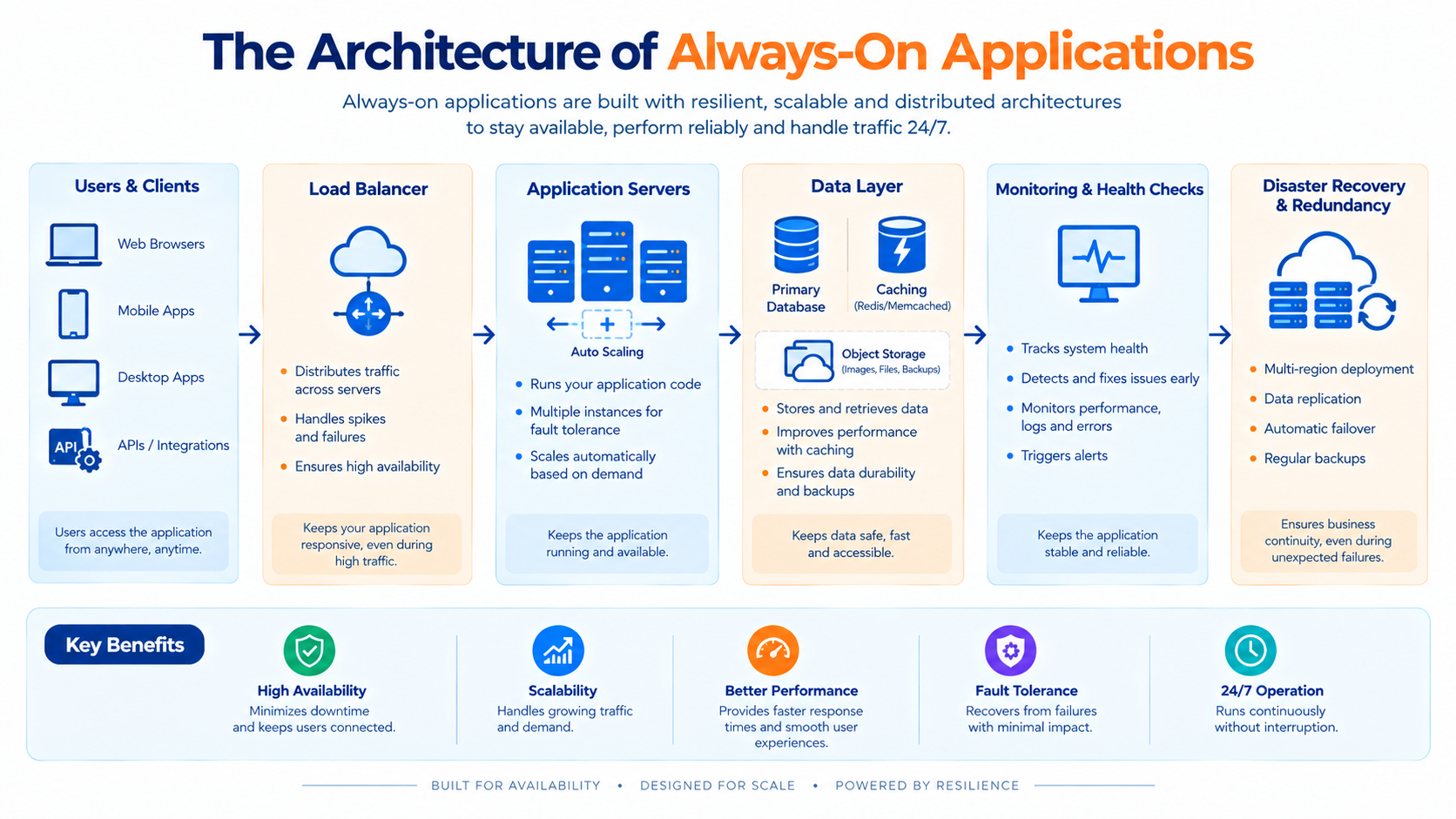
Most applications claim to be always-on. Few actually are. The difference is not redundancy it is architecture. Systems that are genuinely always-on are built on the assumption that every component will eventually fail, and they are designed so that failure does not become unavailability.
What "Always-On" Actually Means
Always-on is not a binary property. It is a set of guarantees about how the system behaves under different conditions.
| Condition | Always-On Requirement |
|---|---|
| Component failure | No user-visible impact |
| Deployment | No dropped requests, no downtime |
| Database migration | No service interruption |
| Traffic spike | Graceful scaling, no degradation |
| Regional outage | Continued service from another region |
| Dependency failure | Graceful degradation, not outage |
| Maintenance | Performed without downtime |
The common thread is that none of these events should be visible to users. That requires architecture, not just operations.
The Foundational Principle: Design for Failure
Always-on applications are built on a single assumption: everything fails, eventually.
Hardware fails. Networks partition. Dependencies time out. Deployments introduce bugs. Regions go offline. The architecture must treat these as normal events, not exceptions.
This principle leads to a set of design consequences:
-
No single point of failure
-
No component trusted to be always available
-
No deployment that requires stopping the system
-
No maintenance that requires downtime
-
No state that exists in only one place
Pattern 1: Redundancy at Every Layer
Redundancy is the foundation. Every critical component must have at least one peer that can take over.
Layers requiring redundancy:
| Layer | Redundancy Approach |
|---|---|
| Compute | Multiple instances behind a load balancer |
| Database | Primary with standby, or multi-primary |
| Cache | Clustered or replicated |
| Queue | Replicated broker |
| Storage | Replicated across zones |
| Network | Multiple paths and providers |
| Region | Multiple regions serving traffic |
The key insight: redundancy is only useful if failover is automatic. A standby that requires a human to promote it is not redundancy it is a plan.
Pattern 2: Stateless Services
State is the enemy of always-on. A stateful service cannot be freely restarted, scaled, or replaced.
The pattern: Move state out of the service and into dedicated stateful systems databases, caches, object storage, and queues. The service becomes stateless and can be treated as disposable.
What this enables:
-
Instances can be added or removed freely
-
Instances can be replaced during deployment
-
Failures can be recovered by replacing the instance
-
Scaling is a matter of adding instances
Design consequence: Session state moves to a shared store. File uploads go to object storage. Background jobs use a shared queue. The service itself holds nothing that cannot be reconstructed.
Pattern 3: Rolling and Blue-Green Deployments
Always-on applications cannot have maintenance windows. Deployment must be invisible to users.
Rolling deployment: Instances are replaced gradually, with new versions taking traffic as old versions are drained and removed. At no point is the service unavailable.
Blue-green deployment: Two identical environments exist. Traffic is switched from one to the other atomically. If the new version fails, traffic switches back.
Canary deployment: A small fraction of traffic goes to the new version. If metrics remain healthy, the fraction increases. If not, the change is rolled back.
The requirement: Deployments must be backward-compatible. During a rolling deployment, both old and new versions are running simultaneously. They must be able to coexist which means database schema changes and API changes must be made in compatible stages.
Pattern 4: Backward-Compatible Schema Changes
Database migrations are one of the most common causes of downtime. A schema change that breaks the running version causes failures during deployment.
The expand-contract pattern:
-
Expand: Add the new column or table without removing the old. Both old and new code can run.
-
Migrate: Backfill data and update code to write to both old and new.
-
Switch: Update code to read from the new location.
-
Contract: Remove the old column or table once no code depends on it.
This pattern allows schema changes to be deployed without downtime, because at no point does the running code depend on a schema that does not yet exist.
Pattern 5: Graceful Degradation
Not every dependency will be available at all times. Always-on applications degrade gracefully rather than failing.
Examples:
-
If a recommendation service is down, show a default set of recommendations rather than an error.
-
If a personalization service is slow, show generic content rather than waiting.
-
If a secondary data source is unavailable, use cached data with a staleness indicator.
The principle: A dependency failure should reduce functionality, not eliminate it. The application should know what it can do without each dependency and fall back accordingly.
Implementation: Circuit breakers, timeouts, and fallbacks. When a dependency fails repeatedly, the circuit breaker opens and requests are routed to the fallback rather than failing.
Pattern 6: Multi-Region Architecture
A single region is a single point of failure. Always-on applications span multiple regions.
The tiers:
| Tier | Approach |
|---|---|
| Backup and restore | Data backed up to another region; recovery is manual |
| Warm standby | Infrastructure runs at low capacity in a second region |
| Active-passive | Second region ready to take over with minimal delay |
| Active-active | Both regions serve traffic simultaneously |
The cost-resilience trade-off: Each tier increases resilience and cost. Most applications do not need active-active. The right tier depends on the cost of downtime.
The critical requirement: Failover must be tested. An untested failover plan is documentation, not capability.
Pattern 7: Observability
Always-on applications require deep observability. You cannot maintain availability for behavior you cannot see.
What to observe:
-
Metrics: Latency, error rates, throughput, saturation
-
Traces: End-to-end request paths, including dependency calls
-
Logs: Structured events that indicate what happened and why
-
Health checks: Both shallow (is the process alive?) and deep (is the service functional?)
-
Business metrics: Conversion, completion, and other user-facing outcomes
The principle: Monitoring tells you what happened. Observability tells you why. For always-on systems, the second is essential.
Pattern 8: Automated Recovery
Manual recovery is slow and error-prone. Always-on applications recover automatically.
Common mechanisms:
-
Health checks with automatic restart: Unhealthy instances are replaced.
-
Auto-scaling: Capacity adjusts to demand automatically.
-
Automated failover: Database and regional failover happen without human intervention.
-
Self-healing: Systems detect and remediate common failure patterns.
The design principle: If a failure requires a human to fix it, the system is not always-on. It is highly available with human intervention.
Pattern 9: Chaos Engineering
You cannot know whether your system is always-on without testing it. Chaos engineering injects controlled failures to validate resilience.
Common experiments:
-
Terminating instances
-
Introducing network latency or packet loss
-
Simulating dependency unavailability
-
Injecting resource exhaustion
-
Testing regional failover
The purpose: To discover weaknesses before they cause real outages. A system that has never been tested under failure is a system whose resilience is theoretical.
Pattern 10: Capacity Headroom
Always-on applications must handle the loss of capacity without degradation.
The principle: If you are running at 90% utilization, losing a single instance pushes you into overload. Always-on systems maintain headroom so that component loss does not cause failure.
Practical guidance: Design for peak load plus a margin that accounts for the loss of at least one instance, zone, or region depending on your redundancy tier.
The Cost of Always-On
Always-on is not free. It requires:
-
Duplicate infrastructure
-
More complex deployment processes
-
More sophisticated observability
-
Additional engineering effort
-
Ongoing testing and validation
The trade-off: Always-on costs more to build and operate. The question is whether the cost of downtime exceeds the cost of resilience. For revenue-generating systems, the answer is usually yes. For internal tools, often no.
The discipline: Not every system needs to be always-on. Apply the appropriate level of resilience to each system based on its actual availability requirements.
Implementation Roadmap
Phase 1: Assess (Weeks 1-4)
-
Define availability requirements per system. What is the cost of an hour of downtime?
-
Identify single points of failure. Where would one failure cause an outage?
-
Assess deployment process. Can you deploy without downtime today?
Phase 2: Build Resilience (Weeks 5-12)
-
Eliminate single points of failure at each layer.
-
Make services stateless by moving state to dedicated systems.
-
Implement rolling or blue-green deployments.
-
Adopt expand-contract for schema changes.
-
Add circuit breakers and fallbacks for dependencies.
Phase 3: Validate (Weeks 13-16)
-
Test failover for databases and regions.
-
Run chaos experiments to validate resilience.
-
Measure recovery time for common failure scenarios.
-
Iterate based on findings.
Frequently Asked Questions
Q1: What is the difference between high availability and always-on?
High availability tolerates some downtime and may require human intervention for recovery. Always-on means failures are invisible to users, and recovery is automatic.
Q2: Do I need multiple regions?
Not necessarily. Multi-availability-zone deployment survives most failures. Multi-region is warranted when a regional outage would cause unacceptable business impact.
Q3: How do I deploy without downtime?
Use rolling or blue-green deployments with backward-compatible changes. The critical requirement is that old and new versions can run simultaneously during the transition.
Q4: What is the biggest cause of downtime?
Deployments and database changes. Most outages are self-inflicted introduced by change rather than by hardware failure.
Q5: How do I know if my system is actually always-on?
Test it. Inject failures. Kill instances. Fail over the database. If you have not tested it, you do not know.
Q6: How can Innovative AI Solutions help?
We help organizations design and build always-on architectures from redundancy and stateless design to deployment patterns, observability, and chaos testing. Explore our services to see how we combine AI and software development under one roof. Based in Delhi, serving clients across India.
Why Delhi is a Great Hub for Reliability Engineering
Delhi is emerging as a hub for cloud-native and reliability engineering, backed by a thriving IT services ecosystem and a growing base of organizations running high-scale distributed systems. As Indian enterprises scale their digital platforms, always-on architecture becomes a competitive requirement rather than a technical aspiration.
What We Offer at Innovative AI Solutions
-
Availability Architecture: We design redundancy and failover appropriate to your requirements.
-
Stateless Refactoring: We help move state out of services into dedicated systems.
-
Deployment Engineering: We implement rolling, blue-green, and canary deployments.
-
Observability: We build the traces, metrics, and logs that make failures visible.
-
Chaos Testing: We validate resilience through controlled failure injection.
Final Thought
The shift is clear: from highly available with human intervention to always-on by design. Always-on applications are not built by adding redundancy to existing systems. They are built by designing for failure from the beginning stateless services, backward-compatible changes, graceful degradation, automated recovery, and tested resilience. Organizations that master this architecture will deliver the continuous availability that users now expect.
Contact Us:
Phone: +91 7464 099 059 / +91 9689967356
Email: info@innovativeais.com
Address: 904, 9th floor Pearls Best Heights-I, Netaji Subhash Place, Delhi-110034
Website: https://innovativeais.com
About the Author
Abhishek Kumar
Founder & CEO, Innovative AI Solutions
5+ years building AI, cloud, and enterprise systems. Based in Delhi, serving clients across India.