The Big Question
What happens when a website passes every WCAG check but is still unusable for someone with ADHD, dyslexia, autism, or a cognitive disability? When content is technically accessible but cognitively overwhelming? When a form is navigable by keyboard but impossible to complete because it demands more working memory than the user has available?
WCAG measures what can be measured contrast, semantics, keyboard access. Cognitive accessibility is harder to quantify, which is precisely why it is often neglected.
What Cognitive Accessibility Means
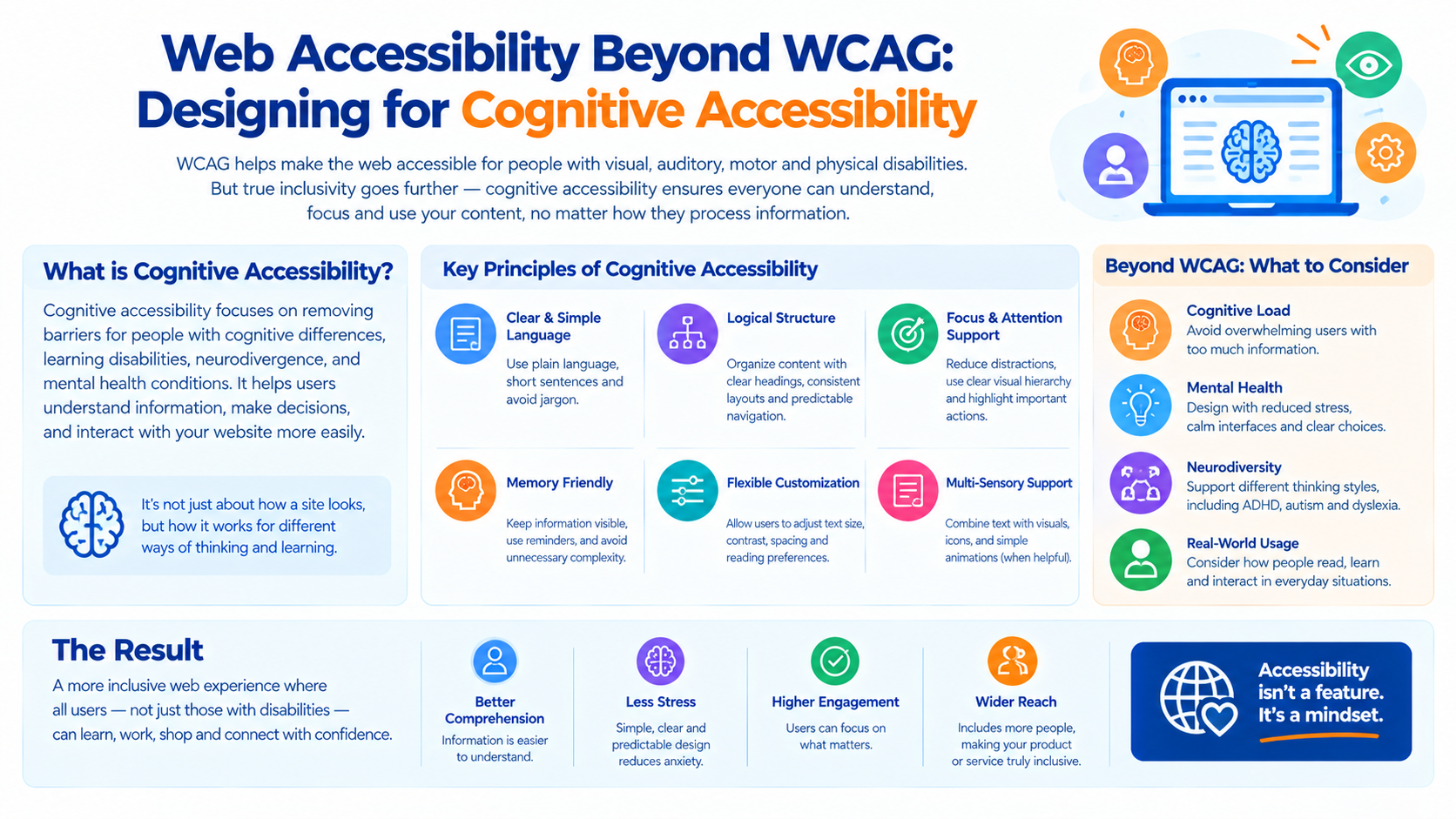
Cognitive accessibility is the practice of designing interfaces that accommodate differences in how people process information. It addresses a wide range of conditions and contexts.
Conditions that affect cognitive processing:
-
ADHD and attention differences
-
Dyslexia and reading differences
-
Autism and sensory processing differences
-
Traumatic brain injury
-
Memory impairments
-
Learning disabilities
-
Age-related cognitive decline
-
Temporary cognitive load (fatigue, stress, distraction)
The critical insight: Cognitive accessibility benefits everyone. A design that reduces working memory demands helps a user with ADHD, a user on a noisy train, and a user who is simply tired.
This is the same principle that makes captions useful for everyone, not just deaf users. Cognitive accessibility is universal design applied to thinking.
Why WCAG Alone Is Not Enough
WCAG is a set of testable success criteria. It measures what can be objectively evaluated: does this element have sufficient contrast? Is this image described? Can this interaction be completed with a keyboard?
Cognitive accessibility resists this kind of measurement. There is no objective test for "is this page overwhelming?" or "does this flow require too much working memory?"
What WCAG covers well:
-
Visual contrast and readability
-
Keyboard and screen reader access
-
Semantic structure
-
Alternative text
-
Motion and animation controls
What WCAG covers inadequately:
-
Cognitive load and information density
-
Memory demands across multi-step flows
-
Time pressure and timeouts
-
Consistent navigation and predictable behavior
-
Plain language and reading level
-
Error recovery and forgiveness
-
Focus management across complex interactions
The WCAG 2.2 guidelines added some cognitive criteria consistent help, redundant entry, accessible authentication but they remain a small fraction of the standard.
The Principles of Cognitive Accessibility
Several principles guide cognitive accessibility design. They overlap with general usability but are applied with greater rigor.
Principle 1: Reduce Cognitive Load
Cognitive load is the amount of mental effort required to use an interface. High cognitive load makes interfaces unusable for people with cognitive differences and unpleasant for everyone else.
Design practices:
-
Present one primary task per screen
-
Remove decorative elements that compete for attention
-
Use progressive disclosure to reveal complexity only when needed
-
Group related information visually
-
Avoid unnecessary choices
Principle 2: Minimize Working Memory Demands
Working memory is the ability to hold information temporarily while using it. Interfaces that require users to remember information across steps are inaccessible to people with working memory impairments.
Design practices:
-
Show information where it is needed, rather than requiring recall
-
Preserve entered data across steps
-
Provide summaries before final submission
-
Avoid requiring users to remember codes, references, or previous screens
Principle 3: Use Plain Language
Complex language excludes users with reading differences and cognitive impairments.
Design practices:
-
Write at the reading level of your audience
-
Prefer short sentences and common words
-
Define technical terms when they are unavoidable
-
Use structure—headings, lists, tables—to make content scannable
-
Avoid jargon, idioms, and ambiguous phrasing
Principle 4: Provide Consistent, Predictable Behavior
Unpredictable interfaces require users to relearn how they work on every screen.
Design practices:
-
Use consistent navigation across pages
-
Place elements in predictable locations
-
Use consistent terminology for the same concept
-
Avoid surprising changes in behavior
Principle 5: Allow Enough Time
Time pressure is a cognitive accessibility barrier.
Design practices:
-
Avoid automatic timeouts where possible
-
Warn before timeouts and allow extension
-
Never lose user data due to timeout
-
Allow users to control animation and auto-advancing content
Principle 6: Support Error Recovery
Errors are inevitable. Interfaces should make them easy to understand and recover from.
Design practices:
-
Explain errors in plain language
-
Indicate exactly what needs to be fixed
-
Preserve user input when errors occur
-
Provide clear paths to correct mistakes
Principle 7: Reduce Sensory Overload
Visual and auditory complexity overwhelms users with sensory processing differences.
Design practices:
-
Use adequate whitespace
-
Avoid dense walls of text
-
Limit the number of colors and fonts
-
Avoid flashing, auto-playing media, and distracting animations
-
Respect reduced-motion preferences
Principle 8: Support Focus and Attention
Users with attention differences struggle with interfaces that fragment attention.
Design practices:
-
Minimize interruptions and notifications
-
Avoid modal dialogs that steal focus unnecessarily
-
Provide clear visual hierarchy
-
Use progress indicators to show where the user is
-
Support the ability to pause and resume
Practical Patterns
The Multi-Step Form
Multi-step forms are a common cognitive accessibility failure point.
Common problems:
-
Users must remember information from previous steps
-
Errors are revealed only at the end
-
Progress is unclear
-
Timeouts lose entered data
Accessible patterns:
-
Show a summary of entered data before submission
-
Validate each step before allowing progress
-
Show progress indicators
-
Preserve data across sessions
-
Allow going back to correct earlier steps
Authentication
Authentication is a high-cognitive-load task, especially with complex password requirements and multi-factor steps.
Accessible patterns:
-
Support password managers and passkeys
-
Avoid requiring memorization of codes where possible
-
Allow pasting of one-time codes
-
Provide clear instructions at each step
-
Avoid timeouts during authentication
Error Messages
Error messages are often written for developers, not users.
Inaccessible: "Error 422: Unprocessable Entity"
Accessible: "We couldn't save your changes because the email address is missing. Please add an email address and try again."
The second version explains what happened, what caused it, and what to do.
Content Structure
Long content without structure is cognitively demanding.
Accessible patterns:
-
Use descriptive headings
-
Break content into short sections
-
Use lists for sequences and options
-
Provide summaries for long content
-
Make key information visually prominent
Testing for Cognitive Accessibility
Cognitive accessibility is harder to test than WCAG compliance, but it is not untestable.
Methods:
Cognitive walkthrough. Step through each task as if you were a first-time user with no prior knowledge. Note where you must remember something, where you must infer something, and where you must hold multiple pieces of information at once.
User testing with diverse participants. Include users with cognitive differences in your testing. Their experience will reveal barriers that no checklist captures.
Reading level analysis. Measure the reading level of your content and target the level appropriate for your audience.
Time-on-task measurement. Tasks that take dramatically longer for some users indicate a cognitive barrier.
Error rate analysis. High error rates on specific tasks indicate cognitive load problems.
Expert review. Accessibility specialists with cognitive expertise can identify issues that automated tools miss.
Implementation Roadmap
Phase 1: Assess (Weeks 1-2)
-
Identify high-cognitive-load areas of your interface forms, authentication, complex flows, dense content.
-
Conduct cognitive walkthroughs on your primary user tasks.
-
Measure reading levels of your content.
Phase 2: Redesign (Weeks 3-6)
-
Apply the principles above to the identified areas.
-
Reduce working memory demands in multi-step flows.
-
Rewrite error messages and instructions in plain language.
-
Improve structure and hierarchy in content-heavy areas.
-
Add time controls where timeouts exist.
Phase 3: Validate (Weeks 7-10)
-
Conduct user testing with participants who have cognitive differences.
-
Measure task completion rates and times.
-
Iterate based on findings.
-
Establish ongoing review as part of your accessibility practice.
Frequently Asked Questions
Q1: Is cognitive accessibility the same as usability?
They overlap significantly, but cognitive accessibility focuses specifically on users with cognitive differences. Practices that improve cognitive accessibility generally improve usability for everyone.
Q2: How do I test cognitive accessibility when there is no standard?
Use cognitive walkthroughs, reading level analysis, and user testing with diverse participants. The absence of a standard does not mean the absence of methods.
Q3: Does cognitive accessibility conflict with visual or motor accessibility?
Rarely. Most practices that reduce cognitive load also improve clarity for all users. Where conflicts arise such as content density—the resolution is usually to provide options rather than to compromise one group.
Q4: What is the most impactful change I can make?
Reducing working memory demands. Requiring users to remember information across steps is one of the most common and most exclusionary patterns.
Q5: How do timeouts relate to cognitive accessibility?
Automatic timeouts exclude users who need more time to process information. Where timeouts are required for security, they should warn before expiring, allow extension, and never lose user data.
Q6: How can Innovative AI Solutions help?
We help organizations design accessible digital experiences from WCAG compliance to cognitive accessibility reviews, content design, and user testing. Explore our services to see how we build inclusive products. Based in Delhi, serving clients across India.
Why Delhi is a Great Hub for Accessibility Innovation
Delhi is emerging as a hub for digital accessibility, backed by a thriving IT services ecosystem, a large and diverse user population, and growing awareness of accessibility requirements under Indian law and global standards. Designing for cognitive accessibility is particularly relevant in a market where users span a wide range of literacy levels, languages, and device capabilities.
What We Offer at Innovative AI Solutions
-
Cognitive Accessibility Review: We evaluate your interfaces for cognitive barriers.
-
Content Design: We rewrite content and error messages in plain language.
-
Flow Redesign: We reduce working memory demands in multi-step processes.
-
User Testing: We conduct testing with diverse participants, including users with cognitive differences.
-
Accessibility Strategy: We help you move beyond WCAG compliance to genuinely inclusive design.
Final Thought
The shift is clear: from compliance to inclusion. WCAG is necessary but not sufficient. Cognitive accessibility extends the practice of accessible design to the way people think their attention, memory, and processing. Organizations that design for cognitive accessibility will build products that work better for everyone, and they will serve users that their competitors have overlooked.
Contact Us:
Phone: +91 7464 099 059 / +91 9689967356
Email: info@innovativeais.com
Address: 904, 9th floor Pearls Best Heights-I, Netaji Subhash Place, Delhi-110034
Website: https://innovativeais.com
About the Author
Abhishek Kumar
Founder & CEO, Innovative AI Solutions
5+ years building AI, cloud, and enterprise systems. Based in Delhi, serving clients across India.