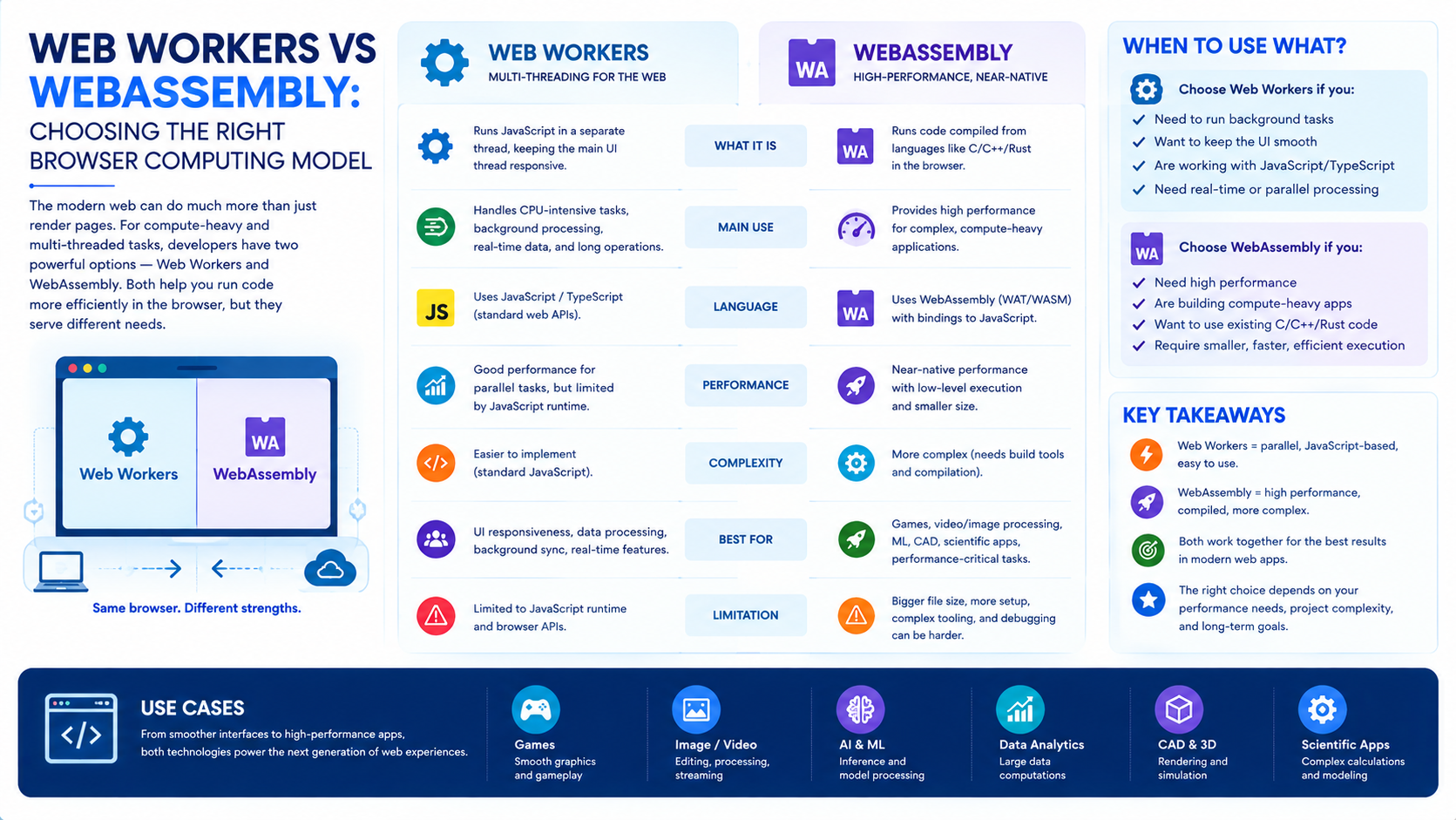
The Big Question
What happens when your web application needs to process thousands of records, run complex simulations, or perform real-time image manipulation but the browser's main thread is already busy rendering the UI? When your JavaScript code is fast enough for most tasks, but not fast enough for the ones that matter most? When you need both speed and responsiveness, but these goals seem to pull in opposite directions?
The answer lies in two browser technologies that are often mentioned together but serve fundamentally different purposes. Web Workers and WebAssembly are not competitors. They are complementary tools. Choosing the right one or using them together depends entirely on what you're trying to achieve.
Web Workers: Offloading Computation to Keep the UI Responsive
What Are Web Workers?
Web Workers are a browser feature that allows JavaScript code to run in a background thread, separate from the main thread that handles the user interface and DOM manipulation. This separation is critical. When JavaScript runs on the main thread, it blocks everything else. The page freezes. Buttons stop responding. Animations stutter. Users notice.
By moving computational work into a Web Worker, you keep the main thread free to handle user interactions and rendering. The worker runs independently, performs its calculations, and communicates back to the main thread through a message-passing interface.
What Web Workers Are Good For
Web Workers are ideal for tasks that are computationally intensive but don't need to touch the DOM. Common use cases include:
-
Data processing: Parsing large JSON files, sorting or filtering thousands of records, aggregating data for analytics
-
Image manipulation: Applying filters, resizing images, or performing pixel-level operations
-
Background synchronization: Fetching data from APIs and preparing it for display without blocking the UI
-
Complex calculations: Financial modeling, scientific simulations, or any CPU-heavy algorithm
The key benefit is responsiveness. The user experience remains smooth even while intensive work is happening in the background.
The Limitations of Web Workers
Web Workers have clear limitations. They cannot access the DOM directly. They cannot manipulate the document, interact with the window object, or use many browser APIs that rely on the main thread. They communicate through a structured messaging system, which introduces some overhead and complexity.
Web Workers also don't make JavaScript faster. They just move the work somewhere else. If your algorithm is slow, it will still be slow just in a different thread.
WebAssembly: Near-Native Performance in the Browser
What Is WebAssembly?
WebAssembly (often abbreviated as Wasm) is a binary instruction format that runs in the browser at near-native speed. It is not JavaScript. It is a compilation target for languages like C, C++, Rust, and Go. When you compile code from these languages to WebAssembly, the browser can execute it efficiently, much faster than equivalent JavaScript in many cases.
WebAssembly was first supported by all major browsers in 2017. Since then, it has evolved significantly. The 2026 WebAssembly 2.0 specification includes features like garbage collection, making it easier to compile languages like Java and Kotlin. SIMD (Single Instruction, Multiple Data) support enables parallel processing of vector operations. Threading support allows WebAssembly to use multiple cores.
What WebAssembly Is Good For
WebAssembly excels at tasks that require raw computational power. It is the right choice when you need to:
-
Port existing native code: If you have a C++ library or a Rust module, you can compile it to WebAssembly and run it in the browser without rewriting it.
-
Run performance-critical algorithms: Video encoding, image processing, cryptography, or physics simulations can run dramatically faster in WebAssembly than in JavaScript.
-
Use languages other than JavaScript: Teams that prefer Rust or C++ can bring their expertise to the browser.
-
Build applications that were previously native-only: CAD tools, video editors, and game engines now run in the browser thanks to WebAssembly.
The Limitations of WebAssembly
WebAssembly is not a replacement for JavaScript. It is a complement. It cannot access the DOM directly. It requires a JavaScript wrapper to interact with the browser environment. It has its own learning curve and toolchain complexity. And it is not always faster than JavaScript for simple tasks or those that involve a lot of DOM manipulation, JavaScript is often the better choice.
The Fundamental Difference
The distinction between Web Workers and WebAssembly is often misunderstood. They operate at different levels of abstraction.
| Aspect | Web Workers | WebAssembly |
|---|---|---|
| Primary Purpose | Move work off the main thread | Run code at near-native speed |
| What It Changes | Where code runs | How fast code runs |
| Language | JavaScript | C, C++, Rust, Go, and others |
| DOM Access | No | No |
| Threading | Runs on a separate thread | Can run on the main thread or in workers |
| Communication | Message passing | Function calls, memory sharing |
| Best For | Keeping UI responsive | CPU-intensive computation |
| Speed Impact | None (moves work, doesn't speed it up) | Significant (near-native performance) |
The key insight: Web Workers address the question of where computation happens. WebAssembly addresses the question of how fast computation can be performed. They are orthogonal concerns.
When to Use Which
Choose Web Workers When:
-
Your main thread is blocked by long-running JavaScript tasks
-
You need to keep the UI responsive during data processing
-
The task is already written in JavaScript and performs adequately in isolation
-
You need to handle background tasks like data fetching or synchronization
-
You want to avoid the complexity of a WebAssembly toolchain
Choose WebAssembly When:
-
You have existing native code you want to reuse
-
The task requires performance that JavaScript cannot deliver
-
You are working with algorithms that benefit from SIMD or threading
-
You need to use a language other than JavaScript for a specific module
-
The computational intensity justifies the build complexity
The Real Answer: Use Both
The most powerful applications combine both technologies. Consider a video editing application in the browser:
-
WebAssembly handles the heavy lifting: video decoding, frame processing, and encoding
-
Web Workers run the WebAssembly module in a background thread, keeping the UI responsive
-
JavaScript handles the DOM, user interactions, and orchestration
This pattern is increasingly common. WebAssembly provides the speed. Web Workers provide the responsiveness. JavaScript provides the glue.
Real-World Examples
Figma: WebAssembly for Design Tools
Figma runs a full-featured design tool in the browser, powered by WebAssembly. The performance-sensitive parts of the application rendering, layout calculations, and geometry operations are compiled from C++ to WebAssembly. The result is a design tool that feels native, not like a web page.
Google Earth: WebAssembly for 3D Rendering
Google Earth is another example of WebAssembly in production. The complex 3D rendering and geospatial calculations are handled by WebAssembly, enabling smooth navigation of the entire planet in a browser tab.
Web-Based Code Editors: Web Workers for Syntax Highlighting
Code editors like VS Code in the browser use Web Workers to handle syntax highlighting, linting, and other background tasks. This keeps the editor responsive even when working with large files.
Implementation Roadmap
Phase 1: Assess Your Needs (Weeks 1-2)
-
Profile your application. Identify where the main thread is blocked. What tasks cause the UI to freeze?
-
Categorize the work. Is the bottleneck the volume of work (use Web Workers) or the complexity of the computation (consider WebAssembly)?
-
Evaluate your team's skills. Do you have C++ or Rust expertise? If not, is the performance gain worth the learning curve?
Phase 2: Implement Web Workers (Weeks 3-4)
-
Start simple. Move one blocking task to a Web Worker and measure the impact.
-
Use a library if helpful. Libraries like Comlink simplify the message-passing interface.
-
Monitor performance. Ensure the worker is actually improving responsiveness, not just moving the problem.
Phase 3: Explore WebAssembly (Weeks 5-8)
-
Identify the right module. Find a function or module that would benefit from near-native performance.
-
Choose a toolchain. Rust with wasm-pack or C++ with Emscripten are common choices.
-
Start with a proof of concept. Compile a small module and integrate it, measuring the performance difference.
-
Combine with Web Workers. Run the WebAssembly module inside a Web Worker for maximum responsiveness.
Frequently Asked Questions
Q1: Are Web Workers and WebAssembly the same thing?
No. Web Workers are a threading mechanism that moves JavaScript off the main thread. WebAssembly is a binary instruction format that runs compiled code at near-native speed. They solve different problems.
Q2: Can WebAssembly run inside a Web Worker?
Yes. This is a common and powerful pattern. The WebAssembly module runs in the background thread, keeping the main thread free for UI updates.
Q3: Is WebAssembly always faster than JavaScript?
No. WebAssembly is faster for computation-heavy tasks. For simple tasks or those involving DOM manipulation, JavaScript is often faster.
Q4: Do I need to know C++ or Rust to use WebAssembly?
Not necessarily. You can use WebAssembly compiled from other languages, or consume pre-built WebAssembly modules. However, writing your own WebAssembly modules typically requires a compiled language.
Q5: Can Web Workers access the DOM?
No. Web Workers cannot directly manipulate the DOM. They communicate with the main thread through message passing, and the main thread handles DOM updates.
Q6: How can Innovative AI Solutions help?
We help organizations design and implement high-performance web applications from Web Worker integration and WebAssembly module development to architecture design and performance optimization. Based in Delhi, serving clients across India.
Why Delhi is a Great Hub for Web Innovation
Delhi is emerging as a hub for web and AI innovation, backed by a thriving developer ecosystem and a mobile-first user base. As Indian enterprises build increasingly complex web applications, understanding the browser's capabilities from Web Workers to WebAssembly becomes essential for delivering fast, responsive experiences.
What We Offer at Innovative AI Solutions
-
Web Performance Strategy: We help you assess where Web Workers and WebAssembly can improve your application.
-
Web Worker Implementation: We help you move blocking tasks off the main thread.
-
WebAssembly Development: We help you compile and integrate WebAssembly modules for performance-critical tasks.
-
Architecture Design: We help you combine both technologies for maximum performance and responsiveness.
Final Thought
The shift is clear: from a single-threaded JavaScript model to a multi-threaded, multi-language runtime. Web Workers and WebAssembly are not competing approaches. They are complementary tools that, when used together, unlock the full potential of the browser as an application platform. The organizations that understand this distinction will be the ones that build web applications that are both fast and responsive delivering experiences that rival native apps.
Contact Us:
Phone: +91 7464 099 059 / +91 9689967356
Email: info@innovativeais.com
Address: Netaji Subhash Place, Pitampura, Delhi – 110034
Website: https://innovativeais.com
About the Author
Abhishek Kumar
Founder & CEO, Innovative AI Solutions
5+ years building AI, cloud, and enterprise systems. Based in Delhi, serving clients across India.